lm
Terminalcover
AC adapter
To poweroutlet
_4
AC plug cord
i!i iiiiiiiiiiiiiiiiiiiiiiiiiiiiiiiiii
iiii_i!_i!ii!ii!ii!ii!ii!ii!iii!!ii!
iiii_iiiiiiiiiiiiiiiiiiiiiiiil;ilili_ill
iiiiiiiiiiiiiiiiiiiii!i!iiiiiiiiiiiiiiiiiiiiiiiiiiiiiiiiiiiiiii
Use of the AC adapter D-AC7 (optional) is recommended if you intend
to use the LCD monitorfor a long time or connect the camera to a PC or
printer.
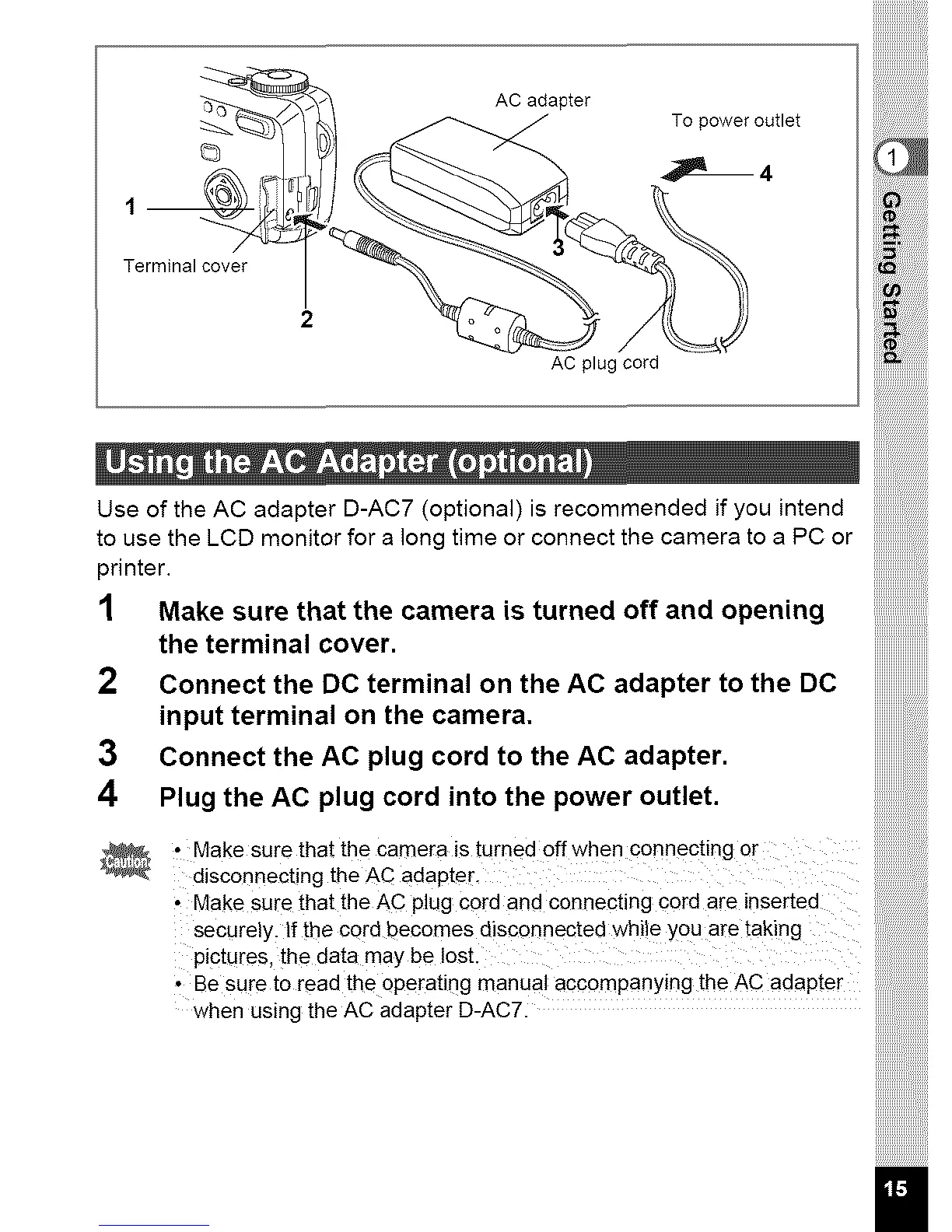
1 Make sure that the camera is turned off and opening
the terminal cover. ........................
2 Connect the DC terminal on the AC adapter to the DC iiiiiiiiiiiiiiiiiiiiiiii
input terminal on the camera.
3 Connect the AC plug cord to the AC adapter.
4 Plug the AC plug cord into the power outlet.
, Make surethatthe camera is turnedoffwhen connecting or !i!i!i!i!i!i!i!i!i!i!i!i!i!i!ii
disconnectng theAC adapteL iiiiiiiiiiiiiiiiiiiiiiiiiiiiii
' MakeSurethattheACplug Cord andconnecting Cord aFe inserted
securely, lfthecordbecomesdsconnectedwhieyou aretakng !i!i!i!i!ili!i!i!i!i!i!i!i!i!i!
pictures, thedatamaybe lost. iiiiiiiiiiiiiiiiiiiiiii
aesuretoreadtheoperating* manualaccompanying theAC adapter
when usingtheACadapterU-AC7. !!!!!!!!ii!i!i!i!i!i!i
iiiiiiiiiiiiiii



 To Next Page