jii!iiii!!ii!!ii!ili
Battery / card cover
iiiiiiiiiii_iiii!
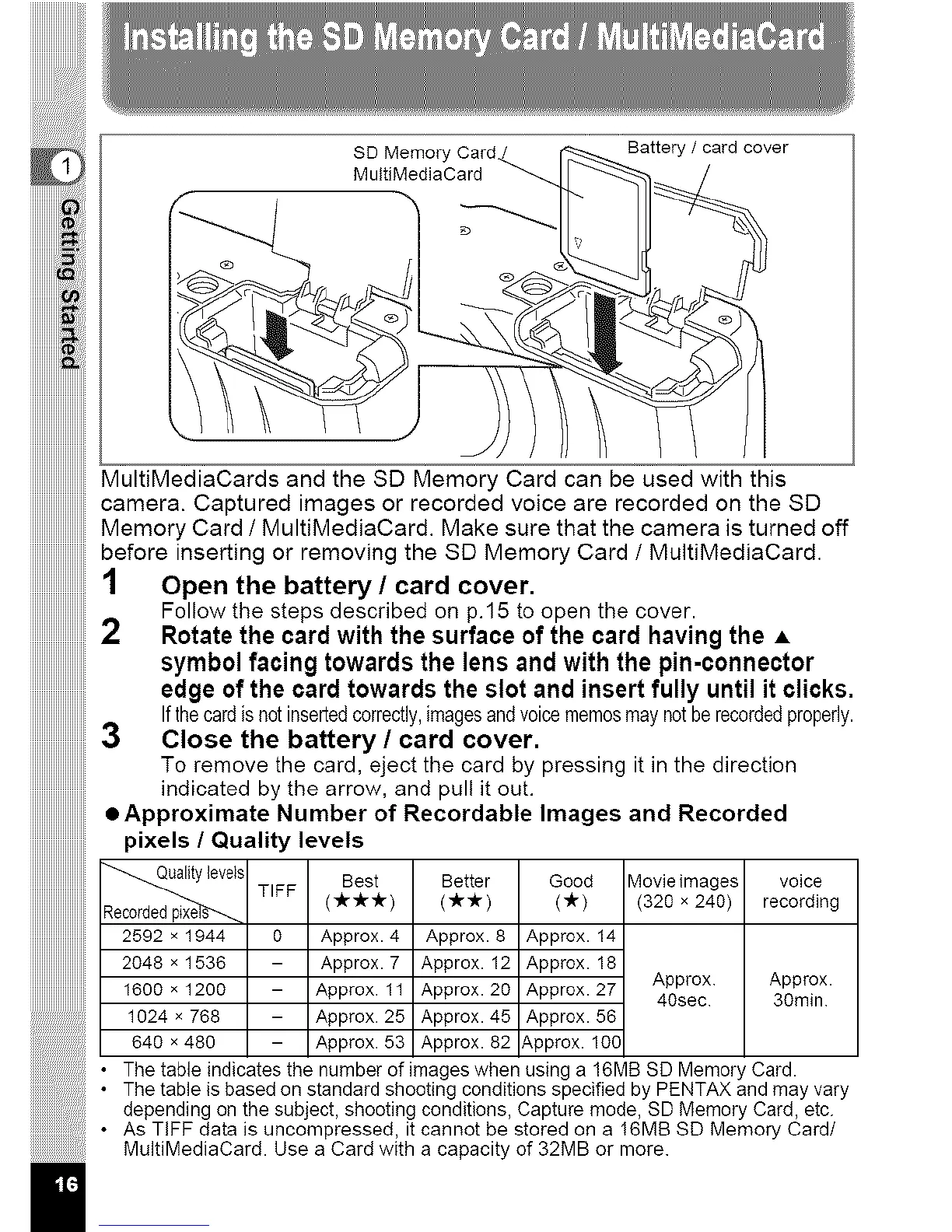
MultiMediaCards and the SD Memory Card can be used with this
camera. Captured images or recorded voice are recorded on the SD
Memory Card I MultiMediaCard. Make sure that the camera is turned off
before inserting or removing the SD Memory Card 1 MultiMediaCard.
10 on,,o covo,.
Follow the steps described on p.15 to open the cover.
2 Rotatethe card with the surfaceof the card havingthe A
symbolfacing towardsthe lens and with the pin-connector
edge ofthe card towardsthe slot and insert fully until it clicks.
If the card is not inserted correctly, images and voice memos may not be recorded properly.
3 close the battery/card cover.
To remove the card, eject the card by pressing it in the direction
indicated by the arrow, and pull it out.
• Approximate Number of Recordable Images and Recorded
pixels / Quality levels
SD Memory Card/._
MultiMediaCard
f
il
s Best Better Good
TIFF ( -Jtr-it -it ) (-/r -_tr) (ltr)
2592 x 1944 0 Approx. 4 Approx. 8 Approx. 14
2048 x 1536 - Approx. 7 Approx. 12 Approx. 18
1600 × 1200 - Approx. 11 Approx. 20 Approx. 27
1024 x 768 - Approx. 25 Approx. 45 Approx. 56
649 x 480 - Approx. 53 Approx. 82 Approx. 10C
Movie images voice
(320 x 240) recording
Approx Approx.
40sec 30rain
• The table indicates the number of images when using a 16MB SD Memory Card.
• The table is based on standard shooting conditions specified by PENTAX and may vary
depending on the subject, shooting conditions, Capture mode, SD Memory Card, etc.
• As TiFF data is uncompressed, it cannot be stored on a 16MB SD Memory Card/
MultiMediaCard. Use a Card with a capacity of 32MB or more.



 To Next Page