!i!i!i!i!i!i!i!i!i!i!i!i!i!i!i!i!i!i!i!i!i!i!i!?]
i
1
[ ]
Recoreee P_xels 2592×1944
WMte Balance AWB
Focusing Area Wide
stttvtty Aut
USERMZvAv" P,OT,,,_ ¸'¸¸¸_
?
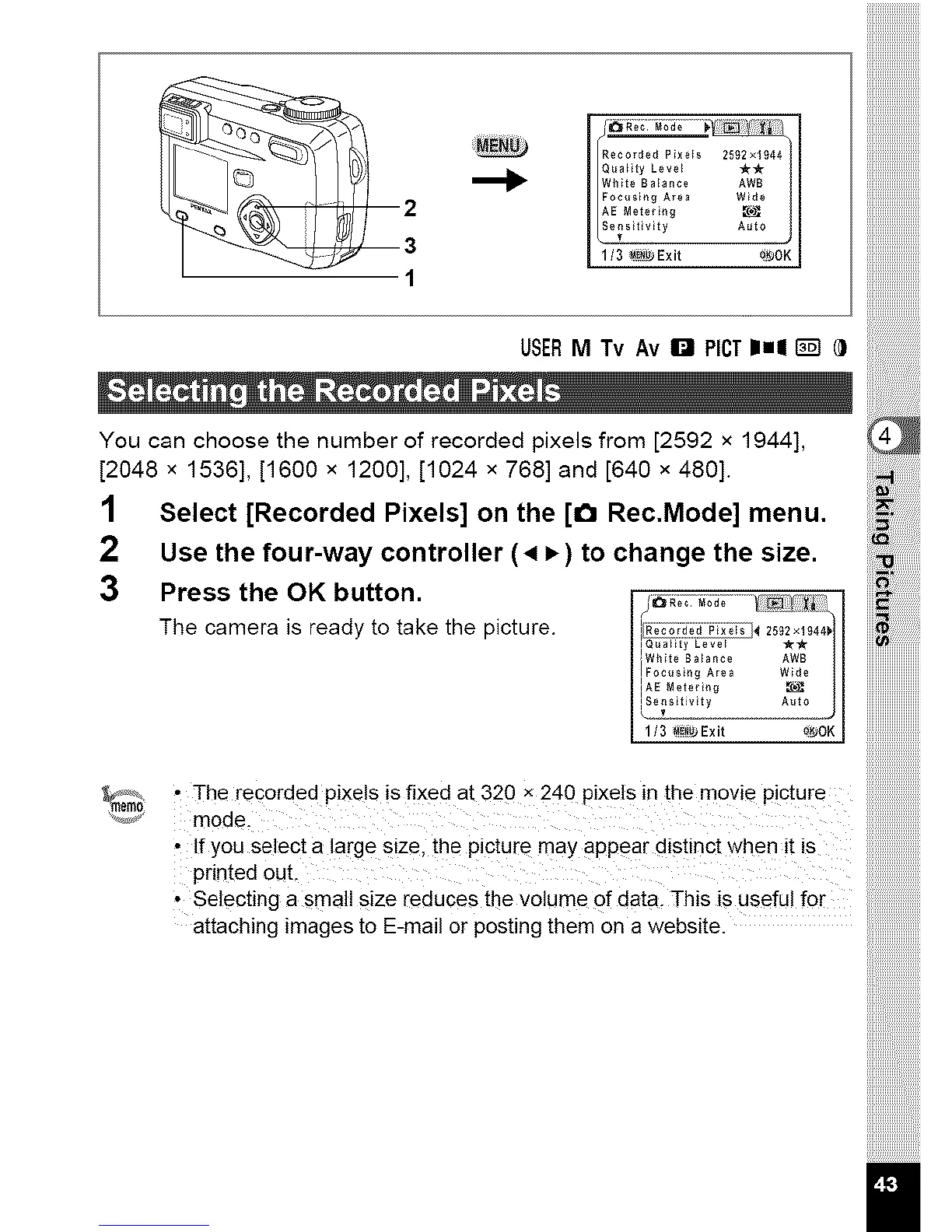
You can choose the number of recorded pixels from [2592 x 1944],
[2048 x 1536], [1600 x 1200], [1024 x 768] and [640 x 480].
1 Select [Recorded Pixels] on the [1_1 Rec.Mode] menu,
2 Use the four-way controller (4 P,) to change the size.
3 Press the OK button. .......... _ I
The camera is ready to take the picture. I_T_;_;_;iC_ 2_2.,_4,,jI
i Q_a eveI _-_-
!WMte Balance AWB
IFocu,t_g ArH Wlde /I
IAE Nete_t_g
d_t?_Z2Z.... A°!2--J
• The recorded pixels is fixed at 320 X 240 pixels in the movie Picture
mode.
• If you select a large size, the picture may appear distinct when it is
printed out,
• Selecting a small size reduces the volume of data, This is useful for
attaching images to E-mail Orposting them On a website.



 To Next Page