t
2592x1944
Q_aHty Level _r_
Focusing Area Wide
AE MO teHiIg
Sensitivity AUto
1/ 3_N_._Ex ONOK
USERM Tv Av _1 fell _ _ ,_'
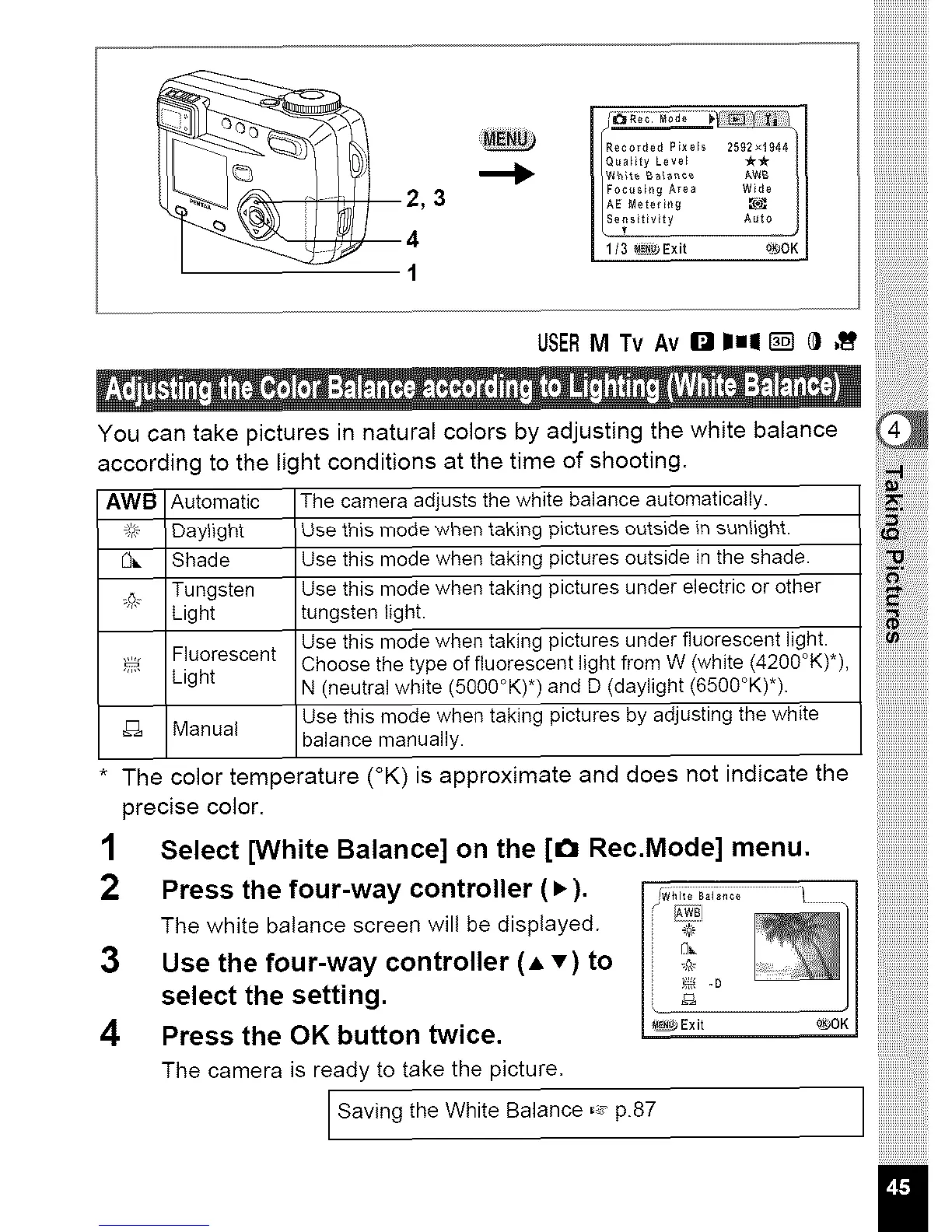
You can take pictures in natural colors by adjusting the white balance
according to the light conditions at the time of shooting.
AWB Automatic The camera adjusts the white balance automatically.
:_;:_ Daylight Use this mode when taking pictures outside in sunlight.
[3_. Shade Use this mode when taking pictures outside in the shade.
_ Tungsten Use this mode when taking pictures under electric or other
Light tungsten light.
Use this mode when taking pictures under fluorescent light.
Fluorescent Choose the type of fluorescent light from W (white (4200°K)*),
Light N (neutral white (50gO°K) *) and D (daylight (6500°K)*).
Manual Use this mode when taking pictures by adjusting the white
balance manually.
* The color temperature (°K) is approximate and does not indicate the
precise color.
1 Select [White Balance] on the [€_ Rec.Mode] menu.
2 Press the four-way controller (• ). _w_,,,;B_;,,_; /
/
The white balance screen will be displayed. _i_¢
3 Use the four-way controller (A v) to n, ;_,
select the setting. _ _ °
4 Press the OK button twice. _Exit 0_OK
The camera is ready to take the picture.
Saving the White Balance -: p.87



 To Next Page