iiiiiiiiiiiiiiiiiiii !ill
iiiiiiiiiiiiiiiiiiii_;_i_ii
iiiiiiiiiiiiiiiiiiii iiii i !
iiiiiiiiiiiiiiiiiiiiiiiiiiiiiiii
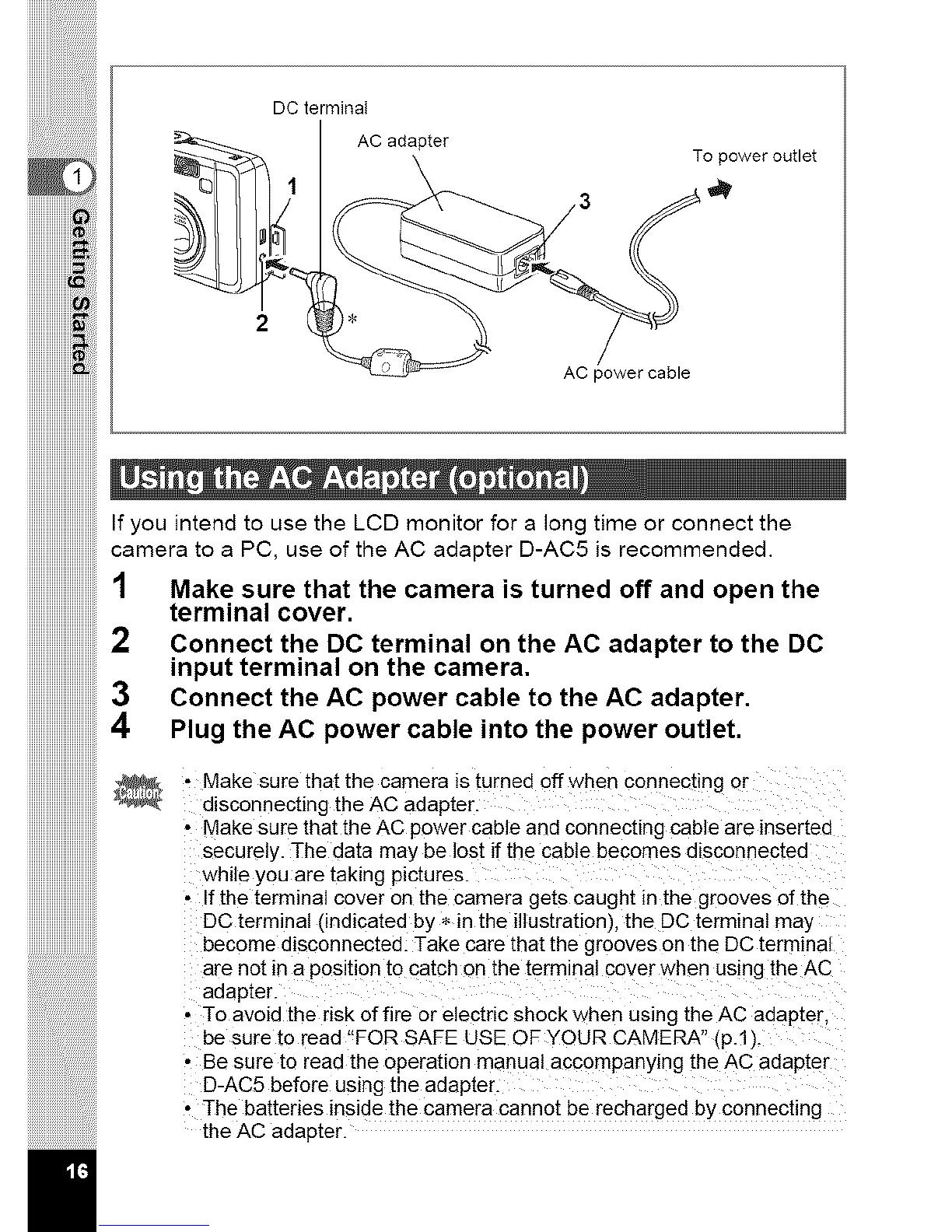
DCterminal
AC adapter
To power outlet
2
AC power cable
iiiiiiiiiiiiiiiiiiiiiiiiiiiiiiii
iiiiiiiiiiiiiiiiiiiiiiiiiiiiiiii3
iiiiiiiiiiiiiiiiiiiiiiiiiiiiiiii
iHHHHHHiiii
iiiiiiiiiiiiiiiiiiiiiiiiiiiiiiii
ijjjjjjjjjjjjjjjjjjjjjjjjjjjjj!i
• Make sure that the camera is turned off when connec[ing or
disconnecting the AC adapter.
• Make sure that the AC power cable and connecting cable are inserted
securely. ]-he data may be lost if the cable becomes disconnected
while you are taking pictures.
• If the terminal cover on the camera gets caught in the grooves of the
DC terminal (indicated by * in the illustration), the DC terminal may
become d_sconnected. Take care that the grooves on the DC terminal
are no_ in a position to catch on [he terminal cover when using the AC
adapter.
• To avoid the risk of fire or electric shock when using the AC adap[er.
be sure [o read "FOR SAFE USE OF YOUR CAMERA" (p.1).
• Be sure to read the operation manual accompanying the AC adapter
D-AC5 before using the adap[er.
• The batteries inside the camera cannot be recharged by connecting
the AC adap[er.
If you intend to use the LCD monitor for a long time or connect the
camera to a PC, use of the AC adapter D-AC5 is recommended.
1 Make sure that the camera is turned off and open the
terminal cover.
Connect the DC terminal on the AC adapter to the DC
input terminal on the camera.
Connect the AC power cable to the AC adapter.
Plug the AC power cable into the power outlet,



 To Next Page