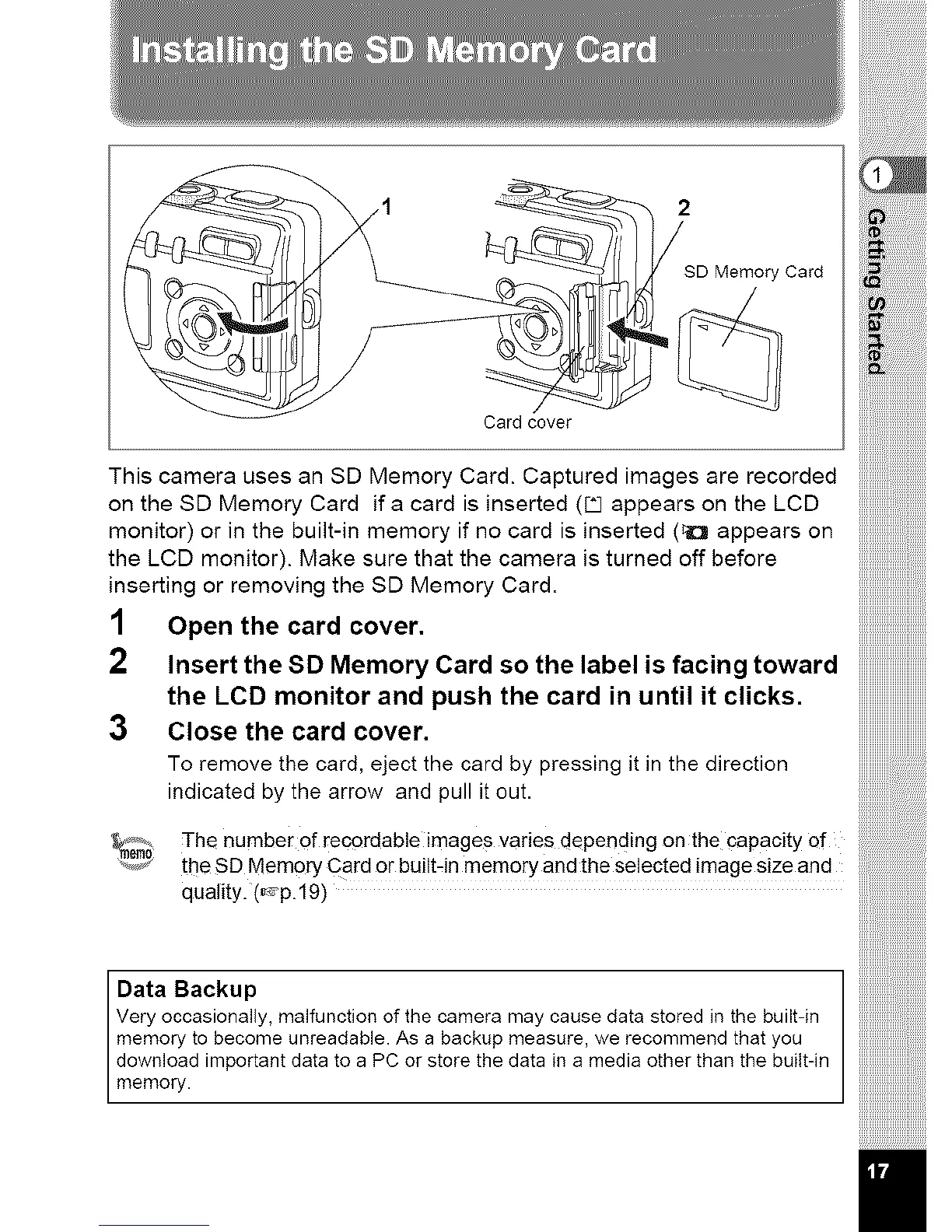
SD Memory Card
Card cover
This camera uses an SD Memory Card. Captured images are recorded
on the SD Memory Card ifa card is inserted (_ appears on the LCD
monitor) or in the built-in memory if no card is inserted (_ appears on
the LCD monitor). Make sure that the camera is turned off before
inserting or removing the SD Memory Card.
1 Open the card cover.
2
Insert the SD Memory Card so the label is facing toward
the LCD monitor and push the card in until it clicks.
3 Close the card cover.
To remove the card, eject the card by pressing it in the direction
indicated by the arrow and pull it out.
'_i_ _ ]-he number of rec0rdable images varies depending on the capacity of
the SD Memory Card or built-in memory and the selected image size and
quality. (,-=p.19)
Data Backup
Very occasionally, malfunction of the camera may cause data stored in the built-in
memory to become unreadable. As a backup measure, we recommend that you
download important data to a PC or store the data in a media other than the built-in
memory.
)))))))))))))))))))))))))))))))
iiiiiiiiiiiiii))))))))))))))'_



 To Next Page