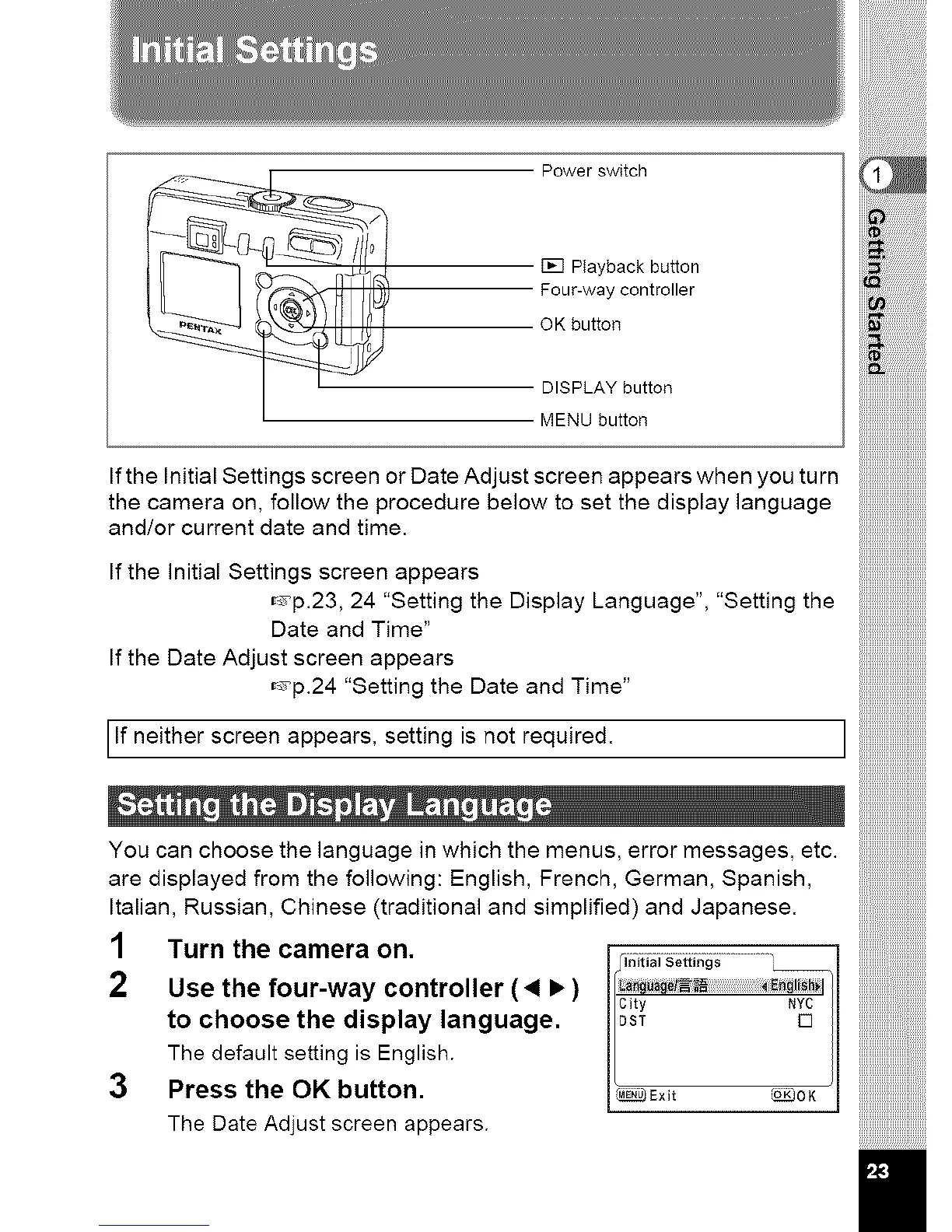
Powerswitch
FcqPtayback button
Four-way controller
OK button
DISPLAY button
MENU button
If the Initial Settings screen or Date Adjust screen appears when you turn
the camera on, follow the procedure below to set the display language
and/or current date and time.
If the Initial Settings screen appears
_p.23, 24 "Setting the Display Language", "Setting the
Date and Time"
If the Date Adjust screen appears
_p.24 "Setting the Date and Time"
IIf neither screen appears, setting is not required. I
You can choose the language in which the menus, error messages, etc.
are displayed from the following: English, French, German, Spanish,
Italian, Russian, Chinese (traditional and simplified) and Japanese.
1 Turn the camera on. _'l;InitiaiSettings.......
2 Use the four-way controller (4 •)
City NYC
to choose the display language. _ []
The default setting is English.
3 Press the OK button. _Ex t _0K
The Date Adjust screen appears.


 To Next Page