........ _ o I _ m._ _ I _}l ;,_
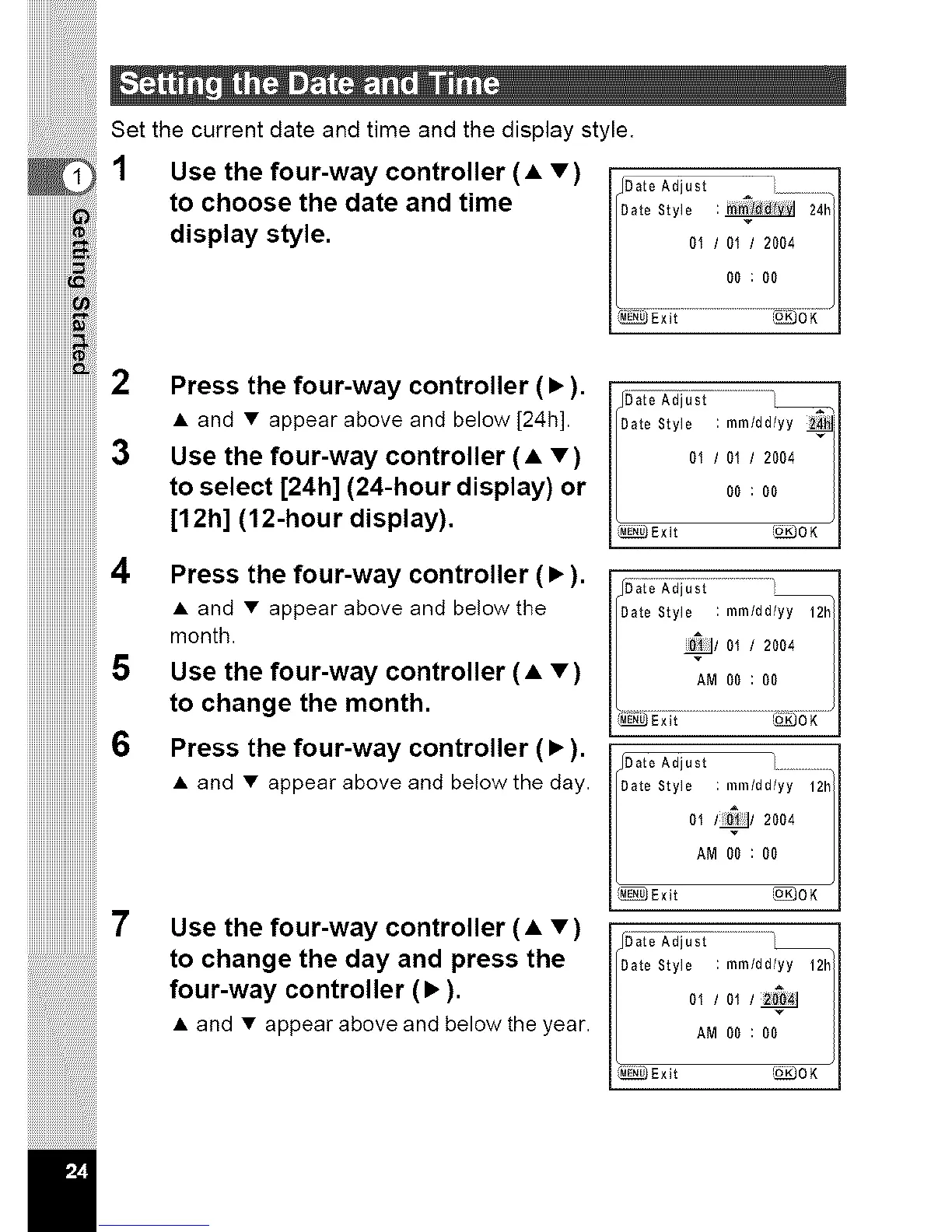
Set the current date and time and the display style.
1 Usethefour-waycontro er(&v) ,_, ,
to choose the date and time ....i4h'_
display style. 0I, 01,2004
L 00:00...............j
_E,lt 60,
2 Press the four-way contro er (•) I ...............................................'
• ' Dat e Adj ust _
• and appear above and below [24h. t_ate Style : mm/dd/yy
3 Use the four-way controller(--)/ 0,/0,/2004 "I
to select [24h] (24-hour display) or I[_ 00:00 11
4 Press the four-way controller (•). J,_;_4_;i
• an_- appearabovean_belowthe I00teStyle:_,dd,yy'_"/
month. / _/ 01 ! 2004
L AM00:00j
_;i_ ................................_ _.....
Use the four-way controller (• •)
to change the month.
Press the four-way controller (•).
• and • appear above and below the day.
Use the four-way controller (• •)
to change the day and press the
four-way controller (•).
• and • appear above and below the year.
iiiiiiiiiiiiiiiiiiiiiiiiiiiiiiiis
iiiiiiiiiiiiiiiiiiiiiiiiiiiiiiii
iiiiiiiiiiiiiiiiiiiiiiiiiiiiiiii
7
[rDate Adjust .................]
[OateStyle:mm/dd/yy12h/I01 I_1 2004
/ AM O0 : O0
_Exit _OK |
IOate Style : mm/ddtyy 1212h/01 / 01 /
[ AM00:00 J
_Ex t _o_


 To Next Page