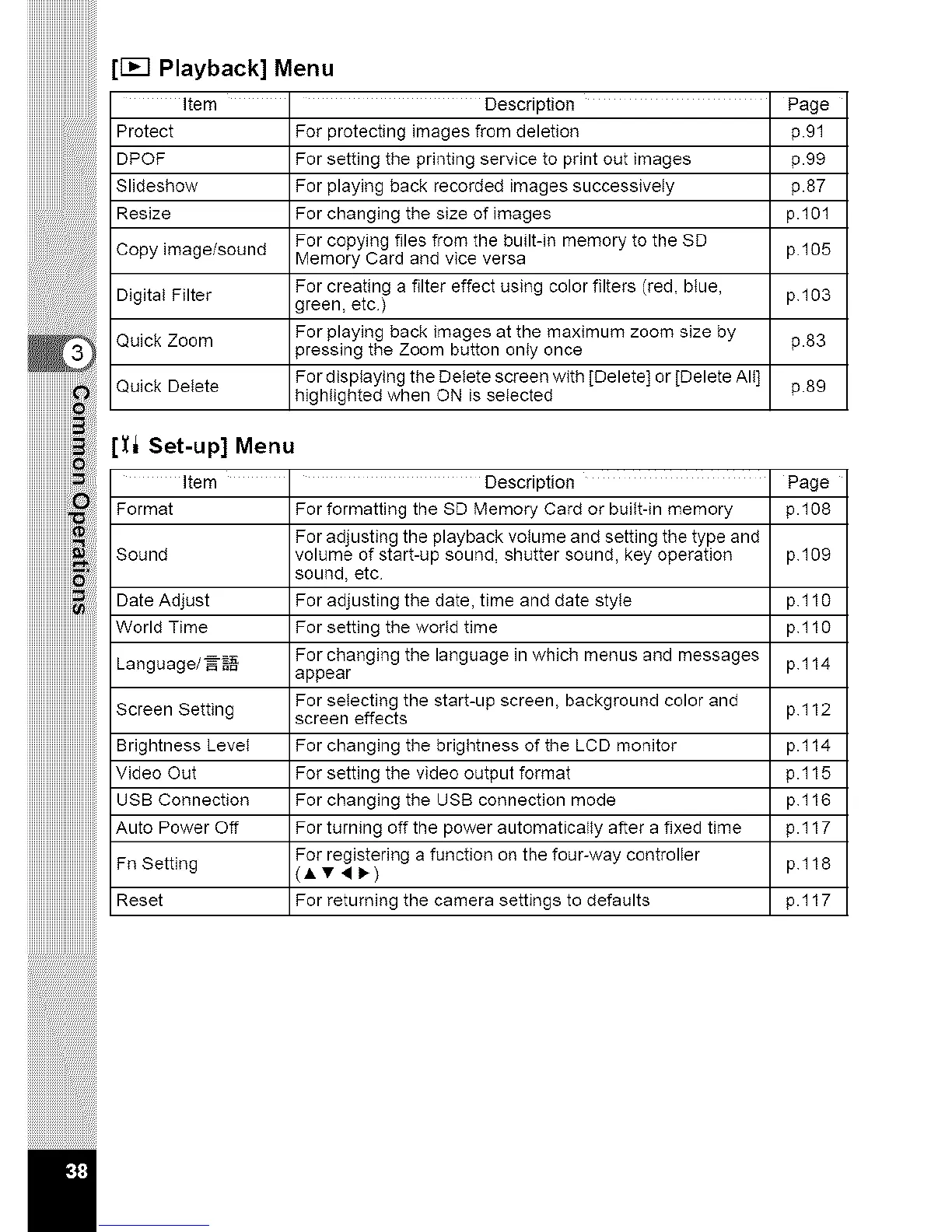
[I-_-I Playback] Menu
Item ' Description
Protect For protecting images from deletion
DPOF For setting the printing service to print out images
Slideshow For playing back recorded images successively
Resize For changing the size of images
Copy image/sound For copying files from the built-in memory to the SD
Memory Card and vice versa
For creating a filter effect using color filters (red, blue,
Digital Filter green, etc)
For playing back images at the maximum zoom size by
Quick Zoom pressing the Zoom button onty once
For displaying the Delete screen with [Delete] or [Delete Alt]
Quick Detete highlighted when ON is selected
Page
p.91
p.99
p.87
p.101
p105
p103
p.83
p.89
[_i Set-up] Menu
Item ' Description Page
Format For formatting the SD Memory Card or buitt-in memory p.108
For adjusting the playback votume and setting the type and
Sound volume of start-up sound, shutter sound, key operation p 109
sound, etc
Date Adjust For adjusting the date, time and date styte p 110
World Time For setting the wodd time p 110
For changing the language in which menus and messages p114
Language/_=_ appear
Screen Setting For selecting the start-up screen, background color and p 112
screen effects
Brightness Level For changing the brightness of the LCD monitor p.114
Video Out For setting the video output format p.115
USB Connection For changing the USB connection mode p116
Auto Power Off For turning off the power automatically after a fixed time p.117
For registering a function on the four-way controller p 118
Fn Setting (A • • I_)
Reset For returning the camera settings to defaults p.117


 To Next Page