2,3
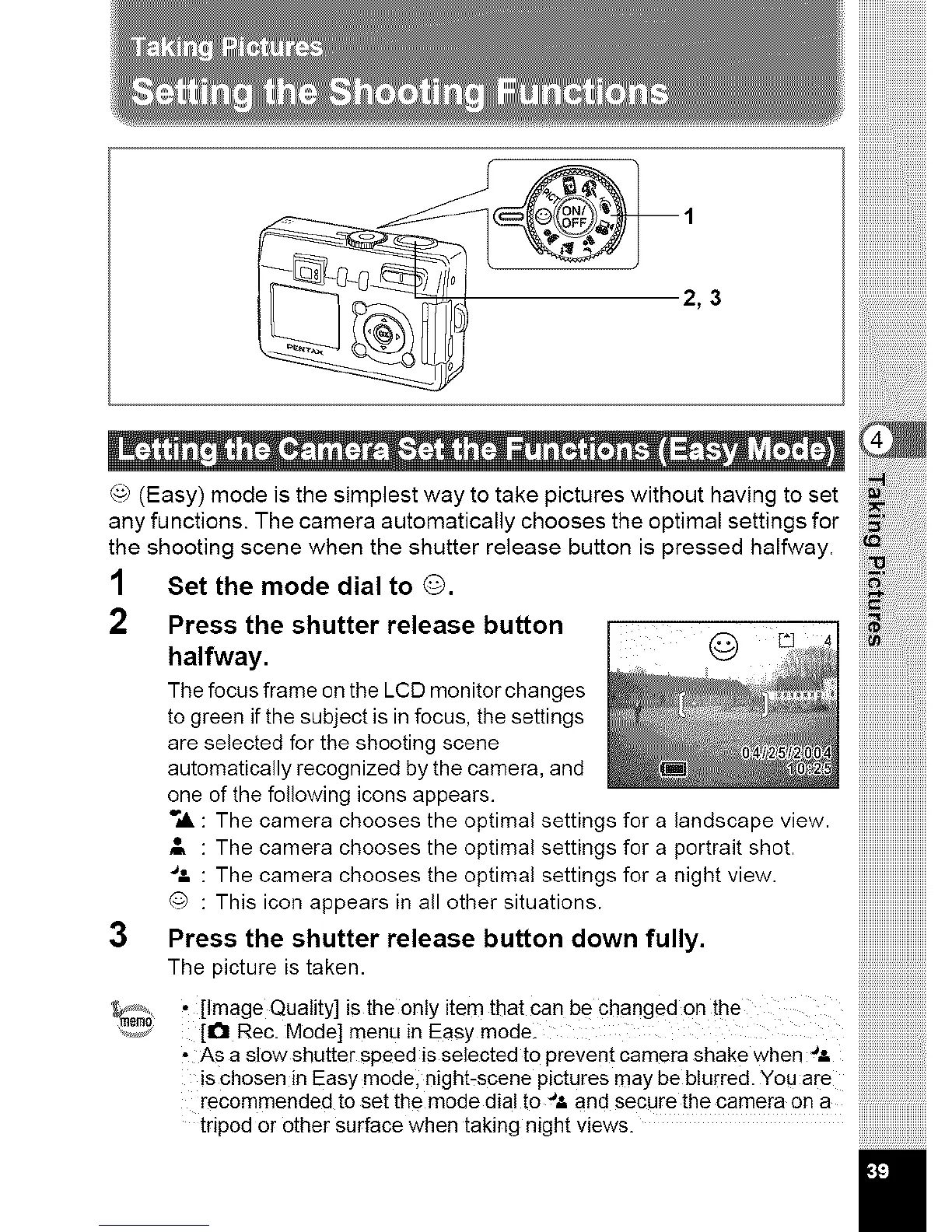
@ (Easy) mode is the simplest way to take pictures without having to set
any functions. The camera automatically chooses the optimal settings for
the shooting scene when the shutter release button is pressed halfway.
1 Set the mode dial to ©.
2 Press the shutter release button
halfway. (_
The focus frame on the LCD monitor changes
to green if the subject is in focus, the settings
are selected for the shooting scene
automatically recognized by the camera, and
one of the following icons appears.
iiiiiiiiiiiiiiiiiiiiiiiiiiiiiii,,
:i he camera chooses the optimal settings for a landscape view.
The camera chooses the optimal settings for a portrait shot.
iiiiiiiiiiiiiiiiiiiHHHHHH,,
The camera chooses the optimal settings for a night view.
HHHHHHHHHHHHHHHi,,
This icon appears in all other situations.
HHHHHHHHHHHHHHHi,,
HHHHHHHHHHHHHHHi,,
3 Press the shutter release button down fully.
HHHHHHHHHHHHHHHi,,
The picture is taken.
• [image Quality] is the only item that can be changed On the
[it Rec. Mode] menu in Easy mode:
• AS a slow shutter Speed is Selected to prevent Camera shake when _.•,
is chosen in Easy mode, night:scene pictures may be blurred. You are
recommended to set the mode dial to &', and secure the camera on a
tripod Or other surface When taking night Views.


 To Next Page