2
5,6
3, 4
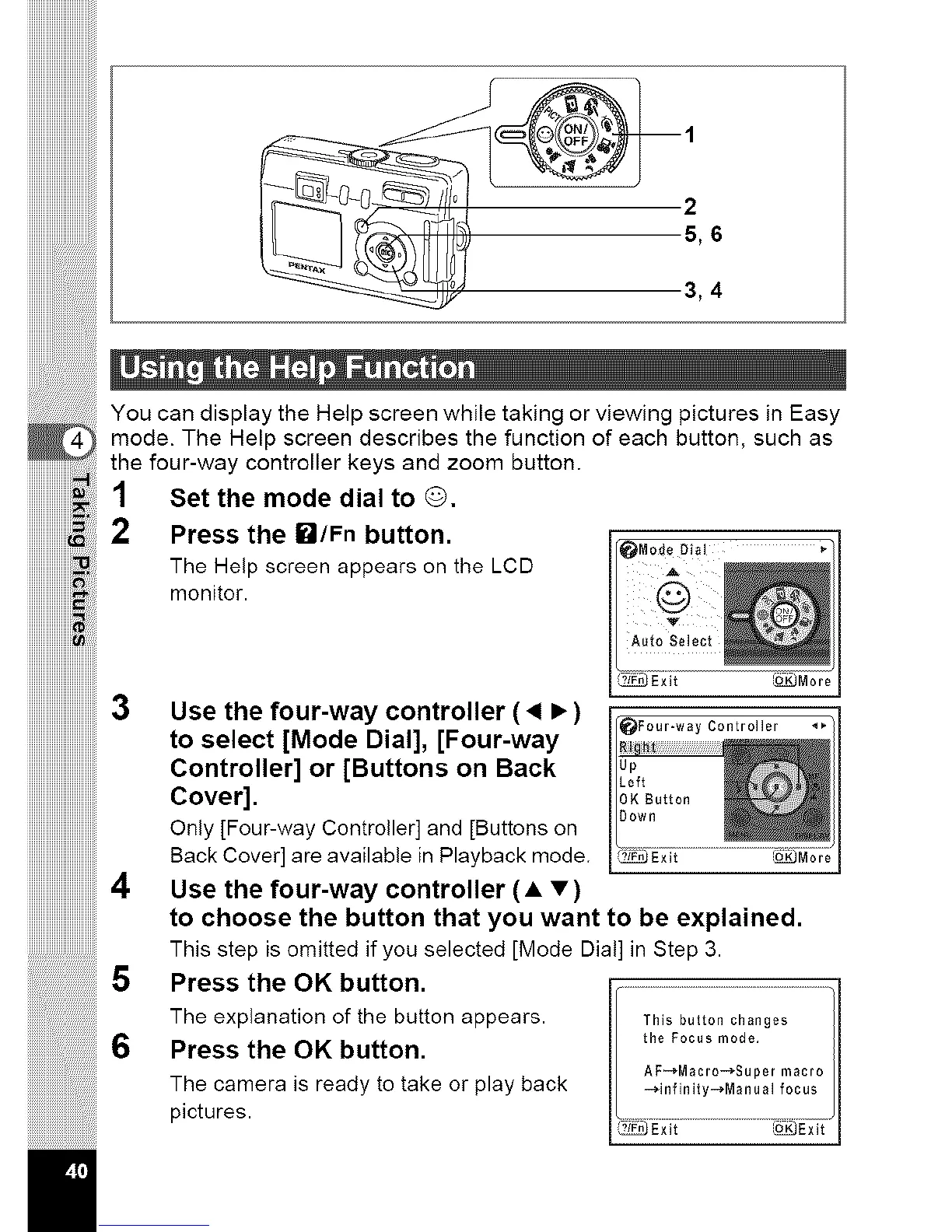
You can display the Help screen while taking or viewing pictures in Easy
mode. The Help screen describes the function of each button, such as
the four-way controller keys and zoom button.
Set the mode dial to ©.
=; Press the I_l/Fn button.
Dial _"
The Help screen appears on the LCD
monitor.
iiiiiiiiiiiiiiiiiiii_ii!!_
iiiiiiiiiiiiiiiiiiii_iiiill
_Exit _More
3 Use the four-way controller (4 •)
to select [Mode Dial], [Four-way
F
y C0ntr011
Controller] or [Buttons on Back
cover].
OnlyIFour-wayContro,erland[Suttonson
Sack Cover] are available in Playback mode. _Exit _more
4 Use the four-way controller (* v)
to choose the button that you want to be explained.
This step is omitted if you selected [Mode Dial] in Step 3.
5 Press the OK button .............................................................................................
¢
The explanation of the button appears. / Thisbuttonchanges J
6 Press the OK button, theF...... de.
AF_Macr0_Super macr0
The camera is ready to take or play back -_*infinity_Manual focus
pictures. I_ii ........................................_E_]{ I


 To Next Page