This mode lets you take moving pictures. Sound can be recorded at the
same time.
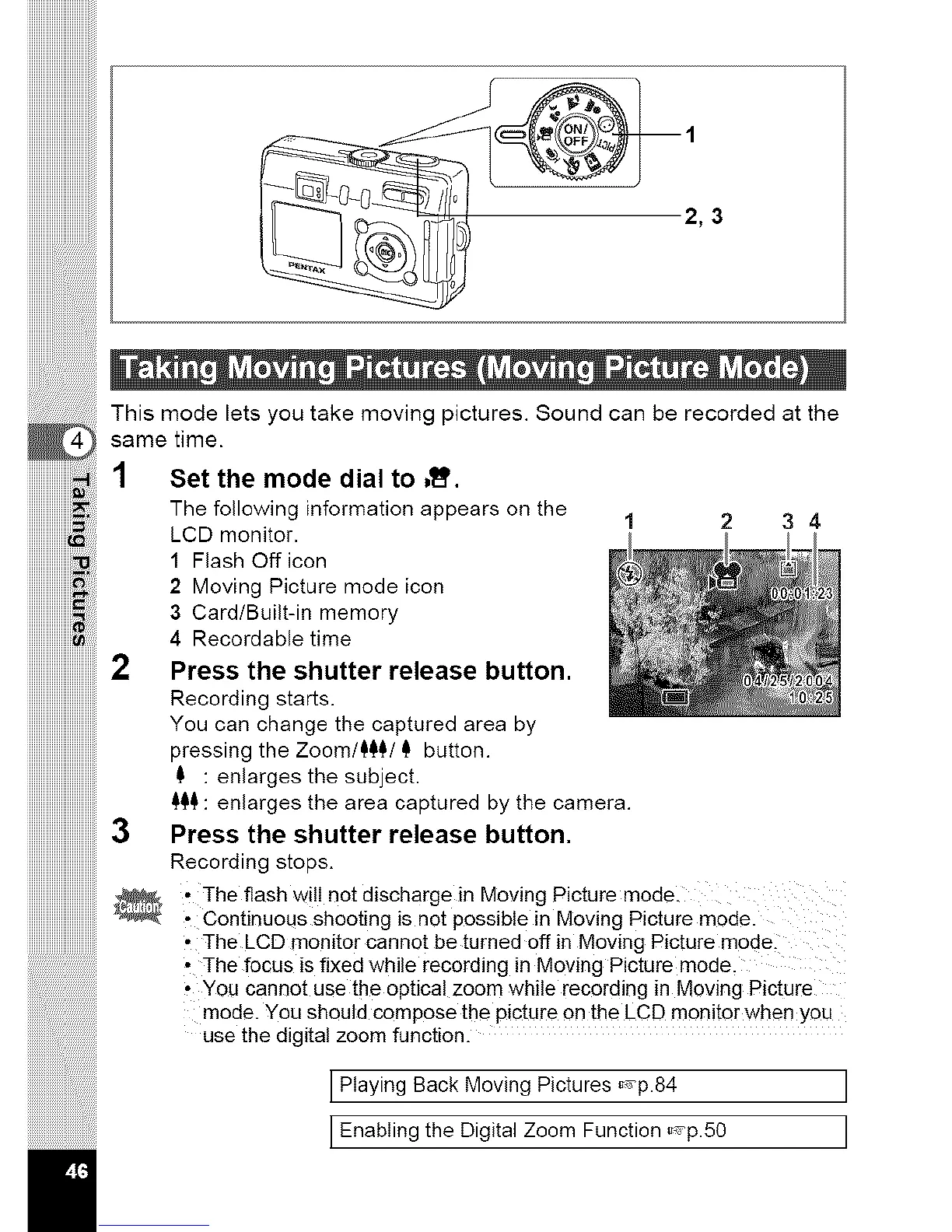
1 Set the mode dial to ,_'.
The following information appears on the
1 2 3 4
LCD monitor.
1 Flash Off icon
2 Moving Picture mode icon
3 Card/Built-in memory
4 Recordable time
2 Press the shutter release button.
Recording starts.
You can change the captured area by
pressing the Zoom/_/_, button.
: enlarges the subject.
_: enlarges the area captured by the camera.
3 Press the shutter release button,
Recording stops.
._ , The flash will riot discharge in Moving Picture mode.
................................, Continuous shooting is not possible in Moving Picture mode.
• The LCD monitor Cannot be turned off in Moving Picture mode
• The focus is fixed while recording in Moving Picture mode.
, You cannot use the optical zoom while recording in Moving Picture
mode. You should compose the picture on the LGD monitor when you
use the digital zoom function.
I Playing Back Moving Pictures _-p.84 I
I Enabling the Digital Zoom Function _. p.50 I


 To Next Page