HHHHHHHHHHHHHH
HHHHHHHHHHHHHH
HHHHHHHHHHHHHH
HHHHHHHHHHHHHH
HHHHHHHHHHHHHH
Recording starts when you keep the shutter release button pressed for iiiiiiiiiiiiiiiiiiiiiiiiiiii
more than one second. Pictures will be taken for as long as you keep the iiiiiiiiiiiiiiiiiiiiiiiiiiii
button pressed. Recording stops when you take your finger off the iiiiiiiiiiiiiiiiiiiiiiiiiiii
shutterre,easebutton iiiiiiiiiiiiiiiiiiiiiiiiiiii
iiiiiiiiiiiiiiiiiiiiiiiiiiii
You can take moving pictures underwater using the waterproof case
(optional). Use Marine Moving Picture mode to take moving pictures
underwater.
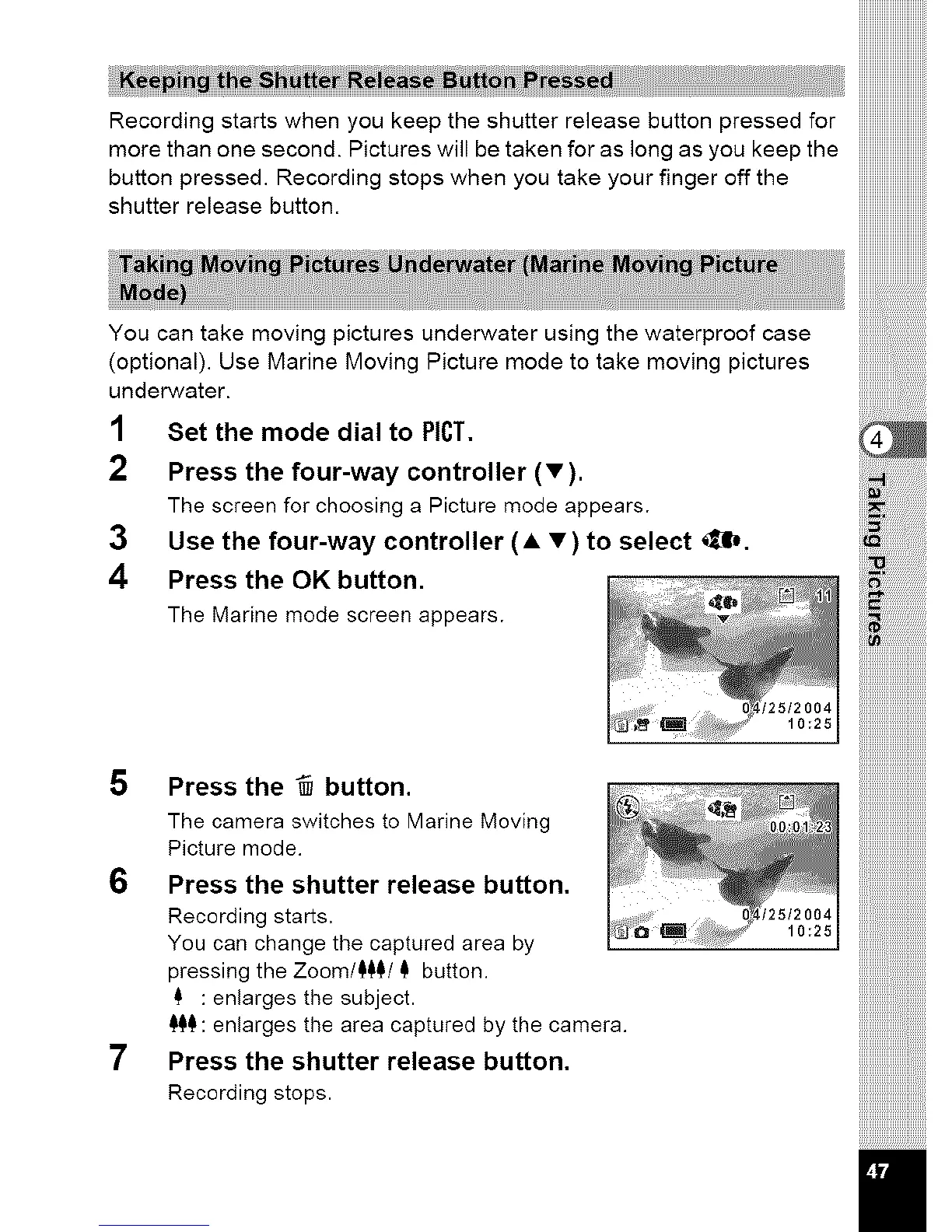
1 Set the mode dial to PICT.
2 Press the four-way controller (v).
The screen for choosing a Picture mode appears.
3 Use the four-way controller (• •) to select _'1_.
4 Press the OK button.
The Marine mode screen appears.
5
6
Press the -_ button.
The camera switches to Marine Moving
Picture mode.
Press the shutter release button.
Recording starts.
You can change the captured area by
pressing the Zoom/_$/_, button.
: enlarges the subject.
_, : enlarges the area captured by the camera.
Press the shutter release button.
Recording stops.


 To Next Page