EasyManua.ls Logo

Pentax PC-555 - Page 17

Pentax PC-555
33 pages
Print Icon
To Next Page IconTo Next Page
To Previous Page IconTo Previous Page
Loading...
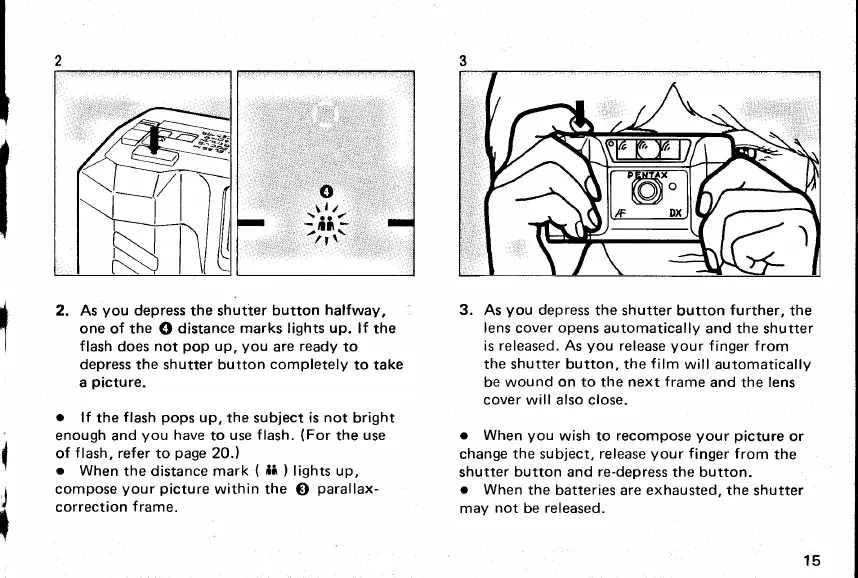
2. As
you
depress the shutter
button
halfway,
one of
the
0
distance
marks
lights
up.
lf
the
flash
does
not
pop
up,
you
are
ready
to
depress
the
shutter button
completely
to take
a
picture.
o
lf
the
flash
pops
up,
the subject
is not
bright
enough and
you
have
to
use
flash.
{For
the
use
of
f
lash, refer
to
page
20.)
o
When
the distance mark
(
ii
)
lights
up,
compose
your picture
within the
@
parallax-
correction
f
rame.
3. As
you
depress
the shutter
button
further,
the
lens
cover opens
automatically
and
the
shutter
is released. As
you
release
your
finger
f rom
the shutter button, the
film
will automatically
be wound
on to the next
frame
and the
lens
cover will also close.
o
When
you
wish to
recompose
your picture
or
change
the
subject,
release
your
finger
from
the
shutter
button
and
re-depress
the button.
o
When
the batteries
are
exhausted, the
shutter
may
not
be
released.
{
I
d
r
."o'
\l/
:t1i
15
www.orphancameras.com

Related product manuals