8 9
NOTE
If you are NOT planning to return to the vehicle, you should select
the “Remove your driver log from vehicle” option during the log out
process. This returns your log to PeopleNet. When you retrieve this
log again, the process may take a few minutes.
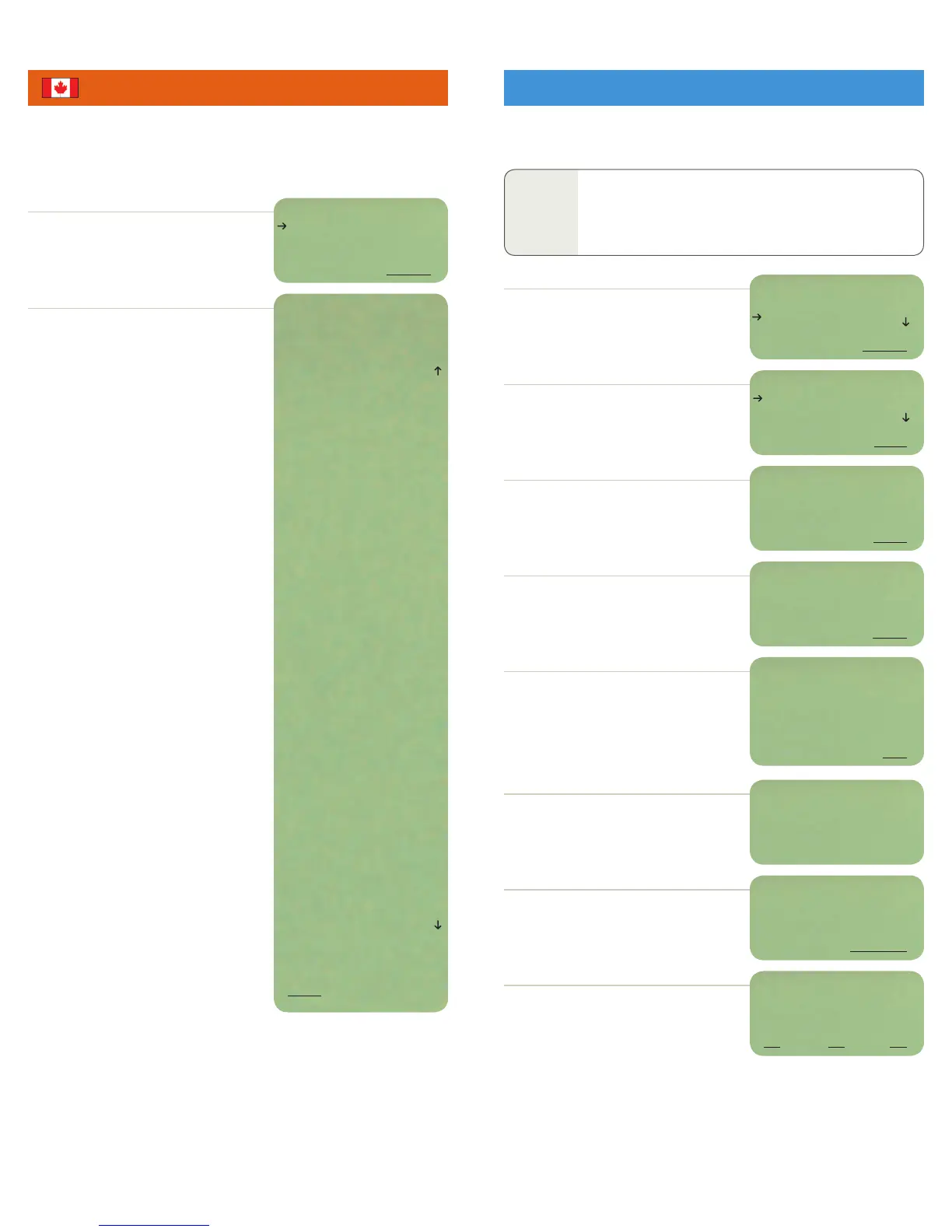
SELECT View Hours from the driver log menu.
Arrow down to view:
Today’s date and driver’s terminal time, including
time zone.
Violation warning if driver is in violation, including
how much off duty time is required to exit Out Of
Service status.
Hours Available: This section displays available
Driving, On Duty, and cycle time per regulation.
It also shows the available time according to day
and work shift rules, as well as available Defer
time if you are eligible to defer.
Rules: Off Duty, Sleeper Berth, Driving, On Duty
and total on duty time (Driving + On Duty) acquired
in the current day. It also displays Driving and total
on duty per the day, work shift and cycle regulations.
Cycle Reset: This displays the current off duty
period (Off Duty and/or Sleeper Berth) counting
towards your cycle reset.
Last and Next 24 Reset: This shows when the last
24 hour off duty period (Off Duty and/or Sleeper
Berth) was, and when you next need to take one.
Hours Gained: This displays the number of hours
gained at the end of the current day for the next
day. It equals the hours used on day 1 of your cycle.
Off Duty Required: This is the total off duty time
required for the day. It also displays the minimum
consecutive off duty time (defer time + 8 hours) for
day 2 when deferring. Additional off duty time is
the daily required 2 hours of off duty not used to
reset your work shift.
Split Sleeper & Defer: This section displays time
spent in current and previous qualified Sleeper
Berth periods. Also displayed is the amount of time
used while deferring on day 1, the consecutive off
duty period (Off Duty and/or Sleeper Berth) used on
day 2, and the total qualifying off duty time on day 2.
Miles (km) Today: This shows the distance traveled
on the current day.
Border Snapshot: This section displays the available
time under your assigned US Mainland regulations.
From the main menu, SELECT LOGOUT.
NOTE: For team drivers, make sure the correct user
is selected before logging out.
Arrow down to the duty status you want to be in
while logged out. Press NEXT. Driver ID and current
duty status is displayed.
Enter any remarks you want to appear in your log
and press DONE.
Remarks are optional. You can skip this screen by
selecting DONE.
YES to confirm your duty status and location.
NO to abort the log out process.
PROCEED to automatically certify your log book
and transfer the logs out of the vehicle to PeopleNet.
BACK to abort the log out process.
A data call will be placed to transmit your driver
logs to PeopleNet. Press OK to return to the main
idle screen while the data call processes.
NO if you will be returning to this vehicle and
want to keep your driver log in the vehicle. Log
out is complete. You will return to the main menu.
YES to remove your driver log from vehicle.
NEXT to confirm your location. If this is not your
location, backspace to delete the location. Then
use the keyboard to type the correct location.
This option allows you to log out of the program. This will suspend active logging under
your name and ensures your Driver ID is not associated with other drivers’ activities.
This option allows you to view your available hours, total hours in each duty status
for the current day, time on and off duty per regulation, and miles traveled. A border
snapshot shows available time for the US when in Canada and vice versa. Use this
screen to plan your day.
DRIVER LOG
LOGIN
LOGOUT
BACK SELECT
Glenn–SB
OFF DUTY
ON DUTY
BACK NEXT
Glenn Williams
02/09/07 17:30 CST
Reg Can Cy:1 70/7
----HOURS AVAILABLE----
Current D: 7:00
Current ON: 7:00
Can 70/7: 13:30
Day D: 7:30
Day ON: 7:00
WrkShf D: 9:00
WrkShf ON: 8:30
WrkShf Clk: 10:00
Defer: 0:00
---Can Cy1:70/7 RULES---
Can 70/7: 56:30
Day D: 5:30
Day ON: 1:30
Day ON + D: 7:00
WrkShf D: 4:00
WrkShf ON: 1:30
WrkShf Clk: 6:00
SleeprBrth: 10:00
OFF: 0:30
Cycle Reset: 2:00
Lst 24 Off: 3 da
Nxt 24 Off: 11 da
Hrs Gained: 6:00
---OFF DUTY REQUIRED---
Total: 0:00
Defer+8: 0:00
Add OFF: 0:00
----SPLIT SB & DEFER----
Curr SB: 2:00
Prev SB: 8:00
Day1 Defer: 0:00
Day2 8+Dfr: 0:00
Day2 TotOff: 0:00
Miles Today: 300
---BORDER SNAPSHOT---
Current D: 7:00
Current ON: 8:00
USA 70/8 LH: 11:00
BACK
DRIVER: Glenn
VIEW HOURS
CURRENT COUNTRY
BACK SELECT
Glenn Confirm Duty Status
Change from Sleeper Berth
to Off Duty at 2M N
Chaska, MN?
NO YES
Location:
2M N Chaska, MN
BACK NEXT
REMARK:
PeopleNet
BACK DONE
Remove Your Driver Log
From Vehicle?
NO YES
PLACING DATA CALL
TO TRANSMIT DRIVER
INFORMATION
OK OK OK
USER WILL CERTIFY
ALL SHEETS WITH THIS
VEHICLE LEAVE
BACK PROCEED
VIEW HOURS (CANADA) LOGOUT


 To Next Page
 Loading...