EasyManua.ls Logo

Pepeo 72140 - OPERATION & MAINTENANCE; Operation; Maintenance; TROUBLESHOOTING GUIDE

Pepeo 72140
76 pages
Print Icon
To Next Page IconTo Next Page
To Previous Page IconTo Previous Page
Loading...
GB
OPERATION
&
MAINTENANCE
Operation
Speed settings
for warm
or cool
weather depend
on factors
such as
room sizg
ceiling height,
number
offans
and so on.
The slide
switch
controls
direction,
forward or reverse.
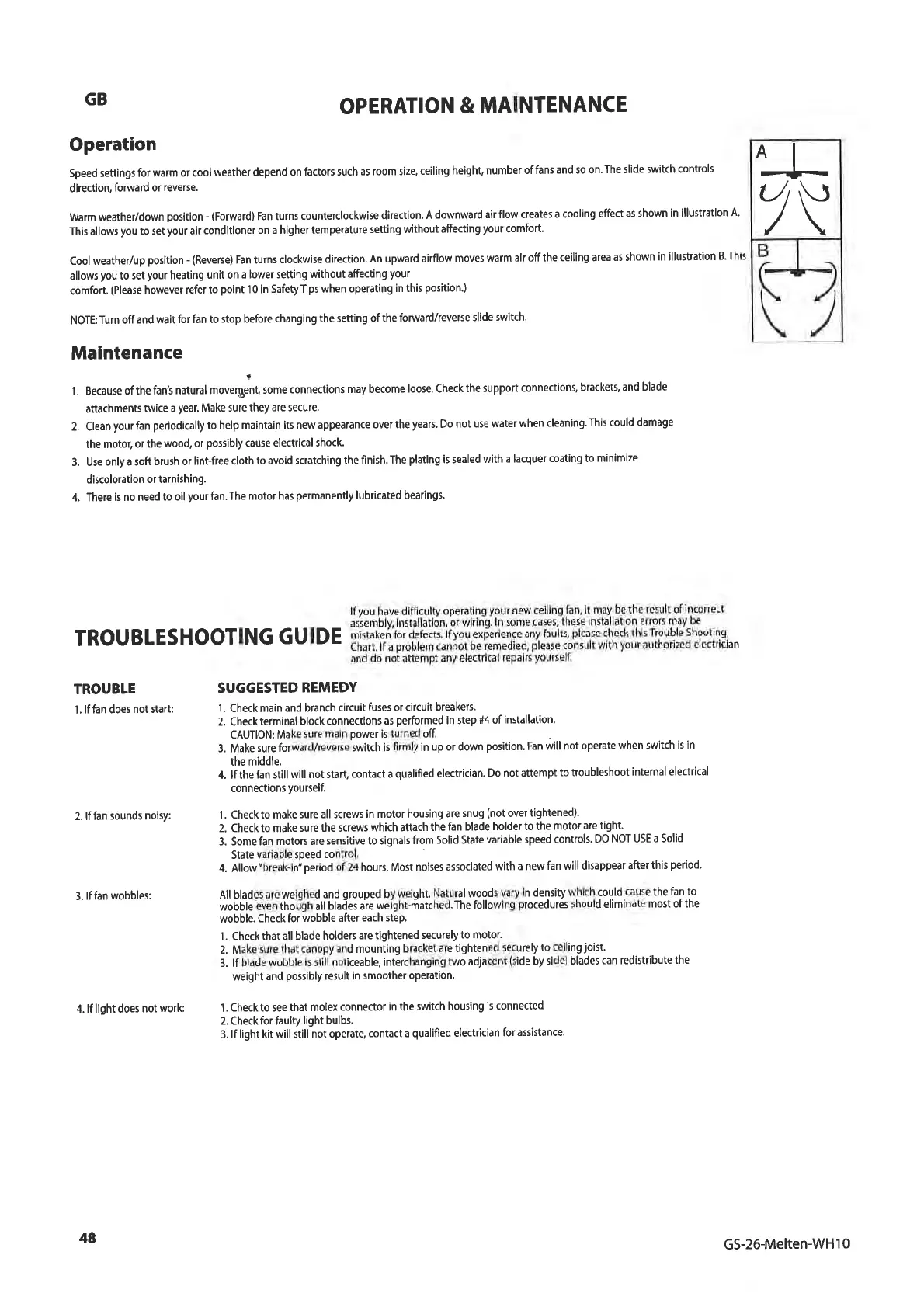
Warm
weather/down
position
-
(Forward)
Fan turns
counterclockwise
direction.
A downward
air flow creates
a cooling
effect
as shown
in illustration A.
This allows
you
to set
your
air
conditioner on
a higher temperature
setting without
affecting
your
comfort.
Cool weather/up
position
- (Reverse)
Fan turns
clockwise
direction,
An upward airflow
moves warm air
offthe
ceiling area
as shown
in
illustration B.This
allows
you
to set
your
heating
unit on a
lower setting
w¡thout affecting
your
comfort.
(Please
however
refer to
po¡nt
'l
0 in
SafetyTlps when
operating
in this
posit¡on.)
NOTE:
Turn off
and wait
for fan to
stop before changing
the setting
of the
forward/reverse
slide
switch.
Maintenance
l.
Because of
the fan3 natural
rou"rgå,,
,or. .onnect¡ons
may become
loose. Check
the support
connections,
brackett
and
blade
attachments
twice
a
year.
Make sure they
are secure'
2. Clean
your
fan
periodically
to help
ma¡ntain its
new appearance
over the
years.
Do
not use water
when cleaning.
This could
damage
the motor,
or the
wood, or
possibly
cause electrical
shock.
3. Use
only a soft
brush or
lint-free cloth
to avoid scratching
the
finish. The
plating
is sealed
with a
lacquer
coating to
minimize
discoloration
or tarnishing.
4. There
is no need
to oil
your
fan. The
motor has
permanently
lubricated
bearings.
lfyou
have difficulty
operating
your
new
ceiling
fan, it
may.be the
result
of inconect
rRouBLEsHoorlNG
GUIDE
äl'Jå:ty;ffi:x;:l,tË.'*nî,fi*Ë"m#;i$ifu1,ËJ:lll¡1s."
and
do noi attempt
any
electr¡cal
repairs
yourself.
TROUBLE
1.
lffan does
not start:
2. lffan
sounds noisy:
3. lf fan wobbles:
4. lf
light does
not work:
SUGGESTED
REMEDY
1. Check main
and branch
circu¡t fuses or
circuit breakers.
2. Check
terminal block
connections
as
performed
in step
#4 of installation.
CAUTION: Make
sure main
power
is turned
off
3. Make sure
forward/reverse
switch is
firmly in up
or down
position.
Fan
will not
operate
when switch
is in
the middle.
4. lf the
fãn still
will not start, contact
a
qualified
electrician.
Do
not attempt
to troubleshoot
internal electrical
connections
yourself.
1 . Check
to make
sure all screws
in motor housing
are
snug
(not
over
tightened).
2. Check to make
sure the screws
which attach
the
fan blade
holder to the
motor are
tight.
3. Some fan
motors are sensitive
to signals
from
Solid State
vãr¡able speed
controls.
DO
NOT USE a Solid
State
variable speed
control.
4. Allow "break-in;
period
of
24 hours. Most
noises associated
with
a new
fan will disappear
after
this
period'
.
All blades are
weighed and
grouped
by
weight.
Natural woods
vary in
density
which could
cause the
fan to
wò¡¡là euen
thoúgh all
blaðes aie
weíght-rñatched.
The
following
procedurès
should
eliminate
most
of the
wobble.
Check for
wobble after
each step.
1.
Check that all
blade holders
are tightened
securely
to motor'
2. Make sure that
canopy and
mounting bracket
are
tightened
securely
to ceiling
joist.
3. lf blade wobble
¡s still
noticeable,
intèrchanging
two adjacent
(side
by side)
blades can
red¡stribute
the
weight
and
possibly
result in smoother
operation'
1.
Check to see
that molex
connector in the
sw¡tch
housing is
connected
2. Check for faulty
light
bulbs.
3. lf light
kit w¡ll still
not operate, contact
a
qualifìed
electrician
for assistance.
AI
J--
7\
U
48
GS-26-Melten-WH10