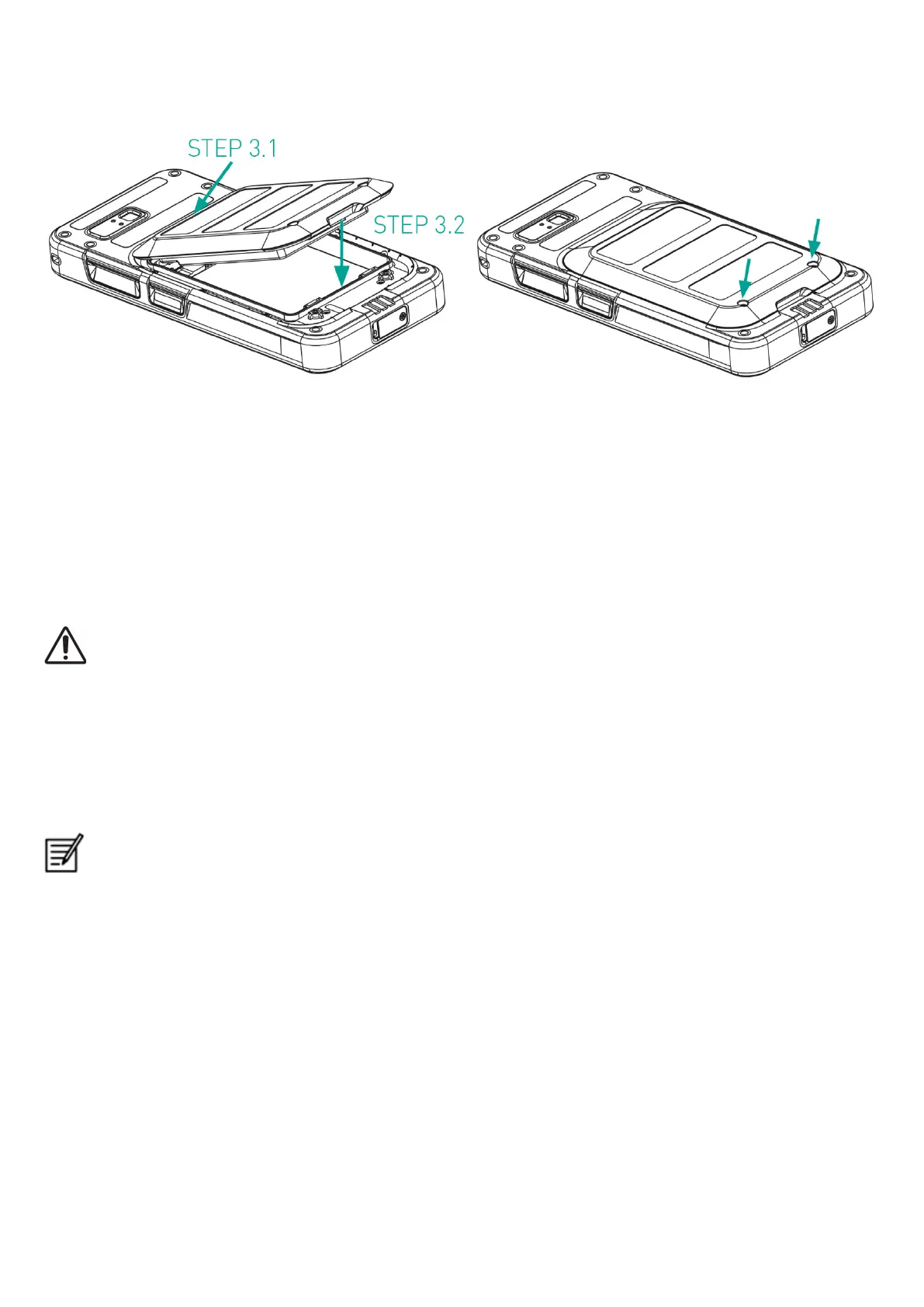
Step 3
1. Insert the battery into the battery slot in the prescribed order as shown in the figure and screw down the two cover screws in
a clockwise direction.
eSIM activation
Send a request for eSIM to the cellular network operator. A QR code is sent via email to activate the same.
1. Go to Settings-> Network and Internet-> SIMs
2. Click Add to add a new SIM.
Follow the wizard instructions to download and activate the eSIM. You will be prompted to scan the QR code sent by the cellular
service provider. The activation process will follow and complete. Once activated the eSIM is set as your default SIM for calls. The
physical SIM gets deactivated.
In case you are performing a factory reset of the mobile phone, please ensure that the eSIM profile is retained. If you
choose to erase it, you will need to contact the network provider again for the activation code.
Charging the phone
1. Connect the USB end of the cable to the phone and the other end to the socket.
2. Plug in the wall charger socket into a power source. The screen lights up showing the battery charging icon at the display.
Also the LED indicator at the top of the phone, shows RED when the charging is in progress and changes to GREEN once the
charging is complete.
On completion that is 100% charge disconnect the USB cable from the phone.
Do not over charge. Maximum time required for full charge is 2.5 hours.
9


 To Next Page