4
outtting & features
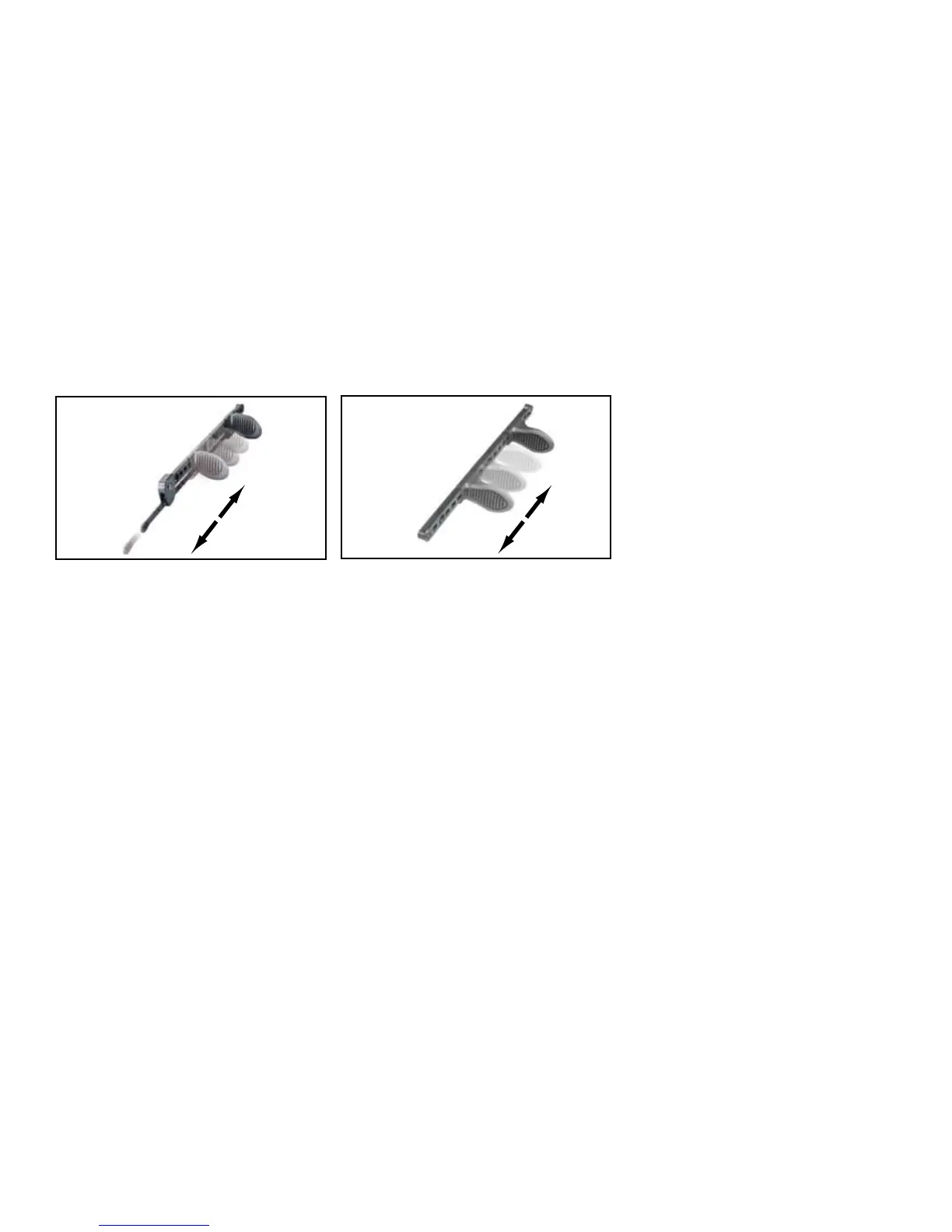
SlIDElOCk FOOTBrACES:
Adjust by pulling up on the tabs closest to your knees.
When you find a comfortable position, let the tabs
drop back down into place to lock in that position.
TrIGGErlOCk FOOTBrACES:
Adustment lever is located on the back of the
footpedal and adjusts by holding the lever down.
It will lock into place by releasing hand from lever.
USING THE rUDDEr SySTEm:
Some kayaks come with an optional factory rudder
system included. After market rudder systems are
also available. Please contact your local dealer for
any questions regarding setup or installation, or visit
www.perceptionkayaks.com.
Once your rudder is installed, use the lift line (located
on the right side of the boat, towards the rear of the
cockpit) to drop the rudder into the water by pulling
it forward.
To operate the rudder, use the footbrace pedals. To
maintain a straight position, both pedals should be
even with each other. To steer the kayak right, push
the right pedal away from you. To steer the kayak left,
push the left pedal away from you. Allow the pedal
that is not in use to automatically move towards you
when the other pedal is pushed.
SEATING:
Seating systems vary by model. If you need additional
assistance on using the adjustment mechanisms, please
visit our website at www.perceptionkayaks.com



 To Next Page