CPMR3 - 1 - PEREL
CPMR3 – PMR TRANSMITTER/RECEIVER SET
1. Introduction
To all residents of the European Union
Important environmental information about this product
This symbol on the device or the package indicates that disposal of the device after its lifecycle could harm the
environment.
Do not dispose of the unit (or batteries) as unsorted municipal waste; it should be taken to a specialised company for
recycling.
This device should be returned to your distributor or to a local recycling service.
Respect the local environmental rules.
If in doubt, contact your local waste disposal authorities.
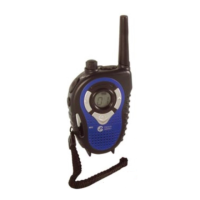
Thank you for buying the CPMR3. It consists of 2 transmitter/receivers, each with an earphone with microphone. Read this
manual carefully before using your CPMR3.
Only for use in following countries: Austria, Belgium, Bulgaria, Cyprus, Denmark, Estonia, Finland, France
(*)
, Germany, Greece,
Hungary, Iceland, Ireland, Italy, Latvia, Czech Republic, Liechtenstein, Lithuania, Luxemburg, the Netherlands, Norway, Portugal,
Slovenia, Spain, Sweden, Switzerland, Turkey, United Kingdom.
(*)
The use of channel 1 and 2 is not allowed in France. Consult the local authorities for proper usage of this device in
your country.
2. Features
a. Buttons and Controls
1. On/off button + volume control 7. Jack for charger
2. PTT key 8. Earphone/mic jack
3. MON key 9. Soft antenna
4. Channel down key () 10. LCD display
5. Call key 11. Channel up key ()
6. Microphone 12. Speaker
b. Display
1. Key lock icon
2. Call: shown when calling another unit
3. TX: transmit indicator: indicates the unit is transmitting
4. RX: receive indicator: indicates the unit is receiving
5. Battery level indicator:
Batteries OK
Batteries low: when this icon is blinking and the device emits a low battery sound alert
(sounds every 3 minutes), it is recommended to install new batteries or recharge them.
6. Channel number display
3. Installing / Recharging Batteries
1. Make sure the unit is switched off. Press the button on the belt clip and turn it 90° clockwise or counterclockwise.
2. Open the battery compartment and take the battery compartment cover off.
3. Insert 3 AAA-batteries, respecting the polarity.
4. Put the battery compartment cover back on & lock it. Rotate the belt clip back into its normal position.
Always replace all batteries at once. Do not mix old with new ones. Do not mix different battery types or batteries of different
capacity. Do not mix rechargeable and non-rechargeable batteries.
Fig.1
Fig.2


 To Next Page
 General