10
11
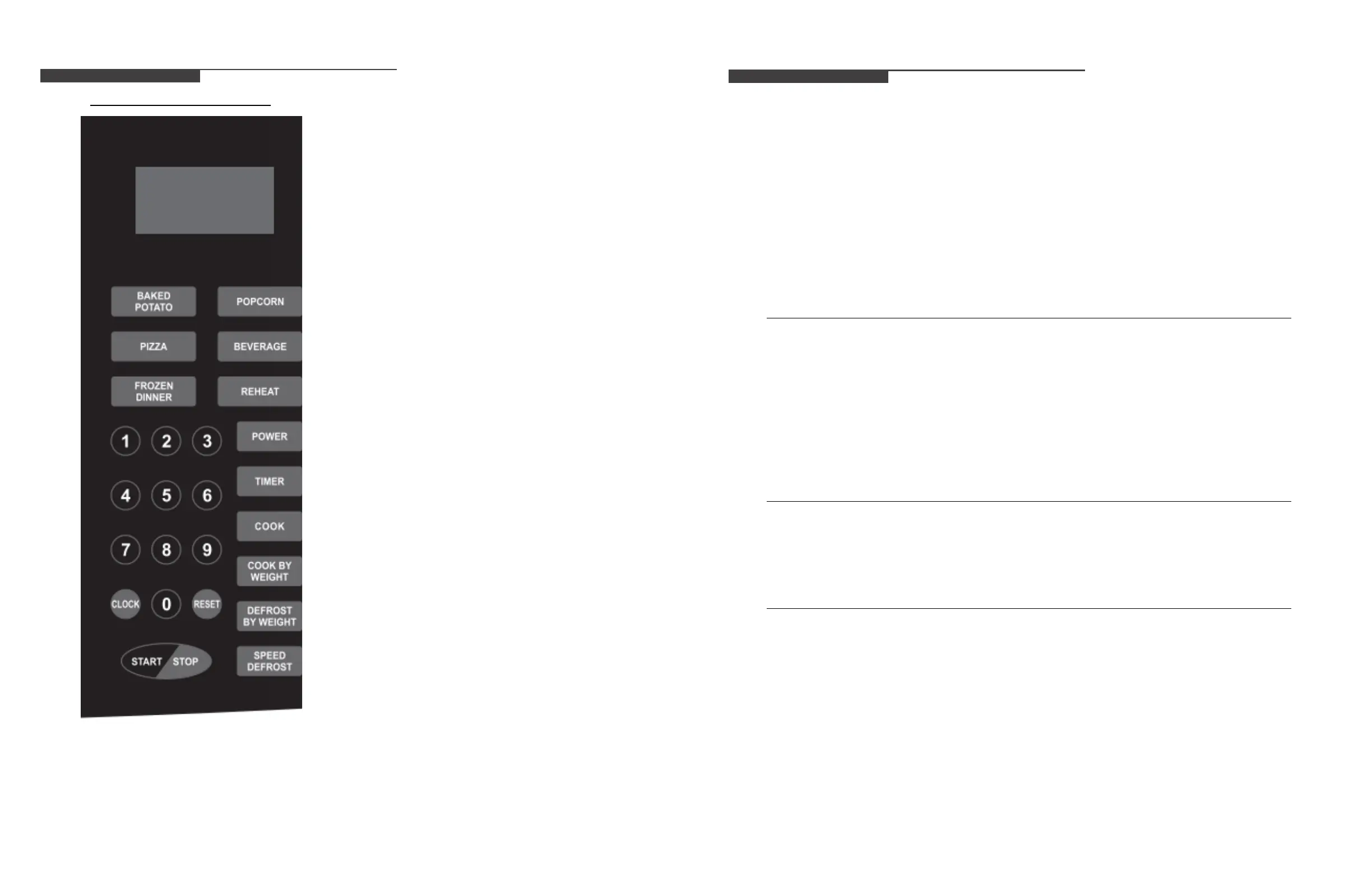
CONTROL PANEL
l DISPLAY
Cooking time, power, indicators and clock time are displayed.
l AUTO COOK MENUS
There are 6 kinds of auto cook menus. Use to set auto cook
program.
l CLOCK
Press to set clock time.
l DEFROST
Press to set defrost program based on time.
Press to set defrost program based on weight.
l TIMER
Press to set the oven timer function.
l POWER LEVEL
Press to set microwave power level.
l TI
ME COOK
Press to set microwave cooking program.
l COOK BY WEIGHT
Press to set cooking program based on weight.
l NUMBER BUTTONS (0-9)
Press to adjust power level, set time or food weight.
But use number buttons from 1 to 6 can set express
cooking program.
l STOP/CLEAR
Press to cancel setting or reset the oven before setting a
cooking program.
Press once to temporarily stop cooking, or twice to cancel
cooking altogether.
•
Display
Cooking time, power, indicators and clock time are
displayed.
•
Auto Cook Menus
There are 6 kinds of auto cook menus. Use to set
auto cook program.
•
Clock
Press to set clock time.
•
Defrost
Press to set defrost program based on time.
Press to set defrost program based on weight.
•
Timer
Press to set the oven timer function.
•
Power Level
Press to set microwave power level.
•
Time Cook
Press to set microwave cooking program.
•
Cook By Weight
Press to set cooking program based on weight.
•
Number of Buttons (0-9)
Press to adjust power level, set time or food weight.
But use number buttons from 1 to 6 can set express
cooking program.
•
Stop/Clear
Press to cancel setting or reset the oven before
setting a cooking program.
Press once to temporarily stop cooking, or twice to
cancel cooking altogether.
It is also used for setting child lock function.
•
Stop/+30 Sec.
Press to start cooking program.
Simply press it several times to set cooking time
and cook immediately at full power level.
OPERATION INSTRUCTIONS
➢ When the oven rst plugged in, beep will sound, and the display will show “1:01” and clock icon.
➢ In the process of cooking setting, broke about 30 seconds the oven will return to standby mode.
➢ During cooking, if press STOP/CLEAR button once, the program will be paused, then press
START/+30 SEC. button once to resume, but if press STOP/CLEAR button twice, the program will
be canceled.
➢ After cooking end, the screen will display End with sound every two minutes until user press STOP/
CLEAR button or open the door.
Setting the Clock
This is a 12- or 24- hour clock, and you can select it by pressing CLOCK button.
1. In standby mode, press CLOCK button once or twice to select 12- or 24- hour clock.
2. Use number buttons to enter correct time.
3. Press CLOCK button again to conrm.
Note: During cooking, the current time of the clock can be seen by pressing CLOCK button
Express Cooking
Directly in standby mode, press number button once (1-6), the corresponding system direct start cooking
time respectively 1 minute, 2 minutes, 3 minutes, 4 minutes, 5 minutes and 6 minutes. The oven will start
to cook at full power level.
30 Sec. Function
In standby mode, press START/+30 SEC. button repeatedly to enter cooking time (each press to increase
30 seconds, and up to 99 minutes and 99 seconds). The oven will auto start cooking at full power level.
Note: During express cooking and microwave cooking program, you can add cooking time by pressing
START/+30 SEC. button.


 To Next Page
 Loading...