12
13
Setting Timer
1. Press TIMER button once.
2. Press number buttons to enter the amount of time. The longest time is 99 minutes and 99 seconds.
3. Press START/+30 SEC. button to conrm.
Note: When the countdown ends, the buzzer will beep to remind you. You can check the countdown time
by pressing TIMER button, but if STOP/CLEAR button is pressed when the display shows the time, the
function can be cancelled.
Microwave Cooking
1. Press TIMER button once.
2. Press number buttons to enter the amount of time. The longest time is 99 minutes and 99 seconds.
3. Press START/+30 SEC. button to conrm.
Note: When the countdown ends, the buzzer will beep to remind you. You can check the countdown time
by pressing TIMER button, but if STOP/CLEAR button is pressed when the display shows the time, the
function can be cancelled.
Use single digit to set a cooking power level:
Note: During cooking, the current cooking power level can be seen by pressing POWER LEVEL button.
If you want to set 100% power level, you can omit the step 3 given above.
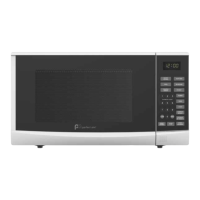
Number button Cooking power (Display) Number button Cooking power (Display)
1,0 100% (100) 4 40% (40)
9 90% (90) 3 30% (30)
8 80% (80) 2 20% (20)
7 70% (70) 1 10% (10)
6 60% (60) 0 0% (0)
5 50% (50)
Time to Defrost
1. In standby mode, press DEFROST button once.
2. Press number buttons to enter defrosting time. The longest time is 99 minutes and 99 seconds.
3. Press START/+30 SEC. button to start.
Note: During defrosting program, the system will pause and sound beeps to remind user to turn food
over, and then press START/+30 SEC. button to resume.
Weight Defrost
1. In standby mode, press WEIGHT DEFROST button twice.
2. Press number buttons to enter weight of food. The frozen food weight ranges from 4 oz ~ 4 LB.
3. Press START/+30 SEC. button.
Note: • During defrosting program, the system will pause and sound to remind user to turn food over, after
that, press START/+30 SEC. to resume the defrosting.
• Weight must be in pounds and ounces. If label gives weight in pounds only, change the fraction of
a pound to ounces using the following chart.
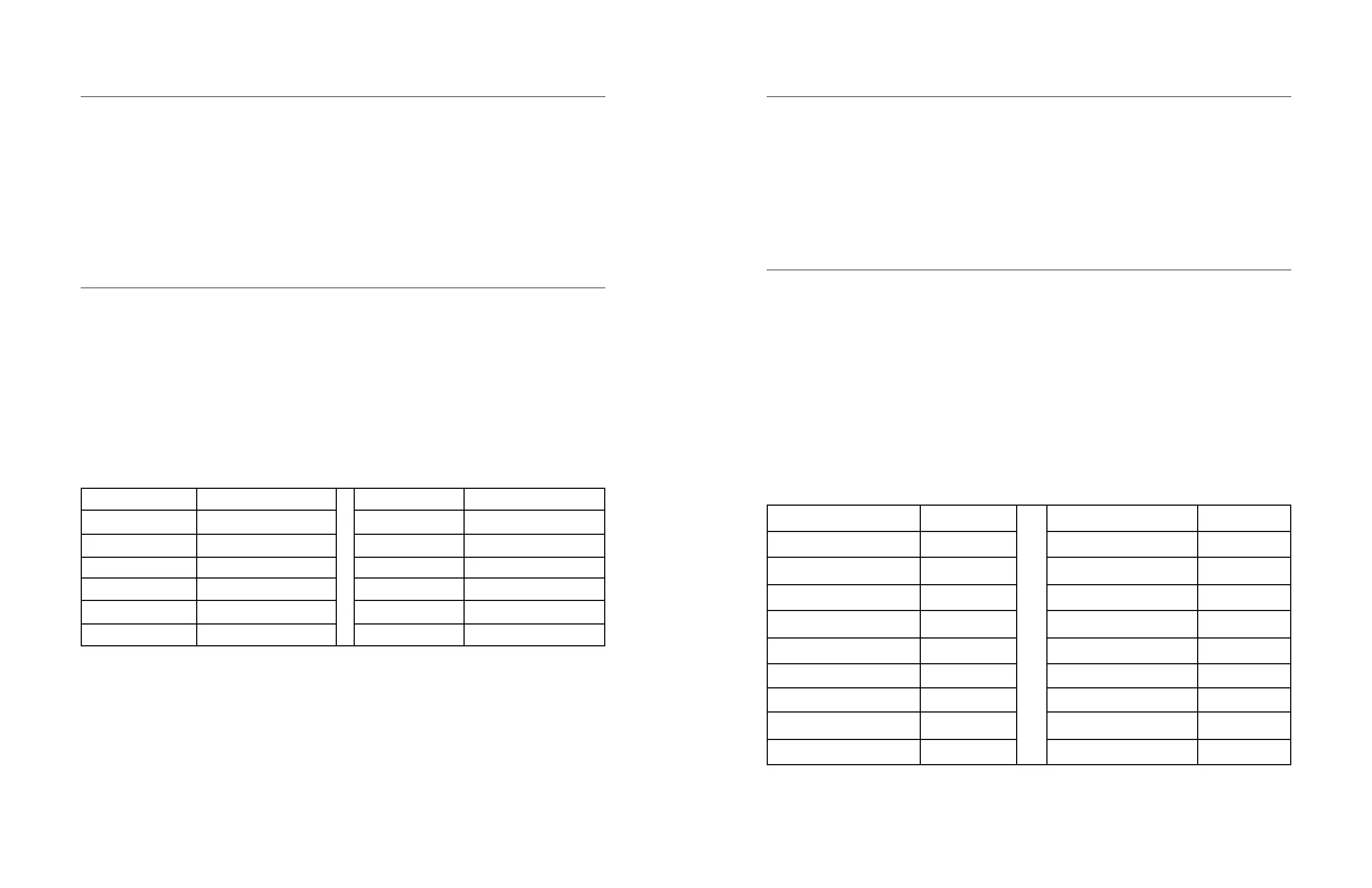
Converting fractions of a pound to ounces:
Fractions of a pound Ounces Fractions of a pound Ounces
Less than .03 0 .54 to .59 9
.03 to .09 1 .60 to .65 10
10 to .15 2 .66 to .71 11
.16 to .21 3 .72 to .78 12
.22 to .27 4 .79 to .84 13
.28 to .34 5 .85 to .90 14
.35 to .40 6 .91 to .97 15
.35 to .40 7 above .97 go to next even
47 to .53 8


 To Next Page
 Loading...