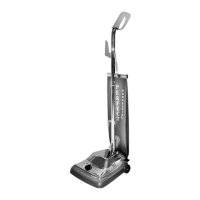
This document is a user manual for the PERFECT P102 Commercial Upright Vacuum Cleaner. It provides essential information regarding safety, assembly, operation, and maintenance of the device.
Function Description:
The PERFECT P102 is a commercial upright vacuum cleaner designed for cleaning various types of carpeting and floors. Its primary function is to effectively remove dirt, dust, and debris from surfaces through a combination of suction and a revolving brush roll. The vacuum cleaner is built for commercial use, implying durability and performance suitable for demanding environments.
Important Technical Specifications (Inferred from the manual):
- Type: Commercial Upright Vacuum Cleaner
- Cleaning Mechanism: Suction with a revolving brush roll
- Bag Type: Cloth bag (or dust cup)
- Height Adjustment: Large, easy-to-turn adjustment knob for carpet pile height (low plush, med plush, high plush carpet settings)
- Power Source: Electrical cord (requires plugging into an outlet)
- Safety Features: Important safeguards listed to prevent electrical shock, injury, and damage to the appliance.
Usage Features:
- Assembly:
- Unpacking: The manual details how to unpack the enclosed packet, which contains two nuts and bolts for the handle and one upper (larger) and lower (smaller) plastic cord hooks. An extra drive belt is included.
- Handle Assembly: Involves placing the lower handle into the handle socket, taking the upper handle and sliding it on top of the lower handle. Users need to make sure holes align for nuts and bolts, and then secure the upper handle curves towards the back of the vacuum cleaner by inserting nuts and bolts and tightening them.
- Upper and Lower Cord Hook Assembly: The lower cord hook is snapped into the lower handle with the hook facing down. The cord is then placed in the cord slot before the clip is snapped in. The upper cord hook is placed in the slot, and the spring retainer is snapped in. Finally, the cord is wrapped around the cord clips.
- Bag Installation: The lower part of the cloth bag or dust cup, with its latch and bag adapter clip, is aligned with the back of the vacuum. The bag collar is brought forward, and the latch is turned so the bag locks onto the rivet. A spring from the cloth bag is attached to the support on the upper cord hook.
- Operation:
- Handle Adjustment: The handle can be adjusted back and forth by stepping on a wide-area foot release pedal. Pressing once lowers the handle, and pressing again brings it down to floor level, allowing cleaning underneath furniture.
- On/Off Switch: The power switch is located on top of the heavy-duty metal hood. Stepping on it turns the power on, and stepping on it again turns the power off.
- Carpet Pile Height Adjustment: A large, easy-to-turn adjustment knob allows users to match the vacuum cleaner's height setting to the carpet pile height. Settings include "high" (for low plush carpet), "normal" (for med plush carpet), and "low" (for high plush carpet). The adjustment should be made when the vacuum is off and unplugged. If the vacuum is hard to push, the dial should be turned to the next setting.
- Cord Storage: The electric cord should always be wrapped around the cord hooks and fastened to prevent unwinding.
Maintenance Features:
- General Maintenance: The manual advises disconnecting the vacuum from the electrical outlet before any maintenance. It also suggests checking the bag, belt, and brush roll often.
- Clear Fan Chamber: The removable clear fan chamber allows users to observe for obstructions, dirt buildup, broken fan, broken belt, or any other maintenance issues. It is recommended that a qualified vacuum repair specialist address maintenance issues.
- Emptying Cloth Bag:
- Safety Precaution: Turn off the switch and unplug the electrical cord before servicing the bag. Never operate the vacuum cleaner without the dust bag.
- Procedure: Unlock the spring from the top clip, unlatch the bag from the vacuum, remove the slide and spring from the top of the cloth bag, and empty the contents into an appropriate container. Then, put the slide and spring back on the top of the cloth bag and reinstall the cloth bag back on the vacuum.
- Important Note: Picking up fine powders, substrates, or carpet fresh powders can clog the cloth bag, so it should be emptied often for efficient operation.
- Brush Roll Belt Replacement:
- Safety Precaution: Turn off the switch and unplug the electrical cord before replacing the belt. Belt pulleys can become hot during normal use, so avoid touching them when servicing the drive belt.
- Inspection: The belt drives the brush roll. Users should check if the belt is stretched, cracked, or worn and replace it if any of these conditions are present.
- Procedure: Turn back the locks to remove the metal bottom plate. Remove the belt from the pulley. Lift up the brush roll, remove it from the vacuum, and take off the belt. Put the new belt on the center of the brush roll. Set the brush roll back in place in the vacuum and align the belt with the belt guide. Pull the belt over the pulley and set it. Rotate the pulley to ensure the belt is riding smoothly on the motor pulley. Finally, put the bottom plate back on and lock it back with both locks.
- Warning: Improper installation of the brush roll or brush roll belt could cause carpet or cleaner damage.
The PERFECT commercial cleaner comes with a limited warranty.
- Coverage: The cleaner is warranted to be free from defects in material and workmanship in normal use for a period of ONE YEAR from the original purchaser. The warranty is subject to the following provisions.
- Exclusions: The warranty does NOT cover parts that require replacement under normal use (e.g., bumpers, bags, bristle strips, belts, and impellers). It also does not cover damages or malfunctions caused by negligence, abuse, or use not in accordance with the Owner's Guide. Defects or damages caused by unauthorized service or the use of other than Perfect parts are also excluded.
- Remedy: The IMIG Company will, at its option, repair or replace a defective cleaner or cleaner part that is covered by this warranty. For a matter of warranty policy, the IMIG Company will not refund the consumer's purchase price.
- Important Note: IMIG INC does not recognize internet sales, and the warranty is null and void if the unit is purchased on E-Bay or any other non-authorized internet site.

 Need help?
 General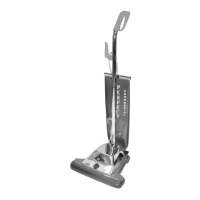

 To Next Page