PlayingMusicinDockingMode
ThemostcommonwaytoplaymusicthroughyourDuospeakersisinDockingMode.Thisis
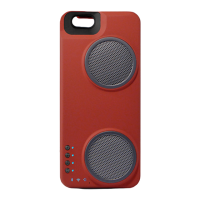
whenyouriPhoneisinsertedintotheDuoanddockedintotheDuo'sLightningconnector.
OnceyouriPhoneisdockedintotheDuo,justturntheDuopoweronusingthePowerbutton.
WhenyouriPhoneisproperlydocked,andtheDuoison,youshouldseeallthreeModeLEDslit
redatthesametime.WhentheiPhoneisdockedintotheDuo,youcannotselecttheother
Modesofplayasthosemodesareallfor"detachedmodes"ofplay.
WhenDockingModeisactive,allnon‐voiceaudiofromyouriPhonewillberoutedtoyourDuo
speakers.Thisincludesaudiosuchasmusicplayback,audiofrommoviesandapps,andaudio
notifications.
PlayingMusicinDetachedModes
Bluetooth,HomeWi‐Fi,andAwayModeareall"detached"modesofmusicplay.Thismeans
thatyoumustensurethattheiPhoneisNOTdockedintotheDuoinordertousethesemodes.
OnceyouriPhoneisundockedfromtheLightningconnector,youwillbeallowedtoswitch
betweenthesethreemodesonyourDuo.YoucansetyourDuoonaflatsurfacewithspeakers
facingup.TheDuocomeswithrubberfeetthatwillensureitstaysinplaceonmostsurfaces
whenyouplaymusic.
PlayingMusicinBluetoothMode
1. EnsureyouriPhoneisdetachedfromtheDuo.
2. PresstheModeSelectbuttontoselectBluetoothMode.Youwillknowyouarein
BluetoothModewhentheBluetoothModeLEDislit.Ifthisisthefirsttimeyouare
selectingBluetoothMode,theLEDwillbelitred.ThismeansthattheDuoisnotpaired
withadevice.
3. WheneveryouareinBluetoothMode,theDuowillbroadcastitsBluetoothsignalfor
devicestoconnecttoit.GotoyouriPhone'sBluetoothSettings‐youshouldseeyour
DuoSpeakerappearatthebottomofthisscreenasanavailabledevice.SelecttheDuo
speakeronyouriPhoneandyourphonewillconnecttoyourDuo.Youarereadytoplay
musictoyourDuoviaAirPlay!
4. OnceyouhaveconnectedtoyourDuoonce,youriPhoneshouldautomatically
recognizeandconnecttotheDuo
aslongyouriPhone'sBluetoothisturnedon.
5. WhenyourDuoisinBluetoothmode,itwillbediscoverablebyyournearbyfriends.
TheycanconnecttoyourDuoandplaytheirmusic!
PlayingMusicinHomeWi‐FiMode
1. EnsureyoucompletedtheInitialAudioNetworkSetupoutlinedintheUserGuideand
havealreadypreviouslyattachedtheDuototheHomeNetworkyouwanttoplaymusic
through.
2. EnsureyouriPhoneisdetachedfromtheDuo.
3. PresstheModeSelectbuttontoselectHomeWi
‐FiMode.Youwillknowyouarein
HomeWi‐FiModewhentheHomeWi‐FiModeLEDislit.TheHomeW‐FiModeLEDwill
belitredwhileyourDuosearchesforaknownHomeNetworkandconnectstoit.This


 To Next Page
 Loading...