9 www.petzonebrand.com
MODE INDICATOR LIGHT
The MODE indicator light shows the status of
Smart Scoop Automatic Litter Box:
Green, solid: Unit is powered on and monitoring
for cat activity.
Green, blinking: Unit has detected a cat and is
waiting 15 minutes to begin cleaning cycle.
Red, solid: Unit has encountered excessive resistance. Turn off the
unit, unlock the clutch, remove obstruction, slide waste unit back into
“ready” position, lock clutch and turn it back on.
Red, blinking: Last cleaning cycle failed to complete. Unit has detected
a cat and is waiting 15 minutes to begin cleaning cycle.
USING NO-TOUCH WASTE BAGS
AND ACTIVATED CARBON FILTERS
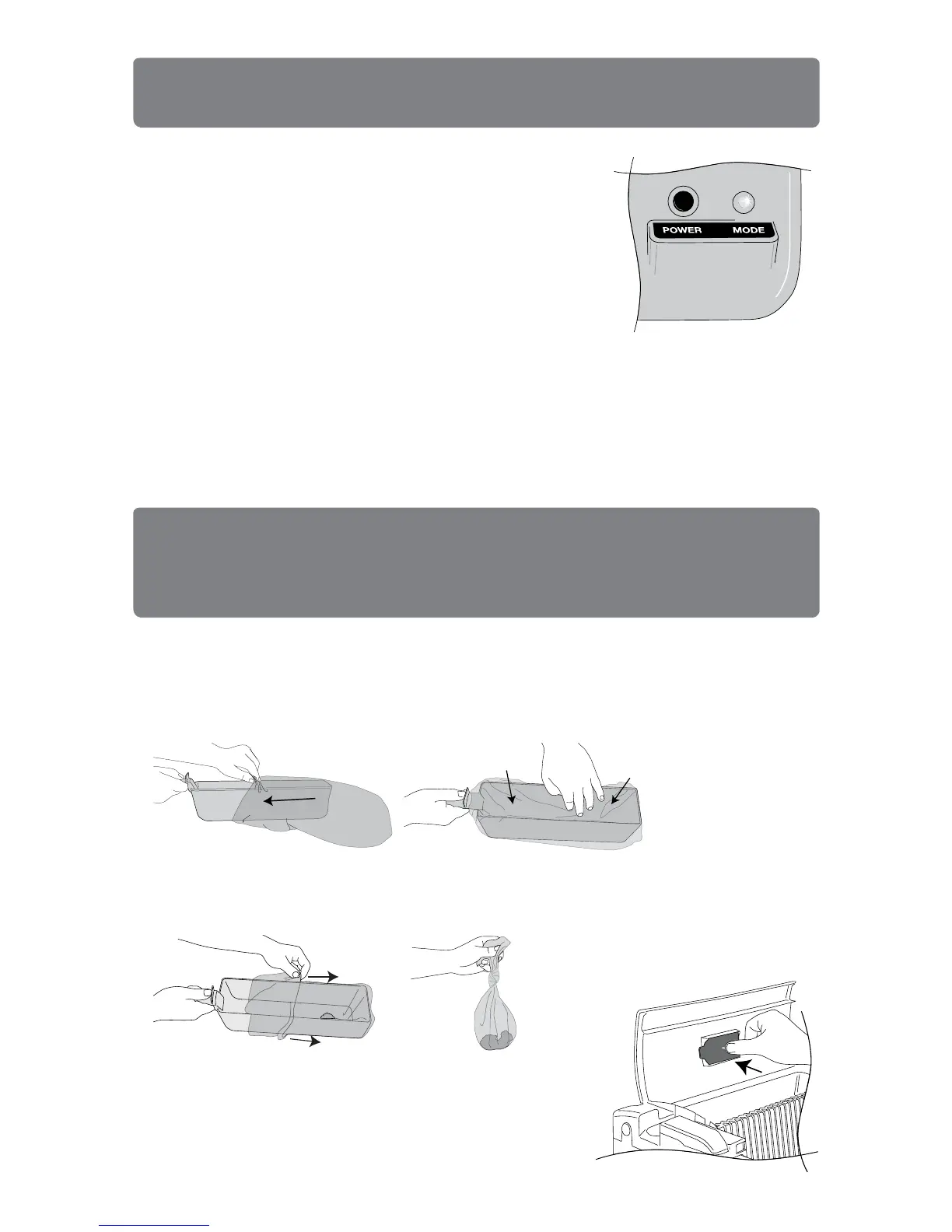
To install Smart Scoop No-Touch Waste Bags, simply slide bag over
waste tray and push it down so bag hugs walls and creates a place for
waste to accumulate. Tuck bag excess under waste tray handle. Lightly
push tray into waste unit so it fits snugly.
To remove No-Touch Waste Bags when they are full, simply peel back
the bag over the waste tray and tie it closed. Disposing of litter is easy,
clean and you never have to come in contact with clumps and waste.
To install Activated Carbon Filter, simply place filter
in square located on waste tray lid and press filter
onto pin. We recommend replacing the activated
carbon filter every time you replace the waste bag
to keep odors to a minimum.


 To Next Page