Need help?
Do you have a question about the Petfan PF-102 and is the answer not in the manual?
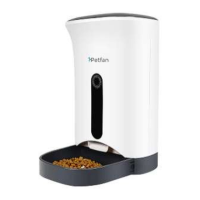
Overview of the automatic pet feeder's main capabilities and design elements like touch buttons, LCD display, and voice recording.
Identifies external parts of the feeder such as the head cover, body, and food tray.
Details the layout of the control panel, including buttons like REC, PLAY, SET, and the LCD display.
Instructions for configuring the device's clock and up to four daily meal feeding times.
Explains how to adjust the portion size for each meal, from 1 to 10 portions.
Guides on recording a voice message to call pets for feeding, up to 10 seconds.
Provides tips on screen unlocking, manual feeding, resetting, and managing food jams or blockages.
Guides on how to correctly assemble and disassemble the food tank and food tray.
Instructions on cleaning the feeder unit, food tray, and food tank, including dishwasher safety.
Covers product usage guidelines, battery replacement, and placement recommendations.
Addresses touch panel issues, low battery effects, food outlet blockages, and error code 'EEEE'.
Lists key specifications including dimensions, capacity, material, power supply, and food compatibility.
 General
| Brand | Petfan |
|---|---|
| Model | PF-102 |
| Category | Pet Care Product |
| Language | English |

 To Next Page