Need help?
Do you have a question about the PetNovations CatGenie 120 and is the answer not in the manual?
Configures the CatGenie for 14 hours awake and 10 hours sleep, offering flexibility in operation times.
Configures the CatGenie for continuous 24-hour readiness, ensuring it's always ready after use.
Instructions for cleaning the Water Sensor Guide, essential for proper unit function.
How the unit indicates when the Water Sensor needs cleaning to prevent false signals.
Basic safety measures to reduce the risk of personal injury during operation and installation.
Guidance on power requirements, safe electrical connections, and proper unit placement.
Advice on proper operation, cleaning procedures, and crucial warnings.
Key technical specifications for CatGenie units, including power and weight.
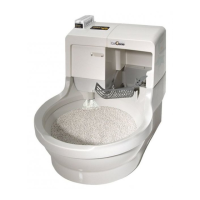
Overview of the main parts and their functions within the CatGenie 120 system.
Explanation of critical components like the Processing Unit, sensors, and waste processing system.
Details on SaniSolution safety, usage duration, and refillability.
Answers regarding biodegradability, impact on water bills, and wastewater disposal.
How the unit handles cats during cleaning and information on granule safety.
Explanation of LEDs, buttons, and error signals on the control panel.
Setting up Cat Start, Auto Start, and Push Start modes for personalized operation.
Step-by-step guide to setting up the Cat Activation mode for automatic cleaning.
Instructions for scheduling specific automatic cleaning cycles based on cat activity.
Examples for programming specific Auto Start times and cycle counts per day.
How to pause cycles and manage operations during power interruptions.
Instructions for activating and deactivating the Child Lock to prevent accidental starts.
Details on biodegradable granules and cartridges, emphasizing environmental benefits.
Guidelines for using and maintaining washable granules, including warnings against cat litter.
Information on the SaniSolution cartridge, its usage, level checks, and critical warnings.
Step-by-step guide for connecting the CatGenie in laundry areas.
Step-by-step guide for connecting the CatGenie in bathrooms.
Proper ways to fit and route the drain hose for optimal function and clog prevention.
Instructions on how to take apart the CatGenie for accessing and replacing parts.
Details on common replacement parts like the Orange Niplet, Water Sensor, and T-Adapter.
Diagnosis and solutions for Error 1 related to the water sensor or internal clogs.
Troubleshooting steps for issues with water intake, pressure, or flow.
Solutions for when the CatGenie is not draining properly, including granule condition.
Steps to resolve problems with the dryer function, such as overheating or stopping.
Addressing leaks and wet granules when no error code appears.
Fixing issues with GenieHand movement or the bowl rotation mechanism.
Solutions for when the CatGenie fails to start or responds with beeps and blinks.
Addressing issues with programmed cycles, power interruptions, and mode resets.
Using the maintenance cartridge for a deep clean to remove lime and grime.
Steps for cleaning the water sensor and checking the hopper for foreign objects.
First steps to attempt clearing a clog, including hose checks, sensor cleaning, and impeller rotation.
Detailed instructions for thorough cleaning of the hopper and base to resolve clogs.
How to enter and navigate the diagnostic Tech Mode for troubleshooting.
Steps for testing individual components and functions within Tech Mode.
Information regarding FCC rules, digital device compliance, and potential interference.
Details on the 90-day guarantee and the 2-year limited warranty terms.
 General
| Type | Automatic |
|---|---|
| For Use With | Cats |
| Material | Plastic |
| Power Source | Corded Electric |
| Color | White |
| Product Type | Automatic cat litter box |
| Power | 120V |
| Compatibility | Works with CatGenie granules |
| Included Accessories | cleaning solution, granules |
| Water Supply | Requires connection to cold water line |
| Waste Disposal | Flushes waste down the drain |

 To Next Page