This document describes the PetSnowy SNOW Self-Cleaning Litter Box, model PS-001. It is designed to provide a convenient and hygienic solution for cat owners.
Function Description
The PetSnowy SNOW Self-Cleaning Litter Box automatically cleans itself after each use, eliminating the need for daily scooping. It features multiple stages to eliminate odor, including a self-sealing trash bag, anti-odor interior structure, deodorizing fragrance, Tio2 deodorization system, and a DIY curtain. The device is intelligent, allowing for one-button cleaning and remote monitoring and control via a mobile application. It includes full waste drawer reminders through an infrared detection device and a Do-Not-Disturb mode that pauses cleaning for 8 hours to ensure undisturbed sleep. The litter box is designed with a curved walkway to prevent litter tracking and is easy to assemble, disassemble, and wash. Its streamlined design and low center of gravity ensure stability, making it topple-resistant. The patented waste collecting drawer has four holes for easy installation, and the large interior space accommodates even large cats, with the waste drawer requiring cleaning only every two weeks. The DIY curtain is easy to change for cleaning and offers both aesthetic and deodorizing benefits.
Important Technical Specifications
- Model: PS-001
- Product Name: SNOW Self-Cleaning Litter Box
- Use Environment: Indoors
- Input: 100-240VAC, 50/60Hz
- Output: DC 12V/1.5A
- Size: 750500550mm
- Maximum Litter Capacity: 5.7 lbs (2.6 kgs)
- Connectivity: 2.4 GHz Wi-Fi networks (not compatible with 5 GHz bands)
Usage Features
- Preparation Before Use: The device must be placed on a flat, hard floor at least 5 cm away from the wall. After connecting the power adapter, the device performs a 2-minute self-check. The soft cushion should be placed inside after the self-check. Litter should be filled into the globe, not exceeding 5.7 lbs (2.6 kgs), and the Reset button must be pressed each time litter is added or changed to reset the weight.
- Cat Introduction: Most cats adapt quickly. For timid cats, suggestions include placing the new box near the old one with some old litter, using catnip or treats to entice them, using training litter, avoiding unfamiliar litter types, gradually introducing power, delaying deodorizing fragrance installation, turning off the fan/deodorization function if the cat dislikes the sound, and removing the old litter box once the cat starts using the new one.
- Deodorizing Fragrance Installation: The deodorizing fragrance box is removed, the fragrance is placed inside, and the box is reattached to the litter box. This is optional and can be delayed if the cat is sensitive to fragrance.
- App Download and Device Pairing: The "PetSnowy" app can be downloaded from the App Store or Google Play. The mobile phone must be connected to a 2.4 GHz Wi-Fi hotspot, and Bluetooth must be turned on. For initial connection, the device should be placed as close to the router as possible. The device can be added manually or automatically if detected nearby. The pairing process involves confirming the Wi-Fi indicator blinking rapidly, selecting the pairing mode (Bluetooth or AP mode), confirming the hotspot, entering the password, and then adding the device.
- Clean Button: A short press initiates cleaning. Any button press pauses cleaning, and pressing the Clean button again resumes it. The Empty button or Reset button cancels cleaning. The app's "Press" button and the device's Clean button have the same function.
- DND Mode: Pressing the Clean button for 3 seconds enables DND mode, pausing cleaning for 8 hours. The cloud indicator light flashes red and green slowly. The device automatically enters this mode daily at the same time. To exit, press the Clean button for more than 3 seconds until the cloud indicator light flashes red and green alternately. DND mode is ideal for bedrooms or quiet times and can be scheduled via the app.
- Empty Button for Changing Cat Litter: A long press of the Empty button for more than 3 seconds initiates the litter dumping process. The cloud indicator flashes white for 4-minute clumping, green for 8-minute clumping, and blue for 16-minute clumping. The app also has a "Change cat litter" function.
- Lock Mode: Pressing and holding the Clean button and Empty button simultaneously for more than 3 seconds until three indicator lights flash enables Lock Mode, disabling all buttons except the Reset button. This prevents accidental operation by pets or children. To exit, repeat the action.
- Turn Off the Indicator Light: Pressing and holding the Empty button and Reset button simultaneously for more than 3 seconds turns off the indicator lights. Repeat the action to turn them back on. This can also be controlled via the app.
- Reset Button: A short press resets the weight. This must be done after adding litter or if the device misinterprets extra weight as a cat. If the cloud indicator light flashes blue and green alternately, check for a cat inside; if none, press the Reset button or power cycle the device. A long press for more than 5 seconds adds the device to the app.
- Automatic Cleanup: The device automatically cleans up 4 minutes after the cat uses the litter box and leaves. This function is enabled by default and can be turned off via the app.
- Scheduled Cleanup: This feature is disabled by default but can be enabled via the app to schedule cleaning at specific times.
- Deodorization Now: The device can be deodorized immediately by clicking "Deodorization now" in the app.
- Scheduled Deodorization: This feature can be enabled via the app to set scheduled deodorization times to keep the litter box fresh.
Maintenance Features
- Cleaning the Waste Collecting Drawer: The frequency depends on cat usage, with weekly cleaning recommended, or daily if flies are a concern. If the cloud indicator light flashes red and green alternately, the drawer must be emptied, or the device will stop. To empty, pull out the drawer, slide the press bar, and remove the trash bag.
- Installing the Trash Bag: Slide the press bar to the other end. Hang the four holes of the trash bag onto the pins of the waste collecting drawer. Stretch the trash bag inside the drawer and fit it tightly.
- Adding Cat Litter: Add litter regularly to compensate for reduced amounts. Only clumping litter is suitable. Pearl and crystal litter are also acceptable if they pass through the filter screen. Always press the Reset button after adding litter.
- Replacing Sealing Strips: Replace sealing strips promptly when worn flat or peeling up to contain odors.
- Cleaning the Base: Use a brush to sweep litter into the waste collecting drawer.
- Cleaning the Outer Surface: Wipe with a soft cloth dipped in warm, soapy water. Avoid abrasives or organic solvents.
- Cleaning Bonnet and Waste Collecting Drawer: These parts do not contain electronic components and can be washed directly with warm, soapy water. Dry thoroughly to prevent water from damaging electronic parts in the base.
- Cleaning the Soft Cushion: Shake off excess litter, rinse with water, and dry before placing back in the litter box.
- Replacing the Deodorizing Fragrance: Replace regularly, or when the device becomes smelly, typically once a month.
- Replacing the Curtain: Remove the old curtain from the hood, take out the rod, put it into the new curtain, and install the new curtain to the bonnet.
Important Notes:
- Read the instruction manual carefully for correct and safe use.
- Place the product on a flat, hard surface, not soft or uneven floors.
- This device is for indoor use only and cannot be used as a stool.
- Only clumping litter is suitable.
- Not suitable for children under 12 or pets weighing less than 1.5 kg.
- Do not move the device while a cat is inside.
- The base contains electronic components and the transmission mechanism and cannot be washed with water; wipe with a soft, dry cloth.
- Do not put hands or objects into the device when the globe rotates.
- Disconnect power before maintenance.
- Any repairs or modifications should be done by qualified professionals.

 Need help?
 General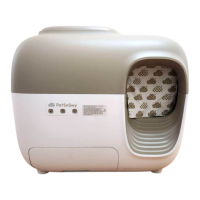

 To Next Page