6 | PREDRIVE USER MANUAL
PETTYJOHNELECTRONICS.COM
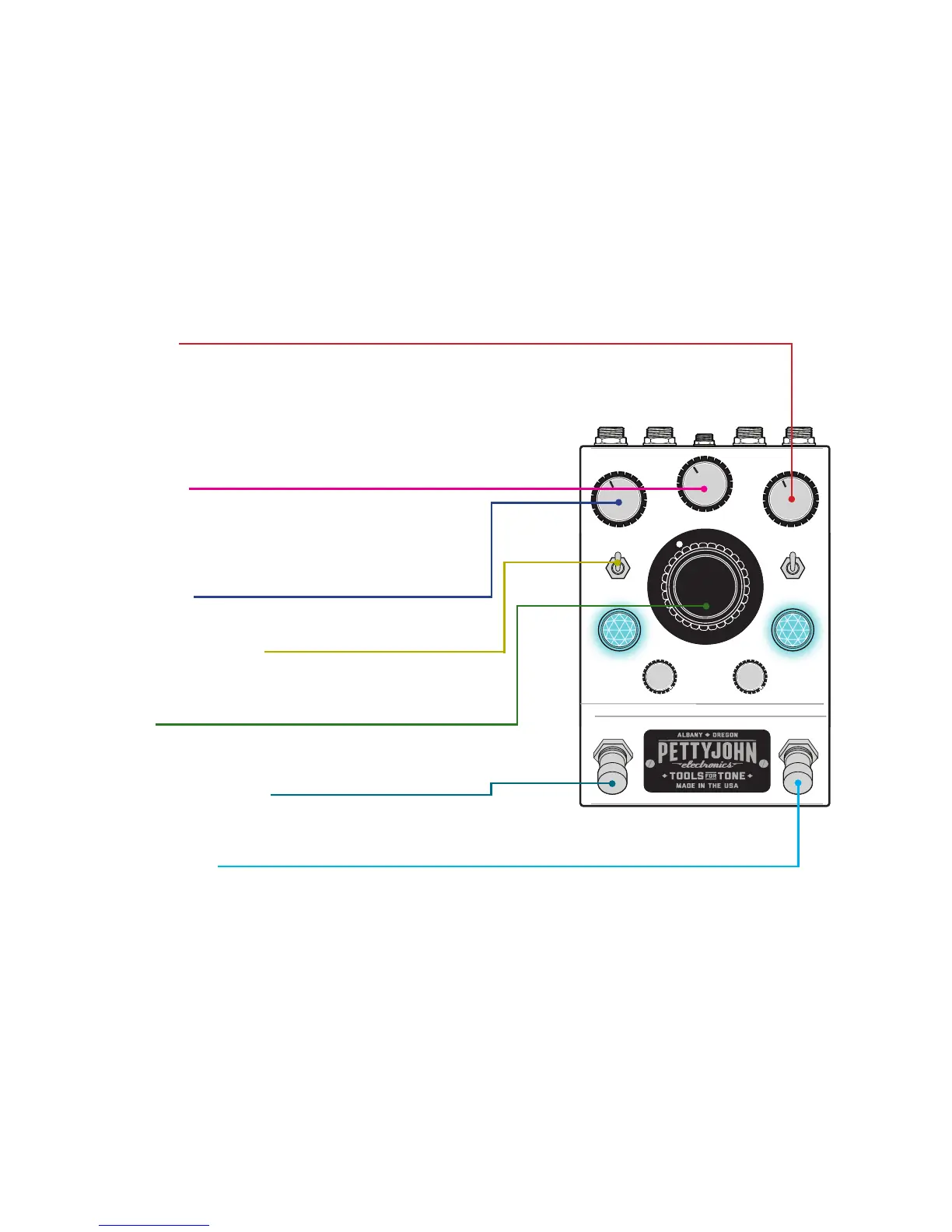
KNOB & SWITCH IDENTIFICATION
INPUT VOLUME:
This knob adjusts the preamp gain structure. At
minimum this stage is a buer as you increase the
gain the tonal characteristics will change as well. Most
people hear greater articulation, note separation,
harmonic detail and at higher settings even a smooth,
natural compression eect.
DRIVE MIX KNOB:
Active in drive mode, this knob mixes in clean signal with
the overdriven tone. With this knob at max the PreDrive is
a full on low gain overdrive pedal. Mix cleans back in a a
dynamic,harmonically rich tone.
OUTPUT VOLUME:
This knob backs o the output volume as needed.
HARMONIC DRIVE ON/OFF:
The up position is clean mode, switching down
engages drive mode.
BOOST GAIN:
This stage has a gain of 1 to 11dB and also exhibits some
sweet mojo at high settings.
BOOST ON/BYPASS SWITCH:
Engages or bypasses the boost mode, controlled by the
big boost knob.
PREAMP ON/BYPASS:
Engage the preamp stage or utilize the true
hard-wired bypass.


 To Next Page