EasyManua.ls Logo

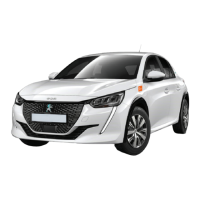
PEUGEOT e-208 2022 - User Manual

PEUGEOT e-208 2022
4 pages
Print Icon
To Next Page IconTo Next Page
Loading...
Fuel: 100% electric
Tyre pressure: see sticker on the pillar of the driver’s door
Vehicle instruction manual: in the glove compartment.
Before starting your journey
Step 1
Check the vehicle for new damages, open the car using your cambio- or MOBIB-
card or the cambioApp and follow the instructions on the onboard terminal.
Step 2
Disconnect the charging cable correctly
1. Scan the charging pass (located in the driver’s
side door) at the charging station to end the
charging session.
2. Disconnect the charging cable from the vehicle
(by pulling). The charge indicator (4) turns green.
3. Close both charging port covers (inner and
outer covers) and place the charging cable in the
boot of the vehicle
PEUGEOT e-208
Caution: is the cable stuck because you waited too long? Lock the vehicle using the key
and unlock it again – the cable should no longer be locked now.
1
Question and Answer IconNeed help?

Do you have a question about the PEUGEOT e-208 2022 and is the answer not in the manual?

Summary

Before Starting Your Journey

Initial Vehicle Check and Access

Check for damages and access the vehicle using the provided card or app.

Disconnecting the Charging Cable

Learn to properly disconnect and stow the charging cable.

Starting and Stopping the Vehicle

Starting the Peugeot e-208

Steps to start the electric vehicle using the key and brake pedal.

Stopping and Closing the Car

Procedures for safely stopping the vehicle and closing it after use.

Connecting the Charging Cable

Guide to correctly connect the charging cable and verify charging status.

Driving Modes and Controls

Drive Modes Explained (D vs B, Eco)

Understand the differences between D and B driving positions and the Eco mode.

Vehicle Controls and Adjustments

Learn to operate reverse gear, adjust side mirrors, climate control, and cruise control.

Vehicle Lighting and Wipers

Headlights and Fog Lights Operation

Instructions for using the vehicle's headlights and fog lights.

Wiper System Usage

Guide to operate front and rear wipers, including automatic mode.

Pedestrian Horn and Spare Wheel

Information on the pedestrian warning system and spare wheel location.

Overview

The device described in the manual is a Peugeot e-208, an electric vehicle operated by cambio.

Function Description

The Peugeot e-208 is a 100% electric car designed for car-sharing services, as indicated by the "cambio" branding and the instructions for using a "cambio- or MOBIB-card or the cambioApp" to access the vehicle. It functions as a personal transport device, with specific features tailored for electric operation and shared use.

Important Technical Specifications

  • Fuel Type: 100% electric.
  • Tyre Pressure: Information available on a sticker on the pillar of the driver's door.
  • Charging: The vehicle uses a charging cable that needs to be connected to a charging station. The charging process is indicated by a blinking green light in the charging port, and remaining charging time is displayed on the dashboard.
  • Regenerative Braking: The car features a regenerative braking function that simulates engine braking. When the accelerator is released, mechanical energy is recovered, partially recharging the battery. This function is activated/deactivated by pushing the gear stick backwards in position D/B. The status of this function is not saved when the ignition is turned off.
  • ECO Mode: This mode optimizes the vehicle's range but may impact speed, acceleration, and heating performance. It can be activated/deactivated using the "Drive mode" button on the central console.
  • Pedestrian Horn: To enhance safety, the vehicle emits a weak noise when driving below 30 km/h (both forward and reverse) to alert pedestrians and cyclists, as electric vehicles are inherently quiet.
  • Spare Wheel: Instead of a traditional spare wheel, the car is equipped with a compressor kit and a tow hook, stored under the trunk floor.

Usage Features

Before Starting Your Journey:

  1. Vehicle Access: Check for new damages, then open the car using a cambio- or MOBIB-card or the cambioApp. Follow instructions on the onboard terminal.
  2. Disconnecting Charging Cable:
    • Scan the charging pass (located in the driver's side door) at the charging station to end the session.
    • Disconnect the cable from the vehicle by pulling; the charge indicator (4) turns green.
    • Close both charging port covers and place the cable in the boot.
    • Caution: If the cable is stuck, lock and unlock the vehicle using the key to release it.
  3. Starting the Vehicle:
    • Place the key in the central console or hold it near the steering column if the car doesn't detect the key.
    • Place your right foot on the brake pedal.
    • Press the "START/STOP" button briefly.
    • Keep your foot on the brake pedal until the dashboard and gauges light up.
    • Press the "UNLOCK" button (B) and select "D/B" (forward) or "R" (reverse) position.
    • The electronic parking brake releases automatically when accelerating, or manually by pressing the (P) button.
    • Release the brake pedal gradually and slowly press the accelerator pedal.

After Your Journey:

  1. Stopping and Closing:
    • Press the "START/STOP" button.
    • Ensure the gear stick is in "P" position (press the P-button).
    • Verify the "READY" light is off.
    • Note: An audible signal is emitted if the driver's door is opened while stopping conditions are not met.
  2. Connecting Charging Cable:
    • Ensure the gear stick is in "P" and ignition is off.
    • Take the charging cable from the boot and connect it to the charging station.
    • Register at the charging station with the charging pass.
    • Press the charging port cover to open it and insert the cable. A blinking green light indicates correct charging; remaining time is shown on the dashboard.
    • Note: If charging doesn't start, re-check connections. A red light indicates the cable is locked.
    • Return the charging pass to the driver's side door, then close the vehicle using the cambio- or MOBIB-card or cambioApp (after returning the key to the onboard terminal).
    • Always check if the car is charging before leaving!

Driving Controls:

  • Gear Positions: P (Park), R (Reverse), N (Neutral), D (Drive - forward), B (Brake - driving forward with regenerative braking).
  • Reverse Gear: Press and hold the "UNLOCK" button (B) while pushing the gear stick forward.
  • Side Mirrors: Controls are on the driver's door. Select left or right mirror (A), then adjust (B). Return the switch to neutral after adjusting.
  • Air Conditioning/Heating: Select the fan icon on the touchscreen to adjust via the Airco Menu.
  • Cruise Control: Controls are on the steering wheel's left side:
    1. Select cruise control mode.
    2. Reduce set speed.
    3. Increase set speed.
    4. Activate/deactivate cruise control.
    5. Pause cruise control.
    • Braking disables cruise control. Settings are displayed on the dashboard.
  • Headlights: Rotate the dial at the end of the lever left of the steering wheel to select the correct setting.
  • Fog Lights: Rotate the dial forward two clicks to switch on rear fog lights; a second control light appears on the dashboard.
  • Front Wipers: Push the lever right of the steering wheel upward for different modes:
    • 2: Fast wiping (heavy rain)
    • 1: Normal wiping (moderate rain)
    • Int: Intermittent wiping
    • 0: Switching off
    • Single wipe
    • AUTO: Automatic wiping (wipers activate with rain). Push lever upward and return to 0 to switch off.
  • Rear Wipers: Rotate the dial forward one click for intermittent operation, or further forward to spray and wipe.

Maintenance Features

  • Vehicle Inspection: Users are instructed to "Check the vehicle for new damages" before starting a journey, implying a user-based initial inspection for shared vehicles.
  • Tyre Pressure: Users are directed to a sticker on the driver's door pillar for tyre pressure information, suggesting this is a user-accessible detail.
  • Charging Cable Management: Instructions include correctly disconnecting, storing, and reconnecting the charging cable, which is a key aspect of maintaining the vehicle's readiness for the next user.
  • Onboard Terminal: The terminal provides instructions and feedback (e.g., charging status), aiding users in proper operation and potentially identifying issues.
  • Vehicle Manual: The "Vehicle instruction manual: in the glove compartment" serves as a comprehensive resource for detailed maintenance and operational information beyond the quick guide.
  • Cruise Control Details: For detailed instructions on cruise control, users are referred to the "car manual."

PEUGEOT e-208 2022 Specifications

General IconGeneral
BrandPEUGEOT
Modele-208 2022
CategoryElectric Vehicles
LanguageEnglish