
 Need help?
Do you have a question about the Phanteks METALLICGEAR NEO-6 and is the answer not in the manual?
Details supported fan sizes and radiator dimensions for the chassis.
Lists and describes the function of front panel connectors like headphone, USB, and power.
Lists all accessories provided with the chassis for installation and mounting.
Specifies maximum dimensions for CPU cooler, GPU, PSU, and motherboard width.
Instructions for mounting the motherboard and installing the power supply unit.
Steps for installing Solid State Drives (SSD) and Hard Disk Drives (HDD).
Guidance on connecting front panel I/O cables to the motherboard header.
Tips and methods for organizing and securing cables within the chassis.
Details D-RGB cable connections and control options for the NEO-G model.
Explains RGB cable setup and control methods for the NEO AIR model.
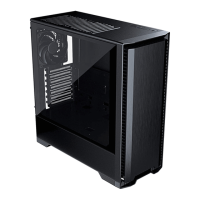
The MetallicGear NEO series chassis, powered by Phanteks, offers a range of PC cases designed for enthusiasts and builders, available in three distinct models: NEO-G, NEO Air, and NEO Silent. This installation manual, version 1.2, provides comprehensive guidance for setting up systems within these chassis.
The MetallicGear NEO chassis serves as the enclosure for a personal computer system, providing structural support for internal components, facilitating airflow for cooling, and offering various front I/O ports for connectivity. Each model caters to slightly different user preferences, with the NEO-G and NEO Air focusing on RGB lighting and airflow, while the NEO Silent prioritizes noise reduction. The chassis supports a wide range of motherboard form factors, including E-ATX (up to 280mm width), ATX, m-ATX, and ITX, making it versatile for various build types.
All models feature a consistent front I/O panel, including:
The chassis supports E-ATX, ATX, m-ATX, and ITX motherboards. Installation involves securing the motherboard with 9 screws, with a pre-installed M4 stand-off for convenience.
The power supply is installed at the bottom of the chassis, secured with 4 screws.
The manual provides clear diagrams for connecting the front I/O cables (Power SW, HD AUDIO, USB 3.0, Reset SW, Power LED) to the motherboard header. Specific connections are highlighted for NEO Silent/Air only and NEO-G/Air only, indicating slight variations in cable requirements or functionality between models.
The chassis incorporates velcro straps and includes zip ties to assist with effective cable management, ensuring a clean interior and optimal airflow.
The design of the chassis, with features like removable SSD brackets and slide-out HDD trays, simplifies component installation and replacement, which indirectly aids in maintenance. The emphasis on cable management also contributes to easier access to components for cleaning or upgrades. The ability to switch RGB control to the motherboard allows for centralized lighting management, potentially simplifying troubleshooting or customization.
Overall, the MetallicGear NEO series offers a well-thought-out design with a focus on user-friendliness, component compatibility, and aesthetic appeal, particularly with its integrated lighting options in the NEO-G and NEO Air models.

 To Next Page
 General