
 Need help?
Do you have a question about the Phase II Plus PHT-1800 and is the answer not in the manual?
Details the warranty coverage, limitations, and exclusions for Phase II testing instruments.
Outlines the authorization requirements, conditions, and restocking fees for product returns.
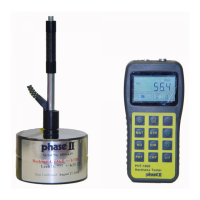
Lists the key features and benefits of the digital hardness tester, highlighting its capabilities and design.
Describes the primary industrial applications and the measurable testing range of the hardness tester.
Provides detailed technical data, performance metrics, and operating parameters of the instrument.
Details the standard and optional components included in the hardness tester package.
Specifies the recommended environmental and operational conditions for optimal instrument performance.
Explains the physical design, main components, and internal structure of the hardness tester.
Describes the layout, display elements, and information shown on the instrument's main LCD screen.
Identifies and explains the function of each button and key on the instrument's keypad.
Details the theoretical basis and methodology behind the Leeb hardness testing technique.
Guides on initial setup, inspection, calibration, and readiness checks for the hardness tester.
Provides instructions and criteria for choosing the appropriate impact device for specific tests.
Outlines the necessary steps for preparing the test sample surface to ensure accurate measurements.
Details the steps for powering on the instrument and preparing it for the testing sequence.
Instructions on how to properly load the impact device into the instrument for testing.
Guidance on correctly positioning the impact device and instrument on the test sample.
Describes the process of performing a hardness test, including stability and measurement areas.
Explains how to interpret and read the hardness values displayed on the instrument's screen.
Explains system notifications, alerts, and feedback provided by the instrument during operation.
Instructions for turning the hardness testing instrument on and off safely.
Guides on selecting and setting the correct material type for accurate hardness measurements.
Instructions for switching between hardness and tensile strength testing modes.
How to set and adjust the impact direction parameter for optimal test accuracy.
Configuration options for setting the number of impact times for averaging measured values.
Features and procedures for saving, storing, and managing recorded test data.
Procedures for cleaning, inspecting, and maintaining the impact device for longevity.
Reference table providing specific parameters, values, or data related to testing.
 General
| Brand | Phase II Plus |
|---|---|
| Model | PHT-1800 |
| Category | Test Equipment |
| Language | English |

 To Next Page