Te o adjust your TV picture controls, select a
hannel and Jbllow the steps shown below."
!
2
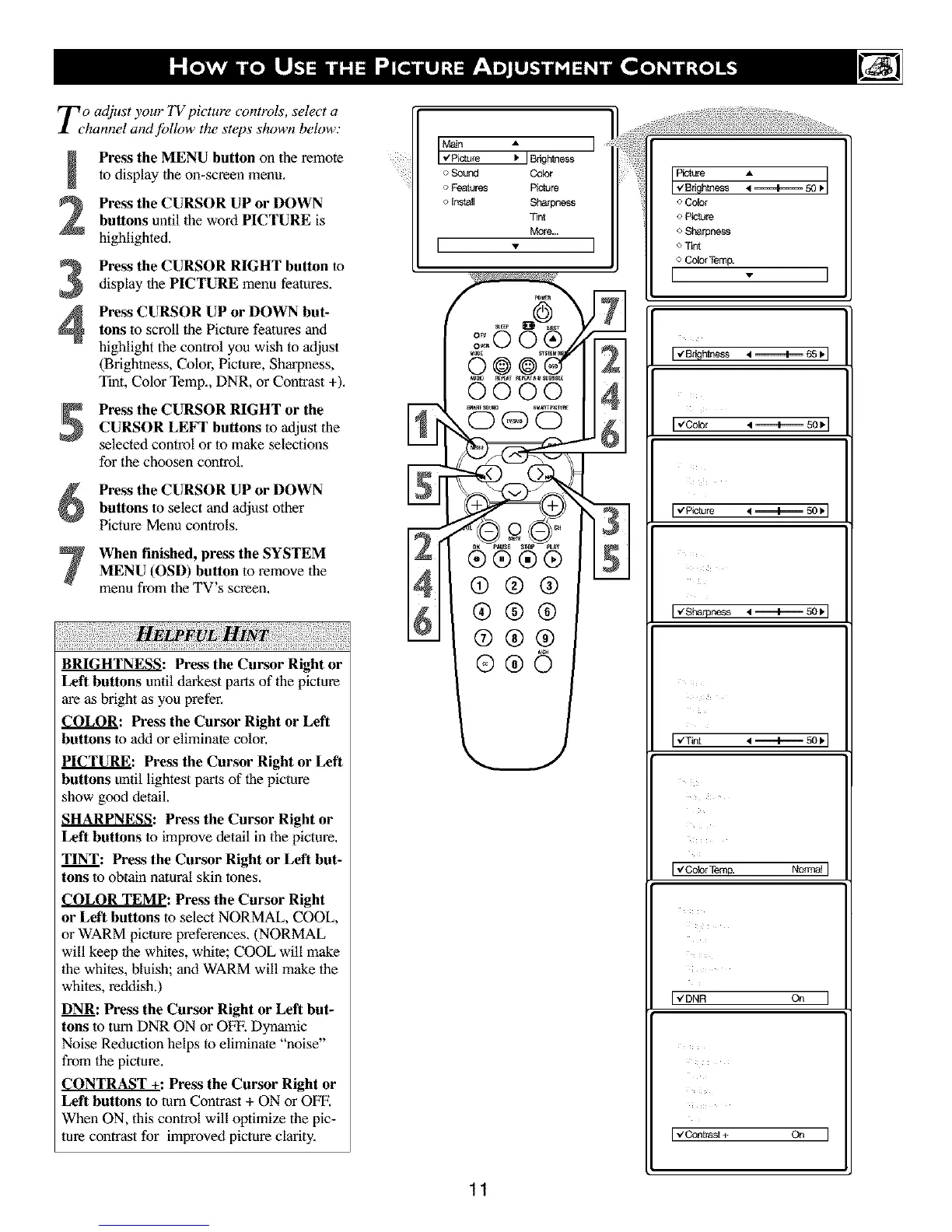
Press the MENU button on the remote
to display lhe on-screen menu,
Press the CURSOR UP or DOWN
buttons until the word PICTURE is
highlighted.
Press the CURSOR RIGHT button to
display lhe PICTURE menu features.
4
Press CURSOR UP or DOWN but-
tons to scroll the Picture features and
highlight the control you wish to adjust
(Brightness, Color, Picture, Sharpness,
Tint, Color Temp., DNR, or Contrast +).
Press the CURSOR RIGHT or the
CURSOR LEFT buttons to adjust the
selected control or to make selections
for the choosen control.
Press the CURSOR UP or DOWN
buttons to select and adjust other
Picture Menu controls.
When finished, press the SYSTEM
MENU (OSD) button to remove the
menu from the TV's screen.
PFVL I
BRIGHTNESS: Press the Cursor Right or
Left buttons until darkest parts of lhe picture
are as bright as you prefer.
COLOR: Press the Cursor Right or Left
buttons lo add or eliminate color.
PICTURE: Press the Cursor Right or Left
buttons until lightest parr of the picture
show good detail.
SHARPNESS: Press the Cursor Right or
Left buttons lo improve detail in the picture.
TINT: Press the Cursor Right or Left but-
tons lo obtain natural skin tnr,es,
COLOR TEMP: Press the Cursor Right
or Left buttons to select NORMAL, COOL,
or WARM picture preferences. (NORMAL
will keep the whites, white; COOL will make
1he whites, bluish; and WARM will make the
whites, reddish.)
DNR: Press the Cursor Right or Left but-
tons to turn DNR ON or OFE Dynamic
Noise Reduction helps to eliminale "noise"
from the picture.
CONTRAST +: Press the Cursor Right or
Left buttons to turn Contrast + ON or OFF.
When ON, this control will optimize the pic-
ture contrast for improved picture clarity.
_n A
['Zpictu_e _ IBrightnessl
o Sound Color
o Fealures P_re
o Install Sharpness
Tint
More...
[ . ]
o 114
qo .II4
N
@@@ --
®@®
@@@
11
o Cobr
o P_'ture
o Sharpness
o Tint
o Cobr Temp.
I
l,,'8r_ht_ss4 ._=_l_ _, I
[,zColor
[,€ P_.ture
I,,'Sharpness.q._,_-_ so_q
Iv'Cobr Temp. Normal I
I"DN_ O_ I
I vContrast + On I



 To Next Page