Channel Edit makes it easy fiJr you to ADD
or DELETE channels from the list of
channels stored in the TV's memory.
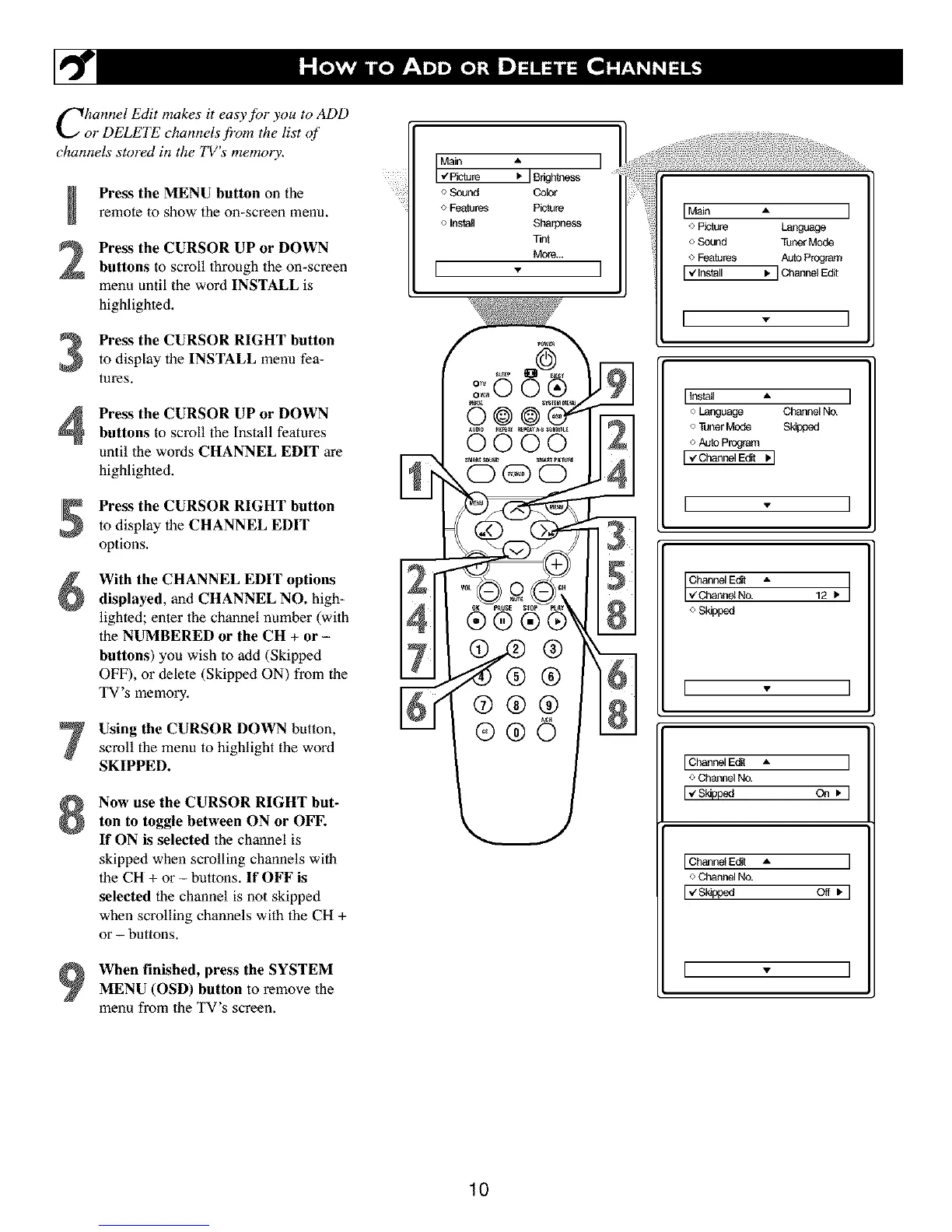
Press the MENU button on the
remote to show the on-screen menu,
Press the CURSOR UP or DOWN
buttons to scroll lhroagh the on-screen
menu until the word INSTALL is
highlighted,
Press the CURSOR RIGHT button
to display the INSTALL menu fea-
tures.
Press the CURSOR UP or DOWNbuttons to scroll the Install features
until the words CHANNEL EDIT are
highlighted.
Press the CURSOR RIGHT button
to display the CHANNEL EDIT
options,
With the CHANNEL EDIT options
displayed, and CHANNEL NO. high-
lighted; enter lhe channel number (wilh
the NUMBERED or the CH + or -
buttons) you wish to add (Skipped
OFF), or delete (Skipped ON) from the
TV's memory.
Using the CURSOR DOWN button,
scroll the menu to highlight the word
SKIPPED.
Now use the CURSOR RIGHT but-
ton to toggle between ON or OFF.
If ON is selected the channel is
skipped when scrolling channels with
the CH + or - buttons. If OFF is
selected the channel is not skipped
when scrolling channels with the CH +
or - buttons.
When finished, press the SYSTEM
MENU (OSD) button to remove the
menu from the TV's screen.
o Sound Color
o Fealures Picture
o Install SI_arpn_ss
Tint
More...
I
0 ®
0000
(D@O
@
®®©
MNn A I
o Piclure Language
o Scund Tuner Mode
o Features Auto Program
[ _ Install _, ] Channel Edit
I - I
IInstall A I
o Language Channel NO.
o Tuner Mode Skipped
o AutoProgram
I€c_nel Ed__1
I - I
o Skipped
I
IChannel E{f_t •
o Channel No.
IvS_pp_ On •
I Edit A
o CP_annelNo.
I
I0



 To Next Page