your TV can automatically set itself fi)r
$_ local area (o1"Cable TV) channels. This
makes it easy fbr you to select only the TV
stations in your area when the CHANNEL
(+), (-) buttons are pressed.
Note: Make sure the antenna or eable signal
connection has been eompleted before AUTO
PROGRAM is activated.
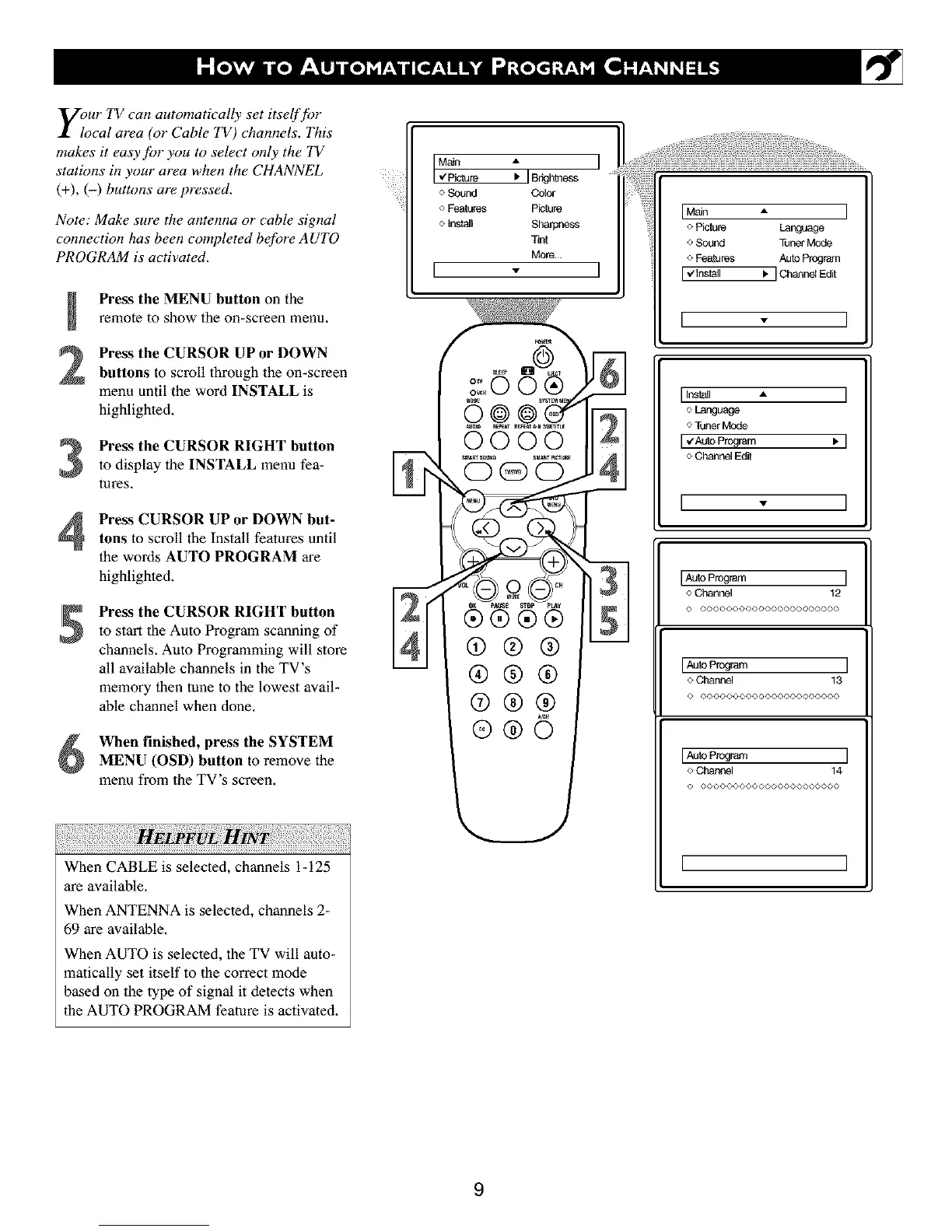
Press the MENU button on the
remote to show the on-screen menu.
Press the CURSOR UP or DOWN
buttons to scroll lhroagh the on-screen
menu until the word INSTALL is
highlighted,
Press the CURSOR RIGHT buttonto display the INSTALL menu fea-
tures.
Press CURSOR UP or DOWN but-tons to scroll the Install features until
the words AUTO PROGRAM are
highlighted.
Press the CURSOR RIGHT button
to start the Auto Program scanning of
channels. Auto Programming will store
all available channels in the TV's
memory then tane to the lowest avail-
able channel when clone.
When finished, press the SYSTEM
MENU (OSD) button to remove file
menu from the TV's screen.
When CABLE is selected, channels i- 125
are available.
When ANTENNA is selected, channels 2-
69 are available.
When AUTO is selected, the TV will auto-
matically set itself to the correct mode
based on the type of signal it detects when
the AUTO PROGRAM feature is activated.
Main A I
,€Pickle I, ] Brightness
o Sound Oobr
o Features Piotu_
o Install Sharpness
Tint
More...
I * I
@®®
®®®
@®@
®®©
J
IMain • I
o PiOure Language
o Sound Tuner Mode
o Features AUlOProgram
I,/Install _. IChann_ Edit
[ - ]
IInstall • I
o Language
o Tuner Mode
IvAMaProgram _'I
o Channel Edit
I * I
IAuto Program I
o Channel 12
0 00000000000000004)00000
o Channel 13
© ©©@©©©©©©©O@©©©@©@©©©©
o Channel 14
© @@@@©©O©©O@@@@@©O©O@O©
[ ]
9



 To Next Page