Tehe TUNER MODE control allows you to
hange the TVs signal input to either
ANTENNA, CABLE or AUTO mode. It's
importantJbr the TV to know what type of
signal to lookJM (From a Cable TV signal or
a normal Antenna signal.) In the AUTO
mode, when the AUTO PROGRAMJkature is
activated, the "IVwill automatically choose
the correct mode.
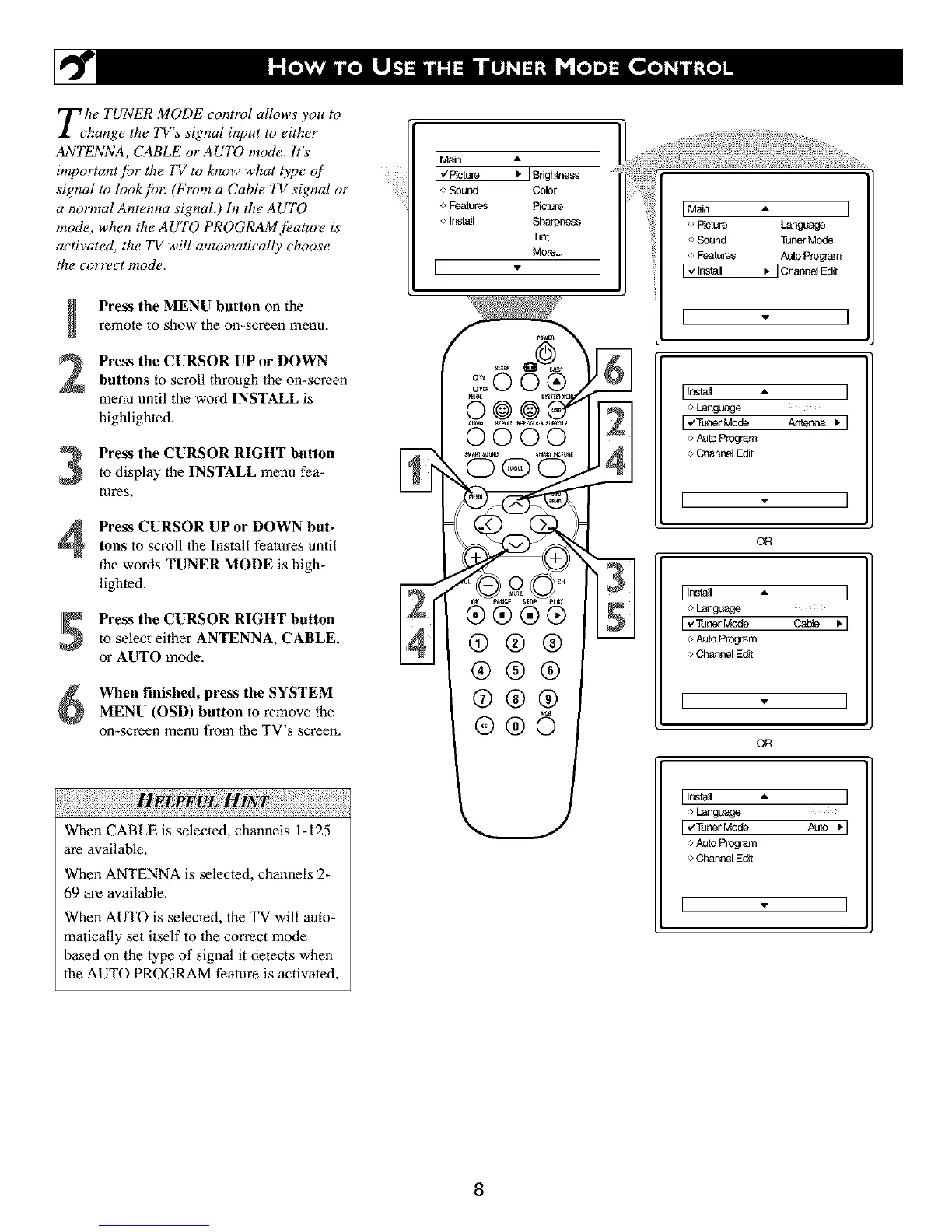
Press the MENU button on the
remote to show the on-screen menu,
Press the CURSOR UP or DOWN
buttons to scroll lhroagh the on-screen
menu until the word INSTALL is
highlighted,
Press the CURSOR RIGHT button
to display the INSTALL menu fea-
tures.
Press CURSOR UP or DOWN but-tons to scroll the Install features until
the words TUNER MODE is high-
lighted.
Press the CURSOR RIGHT button
to select either ANTENNA, CABLE,
or AUTO mode.
When finished, press the SYSTEM
MENU (OSD) button to remove the
on-screen menu from the TV's screen,
HELPFUL: ;
When CABLE is selected, channels i- 125
are available.
When ANTENNA is selected, channels 2-
69 are available.
When AUTO is selecled, the TV will auto-
matically set itself to lhe correct mode
based on the type of signal it detects when
lhe AUTO PROGRAM feature is activated.
o Soul_d Color
o Features Picture
<>Insla_l Sharpness
Tint
More...
[
0000
®®®®
®®®
®®®
®®©
IMain A I
o Piclure Language
oSound TunerMode
o Features Auto Program
[ -¢'lnsNI I, ]Cha_oelEdit
I " I
[ InsNl • ]
o Language
rvTunerModeAntenna , 1
o AUtoProgram
o channel Edit
[ - ]
OR
[Insl_l A ]
o Language
[ €TunerMode cable q
oAutoProgram
oChannelEdit
[ - ]
OR
[Insl_l *, ]
Language
IvTunerMode AUtO• I
<>Auto Program
o Channel Edit
[ - ]
8



 To Next Page