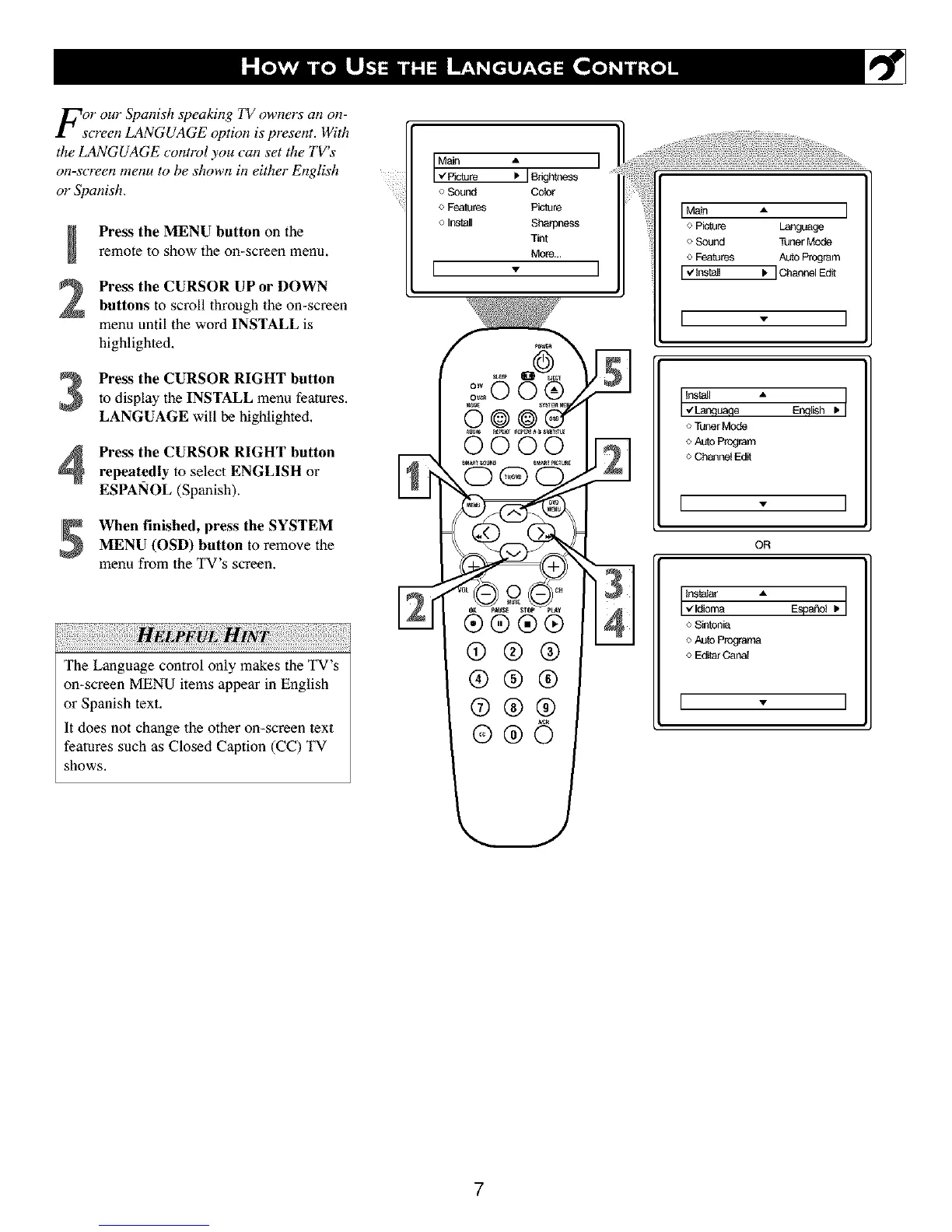
For our Spanish speaking TV owners an on-
screen LANGUAGE option is present. With
the LANGUAGE control you can set the TV's
on-screen menu to be shown hi either English
or Spanish.
3
4
Press the MENU button on the
remote to show the on-screen menu,
Press the CURSOR UP or DOWN
buttons to scroll lhroagh the on*screen
menu until the word INSTALL is
highlighted.
Press the CURSOR RIGHT button
to display the INSTALL menu features.
LANGUAGE will be highlighted.
Press the CURSOR RIGHT button
repeatedly to select ENGLISH or
ESPANOL (Spanish).
When finished, press the SYSTEM
MENU (OSD) button to remove the
menu from the TV's screen.
HELPFUL: ;
The Language control only makes the TV's
on-screen MENU items appear in English
or Spanish text,
It does not change the other on-screen text
features such as Closed Caption (CC) TV
shows.
MNn
Vpk;ture
oSound
o Features
o Install
[
A
IBfight_less
ColOr
P_atur_
Sharpness
Tint
More...
v
O®
0000
0
IMa_ • I
o Picture Language
o Sound Tu_r Mode
o Features AUtOprogram
I_lnst_l _. IC_annelEd_
[ - ]
Install •
I ,Lanqu_,e E,_qlish , I
o Tuner Mode
o AutoProgram
o Chanoel Edit
I - I
OR
Instatar •
I _[dioma Esp_oI I. I
o Sintonia
o Auto Programa
o Edttar Canal
I - I
7



 To Next Page