Overthene t pagesy dllIun
to block channels and get a better under-
standing of the rating terms fi)r certain pro-
gramming.
First, let's start by learning how to set a per-
sonal access code:
m
2
3
4
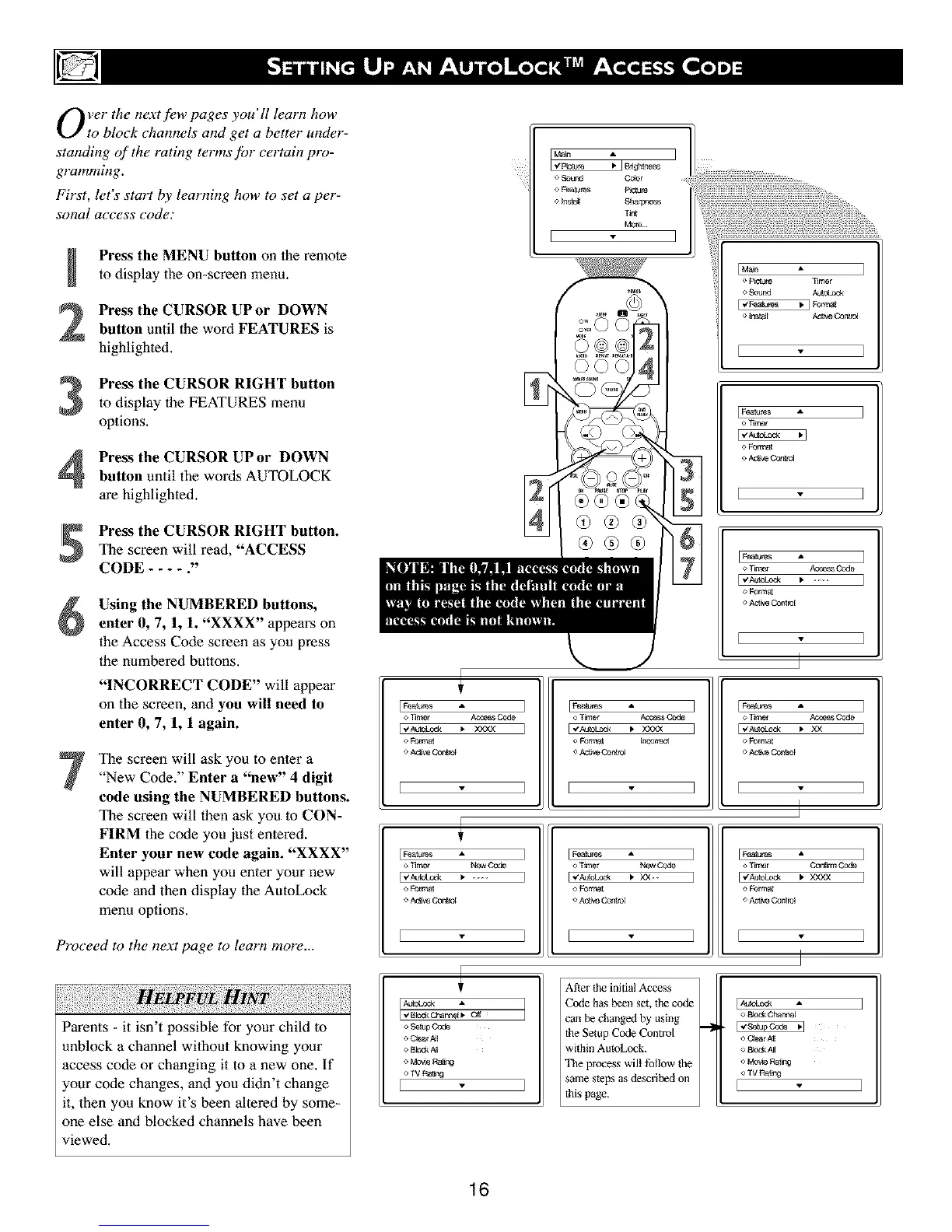
Press the MENU button on the remote
to display the on-screen menu.
Press the CURSOR UP or DOWN
button until the word FEATURES is
highlighted.
Press the CURSOR RIGHT button
to display the FEATURES menu
options.
Press the CURSOR UP or DOWN
button until the words AUTOLOCK
are highlighted.
Press the CURSOR RIGHT button.
The screen will read, "ACCESS
CODE .... ."
Using the NUMBERED buttons,
enter 0, 7, 1, 1. "XXXX" appears on
the Access Code screen as you press
the numbered buttons.
"INCORRECT CODE" will appear
on the screen, and you will need to
enter 0, 7, 1, 1 again.
The screen will ask you to enter a
"New Code." Enter a "new" 4 digit
code using the NUMBERED buttons.
The screen will then ask you to CON-
FIRM 1be code you just entered.
Enter your new code again. "XXXX"
will appear when you enter your new
code and then display the AutoLock
menu options.
Proceed to the next page to learn more...
Parents - it isn't possible for your child to
unblock a channel without knowing your
access code or changing it to a new one. If
your code changes, and you didn't change
it, then you know it's been altered by some-
one else and blocked channels have been
viewed.
o .£ound Color
T_nt
E _
®®®
[ ]
IFea_res A ]
o TirmT/ Ace.s Code
o F0rraa_
o AC_W_I
l ]
o Thner A_e_ Code
I"mo_ _ xxxx I
o Format Incotrec_
I I
[ Featbre s A ]
o T_mar Acoess O0de
[_'_o_a _ xx ]
o Forrc_
o Aa'_veO0ntrol
[ - ]
I Fea_s •
o Timer New Code
o Forma_
o Aetw Oont_ol
[Features •
o Tilner New
[ _"Aule,Lcm,k _ xx.-
o Formal
o Aetw Oont_ol
] I_ums •
o T_mer Oon_rm Code
o FOre'at
o Aet_Oor_
] [
o .S_p Co_
o Q_AI[
o Bbck A_
o Mov_ Rang
o TV R_Ig
I
After the initial Access
Code has been set, the code
can be changed by using
the Setup Code Control
within AutoLock.
The process will follow the
] same steps as described on
_his page.
o 13k_kOhanm[
o (_malP_[
o_,M
o _v_ Ral_g
o TV Ra_lg
I
16



 To Next Page