This portion of the AutoLock TM features
"over program ratings based on the TV
Industry rating system. This is known as TV
Rating within AutoLock TM.
After selecting the Autolock TM f_ature and
entering your personal access code, the
AutoLock TM options screen appears;
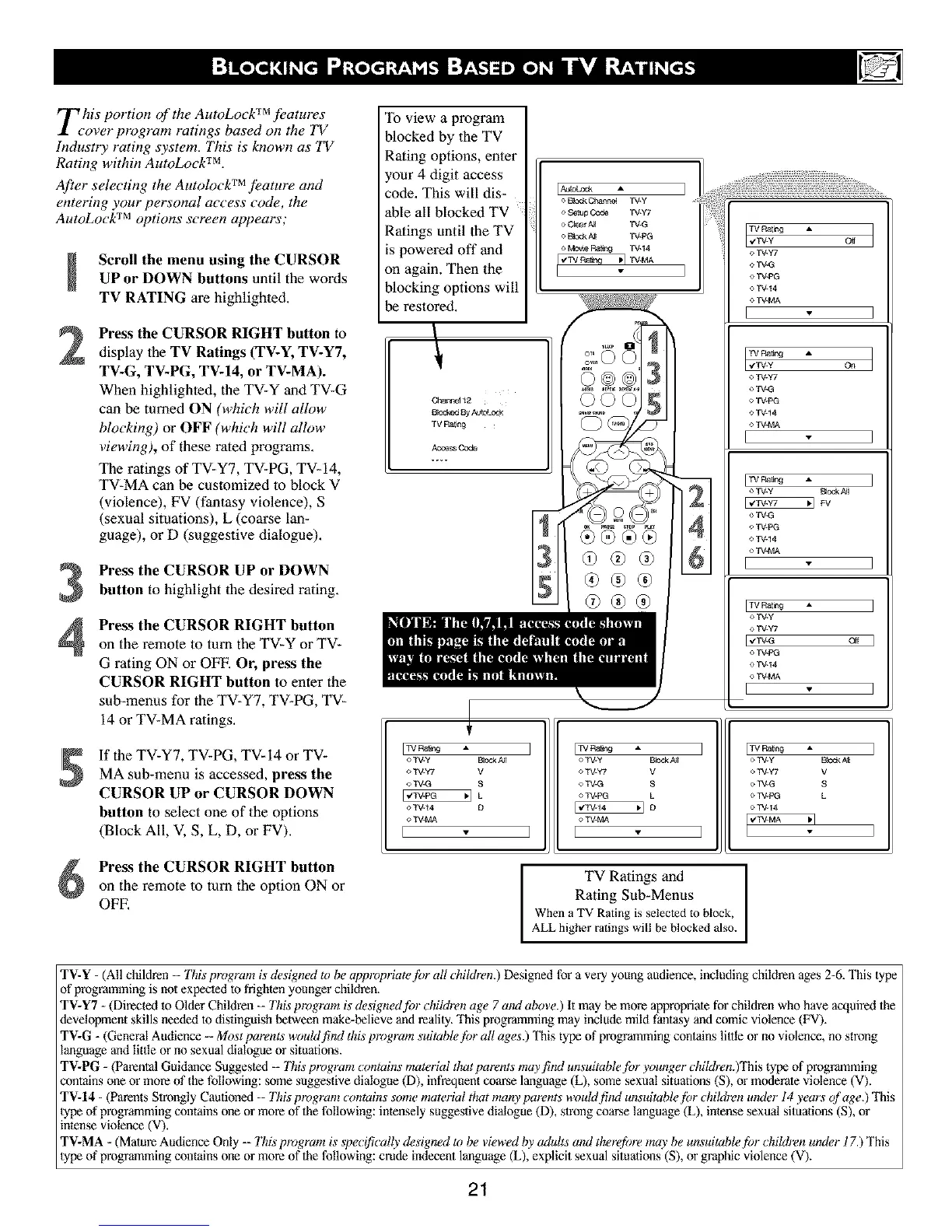
Scroll the menu using the CURSORUP or DOWN buttons until the words
TV RATING are highlighted.
2
Press the CURSOR RIGHT button to
display 1he TV Ratings (TV-Y, TV-Y7,
TV-G, TV-PG, TV-14, or TV-MA).
When highlighted, the TV-Y and TV-G
can be turned ON (which will allow
blocking) or OFF (which will allow
viewing), of these rated programs,
The ratings of TV-Y7, TV-PG, TV-14,
TV-MA can be customized to block V
(violence), FV (fantasy violence), S
(sexual situations), L (coarse lan-
guage), or D (suggestive dialogue),
Press the CURSOR UP or DOWN
button to highlight the desired rating.
Press the CURSOR RIGHT button
on the remote to turn the TV-Y or TV-
G rating ON or OFF. Or, press the
CURSOR RIGHT button to enter the
sub-menus for the TV-Y7, TV-PG, TV-
14 or TV-MA ralings.
If the TV-Y7, TV-PG, TV-14 or TV-
MA sub-menu is accessed, pre_ the
CURSOR UP or CURSOR DOWN
button to select one of the options
(Block All, V, S, L, D, or FV).
To view a program
blocked by 1he TV
Rating options, enter
your 4 digit access
code. This will dis-
ble all blocked TV
',atings until the TV
powered off and
,n again. Then the
_locking options will
e restored.
8_ By Au_
TV Rattng
Acce_ Code
[TVpatJn9 _,
o_-y Bk_k NI
<>_-W V
o _-G S
F,w-m _ L
o_44 D
o W4C,A
[
[Aulokt_:R
o Cte_r AH TV-G
o B_CCkN[ TV-PG
o Mowe F_ng TV-14
_qW.MA
[ J
TV Ratng
o.
e TV-Y7
o TV-G
o TV-PG
o TV-14
o TV-MA
[ ]
TV Rang
oo
o TV_Y7
o TV_G
o TV4_3
o TV_14
o TV_MA
E ]
oTV.y Beck NI
o TV-G
e TV4_3
o TV-14
o TV-MA
E ]
o TV-y
e TV-Y7
[v'TV-G Off ]
o TV@G
<* TV-14
o TV-MA
[ ]
[TV F_tng A
oTV-y P_cckN[
o TV-y7 V
o TV-G S
o TV-PG L
o TV-14
[,'_-_,', _q
22%
g,
(9@@
o_-y Bk_k NI
e W-W V
o_-G S
o W-PG L
[€W44 _ [3
o W4C,A
] [ ]
Press the CURSOR RIGHT button
on the remote to turn the option ON or
OFE
I TV Ratings and
Rating Sub-Menus
When a TV Rating is selected to block,
ALL higher ratings will be blocked also.
TV-Y - (All children -- This program is designed to be appropriatef!)r all children.) Designed for a very young audience, including children ages 2-6. This lype
of programming is not expected 1o frighten younger children.
TV-Y7 - (Direcled to Older Children -- This program is designed for children age 7 and above.) It may be more appropriate for children who have acquired the
deve!opment skills needed 1o distinguish between make-believe and realfiy. This programming may include mild fm_tasy and comic violence (FV).
TV-G - (General Audience -- Most parents wouMfind this program suitabh@)r all ages.) This type of programming contains lillle or no violence, no strong
language and little or no sexual dialogue or situations.
TV-PG - (Parental Guidance Suggested -- Tiffs program comains rr_terial that parents may find unsuitable for younger children. )This type of programming
contains one or more of the following: some suggestive dialogue (D), infrequent coarse language (L), some sexual situations (S), or moderate violence (V).
TV-14 - (Parents Strongly Cautioned -- This program comains some mau, rial that many parents wouM f!tM unsuitable fl_r children under 14 years (fage.) This
lype of programming contains one or more of the following: intensely suggestive dialogue (D), strong coarse language (L), intense sexual situations (S), or
intense violence (V).
TV-MA - (Mature Audience Only -- 77fis program is specifically designed to be viewed by adults and therefi)m may be unsuitable for children under 17.) This
lype of programming contains one or more of the following: crude indecent language (L), explicit sexual situations (S), or graphic violence (V).
21


 To Next Page
 Loading...









