Twhere are two types of program ratings
ithin the AutoLockYM feature. One is
based on the Movie Industry ratings while the
other is based on the TV Industry ratings. Both
can be used to block or censor programming
that has been rated in either mannel:
Let_ first look at the Movie Rating options of
AutoLock TM :
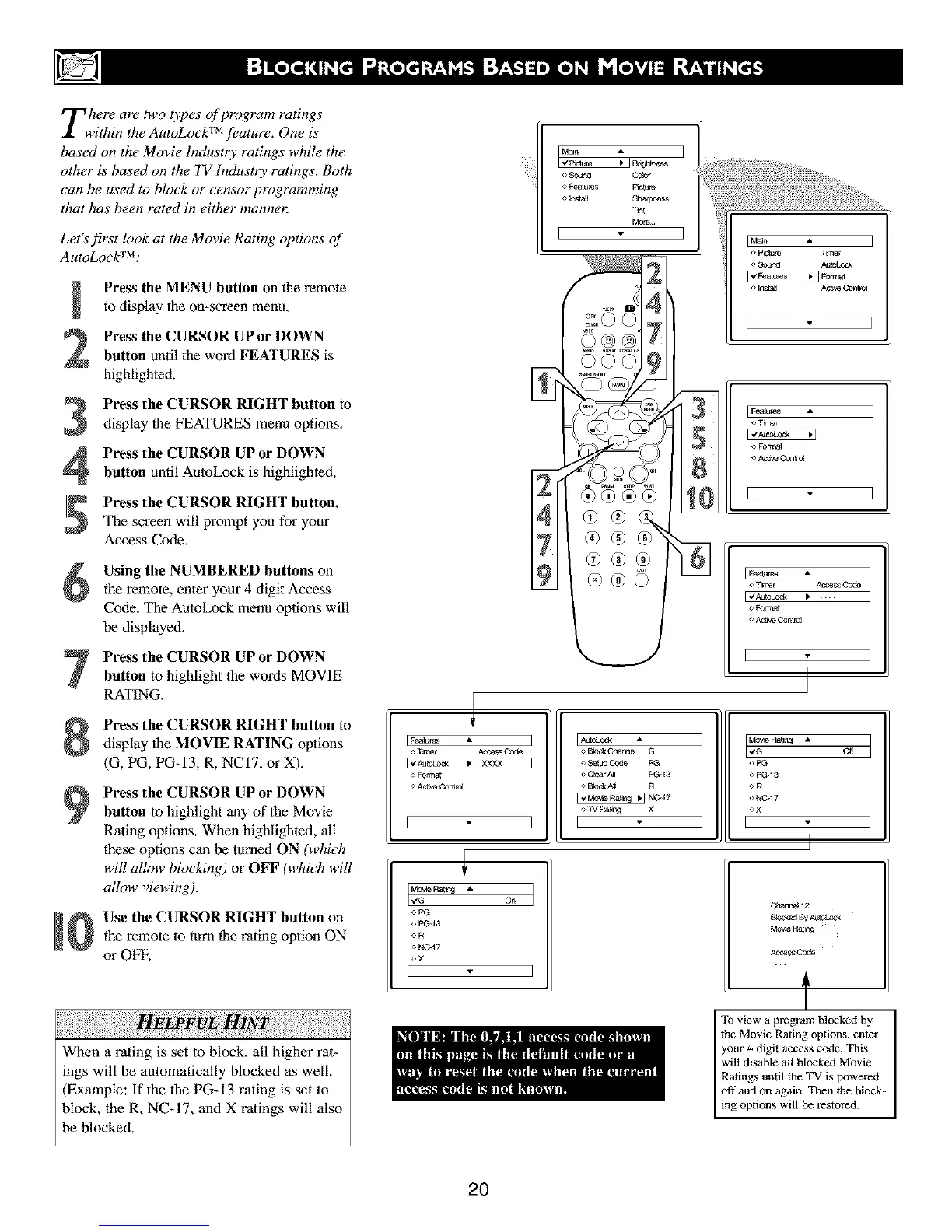
Press the MENU button on the remote
to display the on-screen menu,
Press the CURSOR UP or DOWN
button until the word FEATURES is
highlighted.
Press the CURSOR RIGHT button to
display the FEATURES menu options,
Press the CURSOR UP or DOWN
button until AutoLock is highlighted.
Press the CURSOR RIGHT button.
The screen will prompt you for your
Access Code.
Using the NUMBERED buttons on
the remote, enter your 4 digit Access
Code. The AutoLock menu options will
be displayed.
Press the CURSOR UP or DOWN
button to highlight the words MOVIE
RATING.
Press the CURSOR RIGHT button to
display the MOVIE RATING options
(G, PG, PG-13, R, NCI7, or X).
Press the CURSOR UP or DOWN
button lo highlight any of the Movie
Rating options. When highlighted, all
these options can be turned ON (which
will allow blocking) or OFF (which will
allow viewing).
Use the CURSOR RIGHT button on
the remote to turn the rating option ON
or OFF.
When a rating is set to block, all higher rat-
ings will be automatically blocked as well.
(Example: If the the PG-13 rating is set to
block, the R, NC-17, and X ratings will also
be blocked.
o l'ilrar Asog_ Code
o Foaaat
o _Contr_
o Bled<C_',a,_el G
o Selup Code PG
o Ch_a'A_ pG.13
o Bfed_N[ R
NC'17
o TV Ra_ng X
E ]
I,,_'°_'_ A o_ I
o pG
o PG-13
OR
o NC-17
oX
o pG
o PG-13
OR
o NC-17
<*X
[
Cbar_e112
B_,c_edBy Au_olock
Mo_e Rathg
AccessCod,e
t
To view a programblocked by
the Movie Rating options, enter
your 4 digit access c(;de.This
will disable all blocked Movie
Ratings until theTV is powered
off and on again. Then theblock-
ing options will be restored.
2O



 To Next Page