ThBere may come a time when you want to
lock All the television s channels. Maybe
you don't want your children to watch TV/br
a given time. With the BlockAll control, ALL
available channels (including the A/V Inputs)
can be set to block at the same time.
m
2
3
4
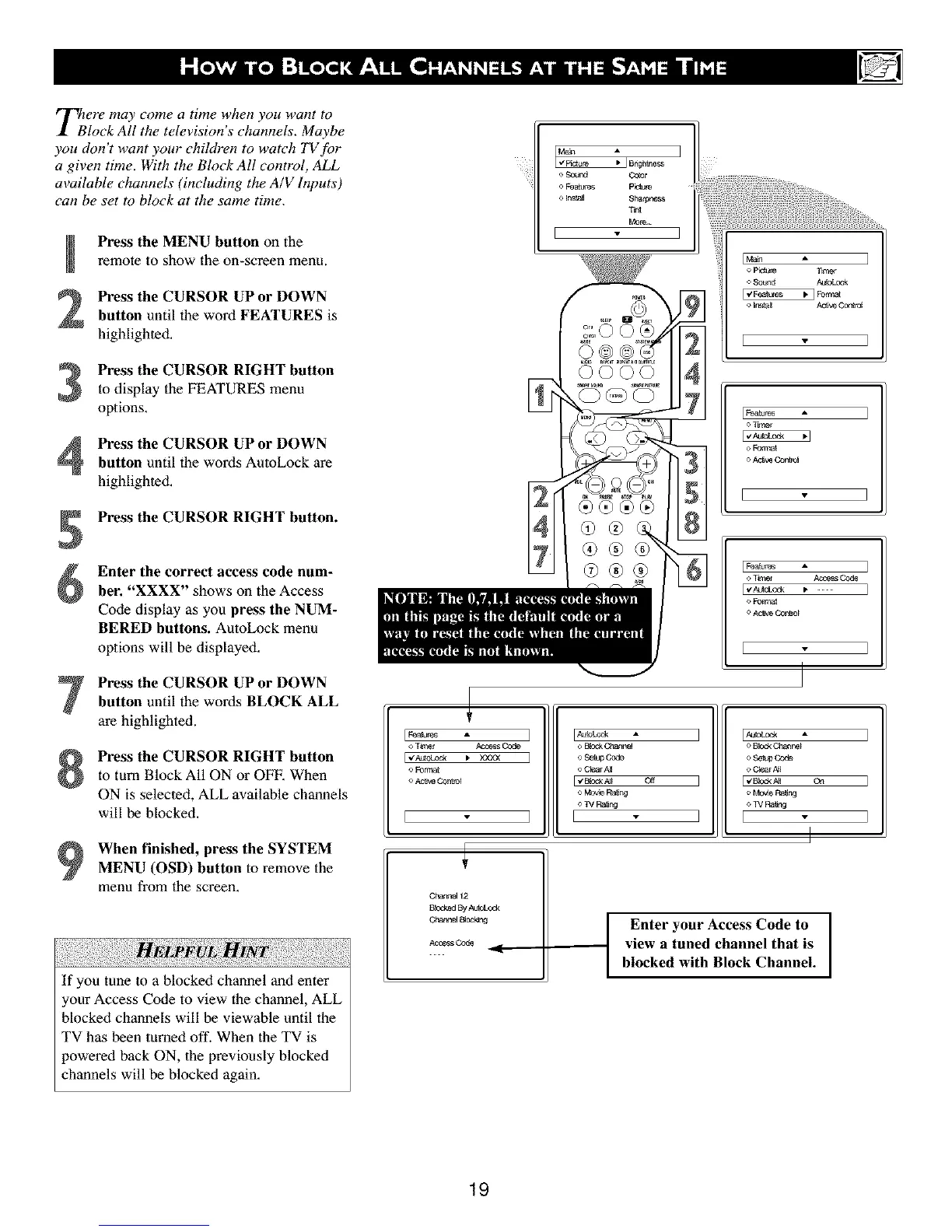
Press the MENU button on the
remote to show the on-screen menu,
Press the CURSOR UP or DOWN
button until the word FEATURES is
highlighted.
Press the CURSOR RIGHT button
to display the FEATURES menu
options.
Press the CURSOR UP or DOWN
button until the words AutoLock are
highlighted.
Press the CURSOR RIGHT button.
Enter the correct access code num-
ber. "XXXX" shows on the Access
Code display as you press the NUM-
BERED buttons. AutoLock menu
options will be displayed,
Press the CURSOR UP or DOWN
button until the words BLOCK ALL
are highlighted.
Press the CURSOR RIGHT button
to turn Block All ON or OFF, When
ON is selected, ALL available channels
will be blocked,
When finished, press the SYSTEM
MENU (OSD) button to remove the
menu from lhe screen.
vL
If you tune to a blocked channel and enter
your Access Code to view the channel, ALL
blocked channels will be viewable until the
TV has been turned off. When the TV is
)owered back ON, the previously blocked
channels will be blocked again,
o Sound Co_r
o F_aK_'eS p_t _¢e
o Inst_ Sharpness
T_
[_a_ms
o Form_
o ,,x_v_ Control
[ _albr_s A ]
o Tir_r N:_s Co_
_, Forre_
o _w Control
[ ]
I_a lbr_ A
o Tir_r _
o Forre_
I
I_o_ked By AutoLod4
C_',ar_164I_o_ng
AccessCo_
o B[od_Cbar_le_
I o Set® Code
o Clear A_
I _ B[od< A]_
o Mov_ Ra_ng
<>_VRa_ng
I I
I I,_'_b_:_ "
o BbekChanne_
o Setu_Code
o_ I [_'_kA_ o_
o Mo_e Ra_ng
<>TVRa_ng
I [ "
I
I Enter your Access Code to I
view a tuned channel that is
blocked with Block Channel.
I
]
]
19



 To Next Page