After blocking specific channels there may
come a time when you wang go clear all
the channels so they can be viewed. The fol-
lowing steps e_plain how to CLEAR ALL
blocked channels.
[
2
3
4
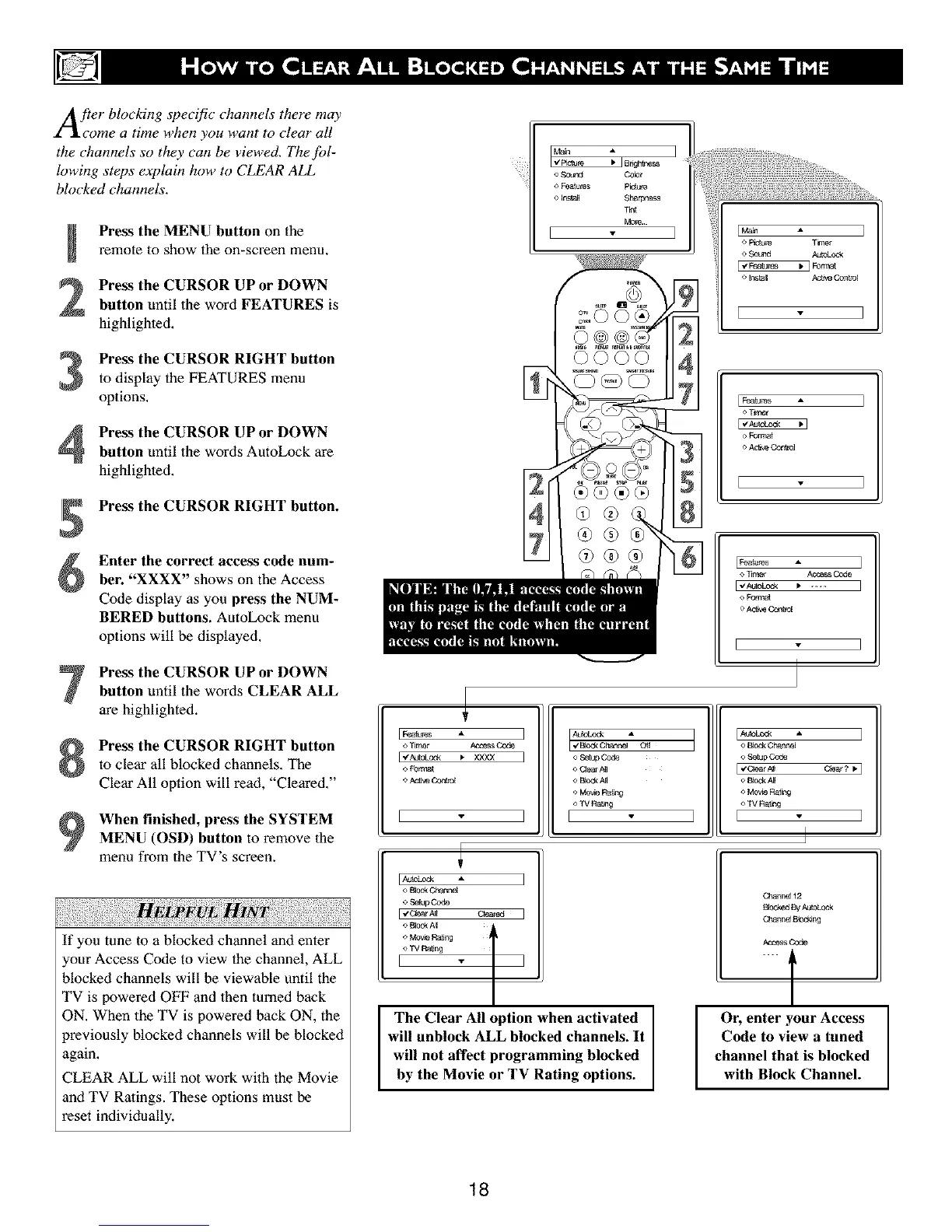
Press the MENU button on the
remote to show the on-screen menu,
Press the CURSOR UP or DOWN
button until the word FEATURES is
highlighted,
Press the CURSOR RIGHT button
to display the FEATURES menu
options,
Press the CURSOR UP or DOWN
button until the words AutoLock are
highlighted.
Press the CURSOR RIGHT button.
Enter the correct access code num-
ber. "XXXX" shows on the Access
Code display as you press the NUM-
BERED buttons. AatoLock menu
options will be displayed,
Press the CURSOR UP or DOWN
button until the words CLEAR ALL
are highlighted.
Press the CURSOR RIGHT button
to clear all blocked channels. The
Clear All option will read, "Cleared."
When finished, press the SYSTEM
MENU (OSD) button to remove the
menu from the TV's screen.
If you tune to a blocked channel and enter
your Access Code to view the channel, ALL
blocked channels will be viewable until the
TV is powered OFF and 1hen turned back
ON. When the TV is powered back ON, the
previously blocked channels will be blocked
again.
CLEAR ALL will not work with the Movie
and TV Ralings. These options must be
reset individually.
_ 8ngh_e_ 7
o So_ Color
o Features P_re
o lr_a_ Sharpness
Tnt
More
E ]
I
T.wzr
AutoLock
I* ] Format
Ac_ve Con_,3[
[Fea_ A
o Forest
_ T_er AcoassCode
For,net
o Act_eCc_llm[
E
[_atbres ]
o_r_r AccessC0_
o _rrc_
[ - ]
o Bbek Channe[
o Se_Code
[ v'C_ar A_I
o B0d_A_
<_Mo_e Ra_r,g
o W Ra_ng
v
AdoLod_ A
I,/BbckC_anPz4 C_{
o Setup
o CAearNI
<_Bbck A_[
'>MoweRang
o TV Rang
E
The Clear All option when activated
will unblock ALL blocked channels. It
will not affect programming blocked
by the Movie or TV Rating options.
I_ " I
o Book Chanr_e[
o .£e_p Code
l_'C_rm C_ear ? _. I
e £1od<A_
o Movie Ral_qg
<>TV Rang
I I
I
Cbanr_ 12
B'ocke_By _
Cbann_ 8bdeng
AccessCode
.... t
Or, enter your Access
Code to view a tuned
channel that is blocked
with Block Channel.
18



 To Next Page