Wl!en the Child Lock or Parental Level
ontrols are on and a disc" containing
material that will be blocked is inserted, the
disc" must first be authorized be_bre playback
can OCCH12
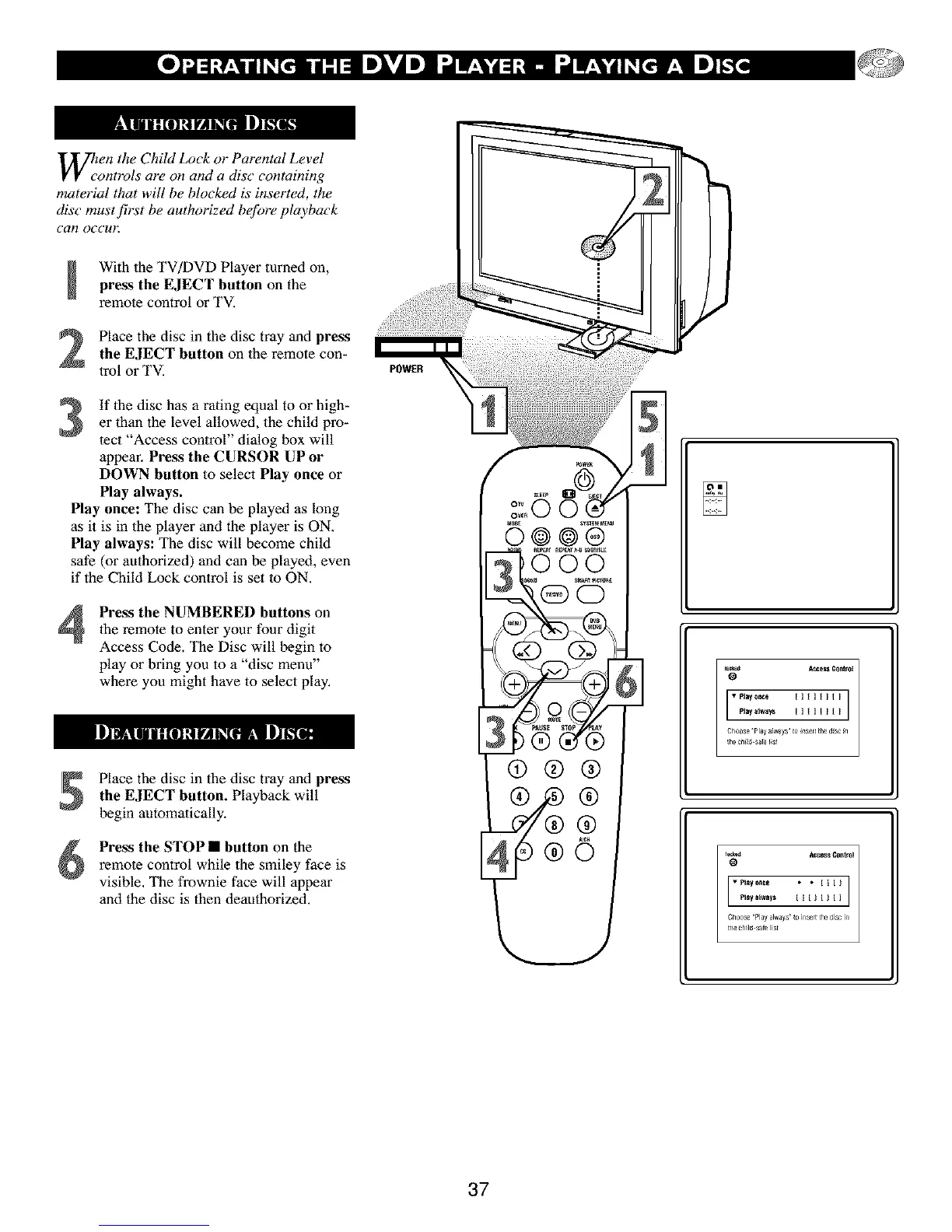
With the TV/DVD Player turned on,press the EJECT button on the
remote control or TV.
Place the disc in the disc tray and press
the EJECT button on the remote con-
lrol or TV.
If the disc has a rating equal to or high-
er than the level allowed, the child pro-
lect "Access control" dialog box will
appear. Press the CURSOR UP or
DOWN button to select Play once or
Play always.
Play once: The disc can be played as long
as it is in 1he player and the player is ON.
Play always: The disc will become child
safe (or authorized) and can be played, even
if the Child Lock control is set to ON.
4
Pre_ the NUMBERED buttons on
1he remote to enter your four digit
Access Code. The Disc will begin to
play or bring you to a "disc menu"
where you might have to select play,
Place the disc in the disc tray and press
the EJECT button. Playback will
begin automatically.
Press the STOP • button on the
remote control while the smiley face is
visible. The frownie face will appear
and the disc is then deaathorized.
POWER
37



 To Next Page