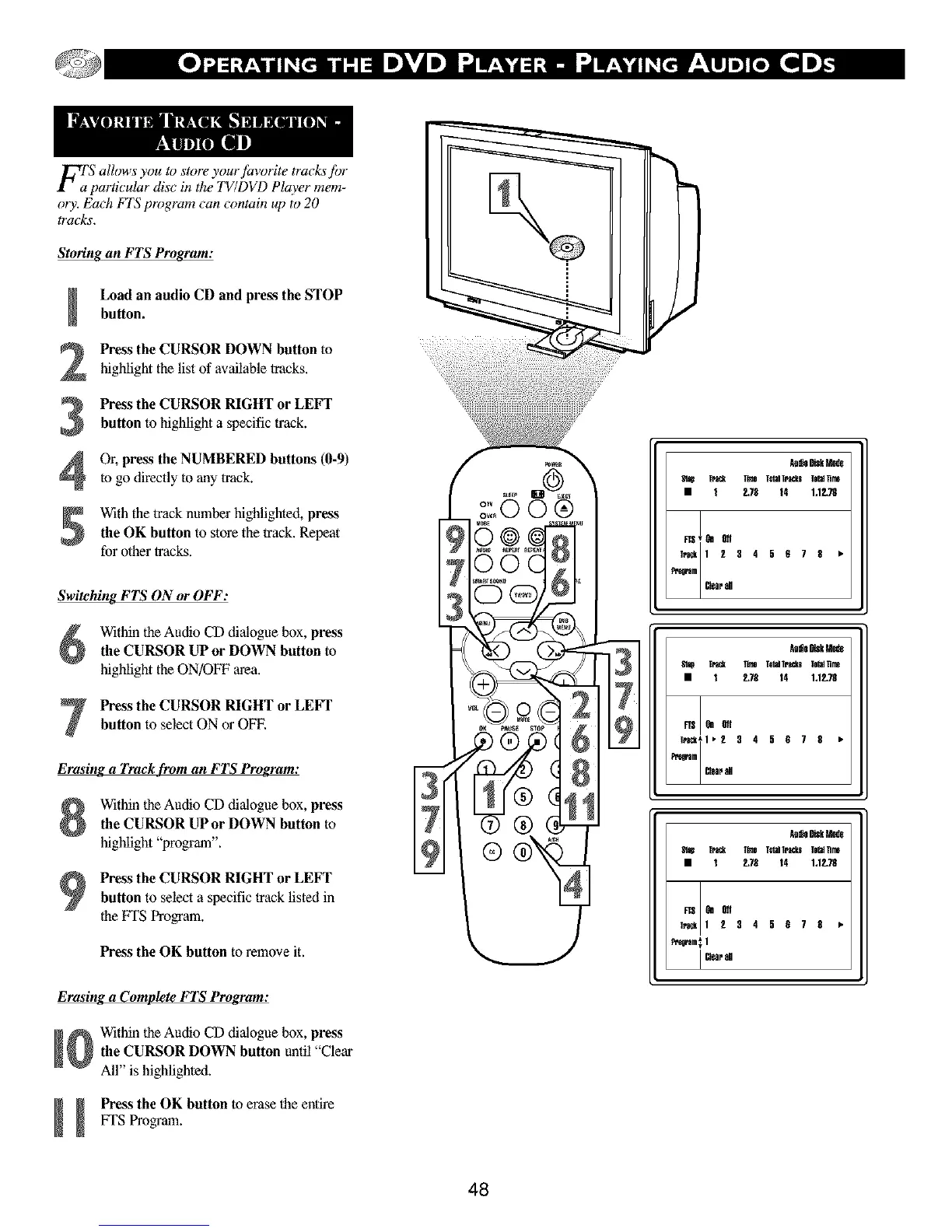
F_'S allows you to store your favorite tracks for
particular disc in the 7_/DVD Player mem-
ory. Each FIS program can contain up to 20
tracks.
Storing an FTS Program:
Load an audio CD and press the STOPbutton.
Press the CURSOR DOWN button to
highlight the listof available tracks.
Press the CURSOR RIGHT or LEFT
button to highlight a specific track.
Or, press the NUMBERED buttons (0-9)
to go directly to any track.
With the track number highlighted, press
the OK button to store the track. Repeat
for other tracks.
Switching FTS ON or OFF:
Within the Audio CD dialogue box, press
the CURSOR UP or DOWN button to
highlight the ON/OFF area.
Press the CURSOR RIGHT or LEFT
button to select ON or OFF.
Erasing a Track from an FTS Program:
Within the Audio CD dialogue box, press
the CURSOR UP or DOWN button to
highlight "program".
Press the CURSOR RIGHT or LEFT
button to select a specific track listed in
the FI'S Program.
Press the OK button to remove it.
Erasing a Complete FTS Program:
Within the Audio CD dialogue box, press
the CURSOR DOWN button until "Clear
All" is highlighted.
I Press the OK button to erase the entire
!
VFSProgram.
48
Aa_SDiskMade
St_ TrS_ FnneT_dTrSCkslehdTJM
• t E78 14 132.78
Aa_SDiskMade
St_ TrS_ FnneT_dTrSCkslehdTJM
• t E78 14 132.78
_ 9n_
T_*l* 2 3 4 5 $ 7 8 •
Pr°c°am_,PJIp81
Aa_SDiskMade
St_ TrS_ FnneT_dTrSCkslehdTJM
• t E78 14 132.78
_ 9n_
T_ 1 2 3 4 5 $ 7 8 •
Pe_oram_1
I _oalrd



 To Next Page