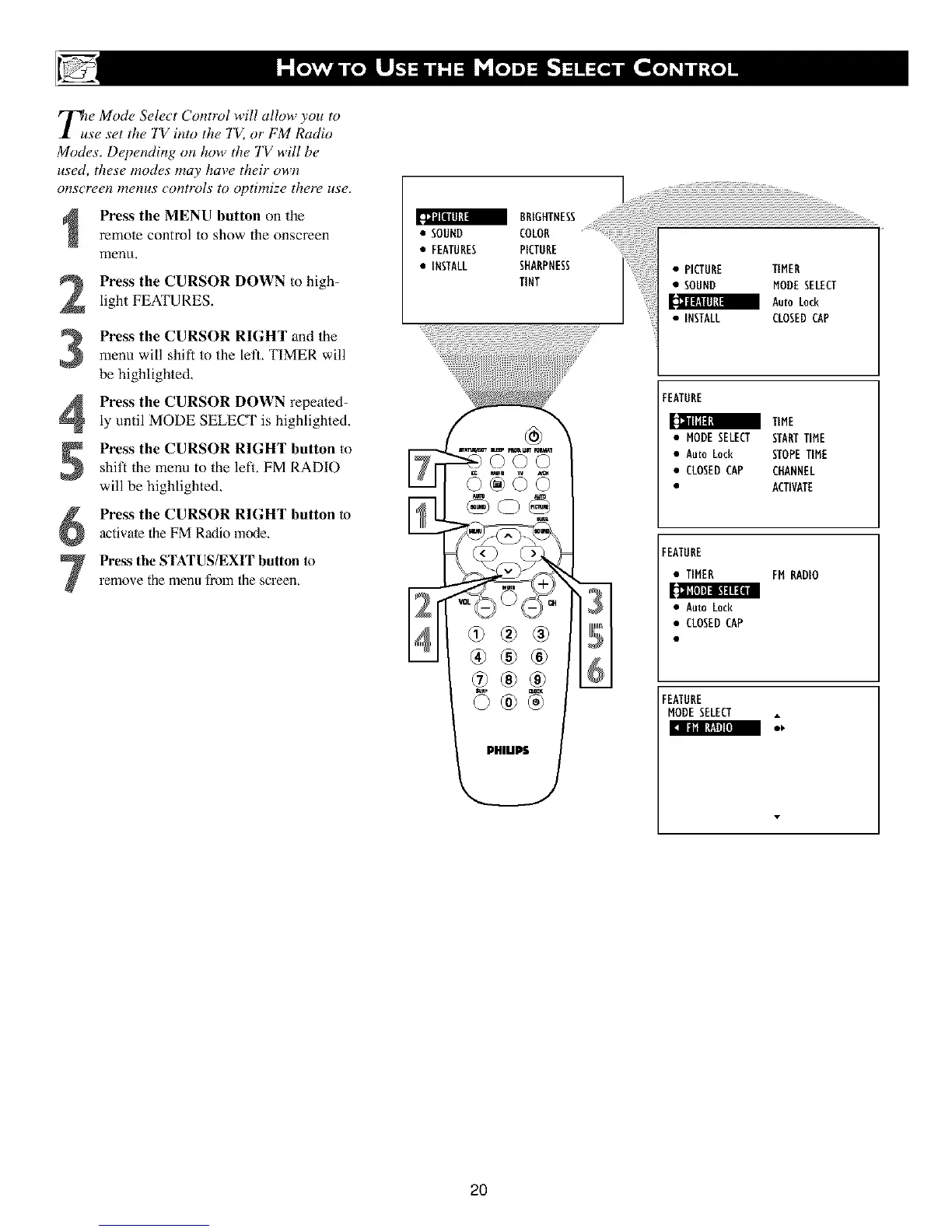
TuZe Mode Select Control will allow you to
se set the TV into the TV, or FM Radio
Modes. Dependbzg on how the TV will be
used, these modes may have their own
o_zs_reen menus copztrols to optimize there use.
Press the MENU button on the
remote control to show the onscreen
menkt.
Press the CURSOR DOWN to high-
light FEATURES.
Press the CURSOR RIGHT and the
menu will shift to the let1, TIMER will
be highlighted,
Press the CURSOR DOWN repeated-
ly until MODE SELECT is highlighted.
5
6
7
Press the CURSOR RIGHT button to
shift the menu to the left. FM RADIO
will be highlighted.
Press the CURSOR RIGHT button to
activate the FM Radio mode,
Press the STATUS/EXIT button to
remove the menu from the screen.
BRIGHTNESS
• SOUND COLOR
• FEATURES PICTURE
• INSTALL SHARPNESS
TINT
mlZ_a T _ m_.olT FO_
®®®
• PICTURE TIMER
• SOUND MODESELECT
AutoLock
• INSTALL CLOSEDCAP
FEATURE
TIME
• MODESELECT STARTTIME
• Auto Lock STOPETIME
• CLOSEDCAP CffANNEL
• ACTIVATE
FEATURE
• TIMER FM RADIO
• AutoLock
• CLOSEDCAP
FEATURE
NODESELECT
2O












 To Next Page