Home
Philips
Monitor
224E2SB/00
Page 14
Philips 224E2SB/00 - Page 14
50 pages
Manual
Save Page as PDF
To Next Page
To Next Page
To Previous Page
To Previous Page
Loading...
12
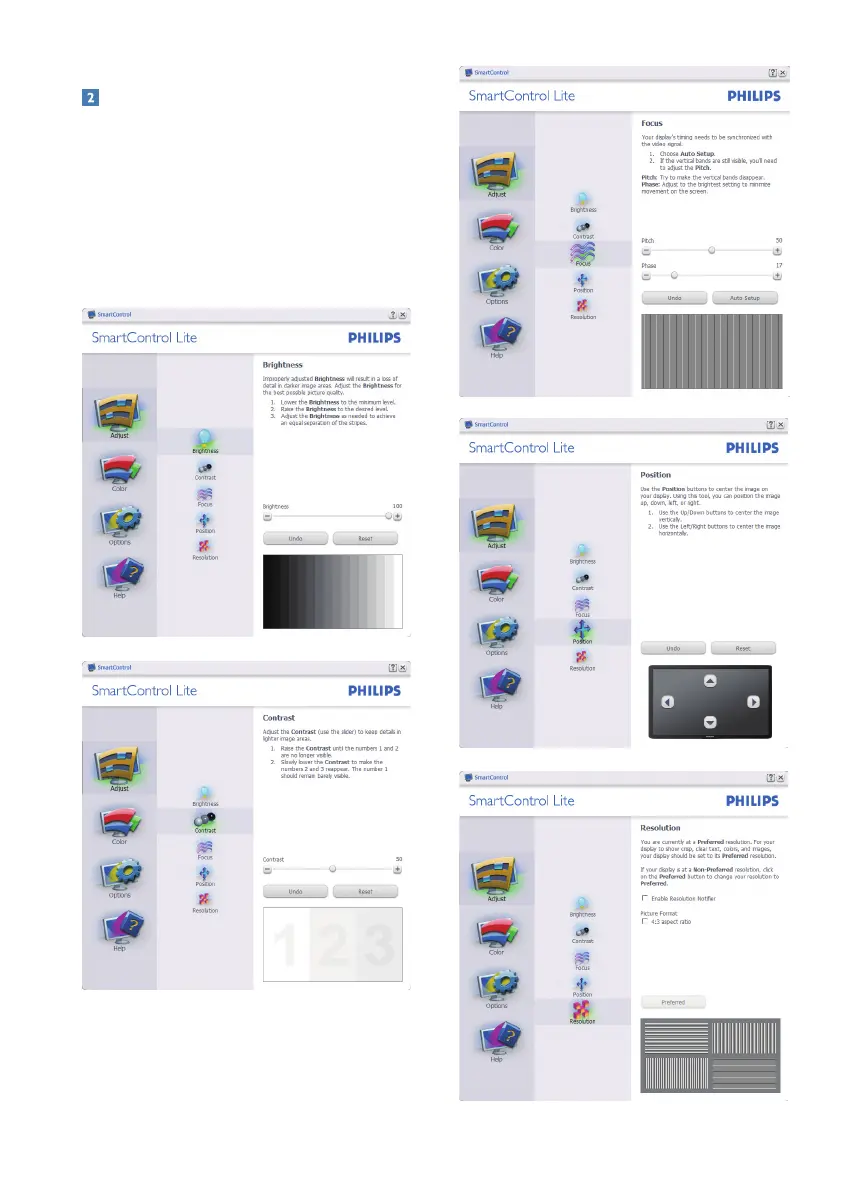
Start with Standard pane:
Adjust menu:
Adjust Menu allow y
ou to adjust Brightness,
•
Contrast,
Focus,
Position and Resolution.
Y
ou can follow the instr
uction and do the
•
adjustment.
Cancel prompts user if you want to cancel
•
installation.
13
15
Table of Contents
Main Page
Default Chapter
2
Table of Contents
2
1 Important
3
Safety Precautions and Maintenance
3
Notational Descriptions
4
Disposal of Product and Packing Material
5
2 Setting up the Monitor
6
Installation
6
Operating the Monitor
7
The Osd Menu
8
Remove Base Stand and Base
9
Resolution Notification
9
Physical Function
9
Remove Base
10
3 Product Information
11
Smartimage Lite
11
Smartcontrast
12
Philips Smartcontrol Lite
13
Philips' Flat Panel Monitors Pixel Defect
20
Policy
20
4 Technical Specifications
22
Resolution & Preset Modes
25
Automatic Powersaving
25
5 Regulatory Information
26
6 Customer Care and Warranty
32
7 Troubleshooting & Faqs
44
Troubleshooting
44
Smartcontrol Lite Faqs
46
General Faqs
47
Related product manuals
Philips 224E5
36 pages
Philips 224CL2SB/00
50 pages
Philips 220V
79 pages
Philips 220E
74 pages
Philips 226V4
38 pages
Philips 221V8
36 pages
Philips 227E6
43 pages
Philips 223V7
30 pages
Philips 225BI
125 pages
Philips 223i5
36 pages
Philips 220V8
35 pages
Philips 220B I
97 pages


 To Next Page