EasyManua.ls Logo

Philips 225BI - Page 68

Philips 225BI
125 pages
Print Icon
To Next Page IconTo Next Page
To Previous Page IconTo Previous Page
Loading...
Installing Your LCD Monitor
7
SmartImage. There are five modes to be selected: Office Work, Image
Viewing, Entertainment, Economy, and Off
8
Earphone jack
RETURN TO TOP OF THE PAGE
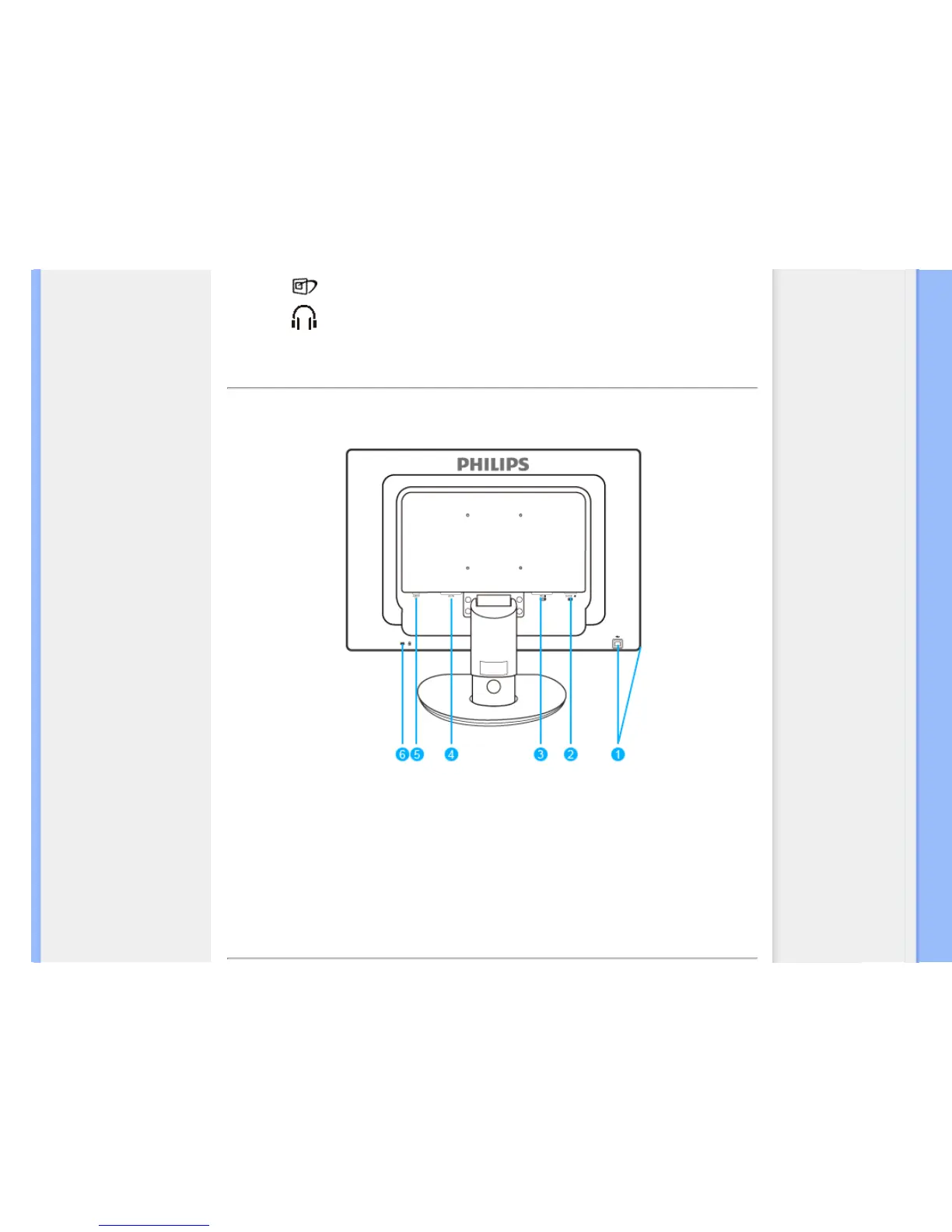
Rear View
1 USB upstream port and downstream port
2 VGA input
3 DVI-D input (available for selective models)
4 AC power input
5 PC Audio input
6 Kensington anti-thief lock
RETURN TO TOP OF THE PAGE

file:///E|/LCD%20Monitor%20OEM/Philips/M1-project/225B1/225B1-EDFU/CD-Contents/lcd/manual/ENGLISH/225B1/install/install.htm 第 2 頁 / 共 3 [98/2/16 下午 03:35:50]

Related product manuals