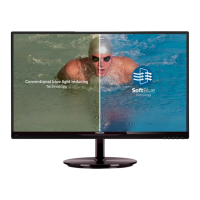
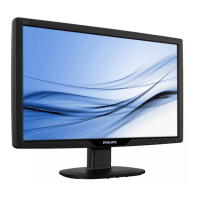
This document describes the Philips 225C5 monitor, a flat panel LCD display designed for optimal performance at a native resolution of 1920 x 1080 @ 60 Hz. It offers a range of features for image optimization, connectivity, and user convenience, along with detailed technical specifications and troubleshooting information.
Function Description
The Philips 225C5 is a flat panel LCD monitor that serves as a high-definition display for computers and mobile devices. Its primary function is to render visual content with clarity and vibrant colors, supporting various applications from text-based work to gaming and video playback. The monitor incorporates Philips' SmartImage technology, which dynamically adjusts display settings (brightness, contrast, color, sharpness) in real-time based on the content being viewed, offering optimized presets like Text, Office, Photo, Movie, Game, and Economy. SmartKolor technology enhances the visual color range for richer picture performance, while SmartContrast dynamically optimizes the contrast ratio for maximum visual clarity, adjusting backlighting for brighter images or dimming for darker backgrounds.
Connectivity options include VGA, DVI (for 225C5QSB/QSW models), and MHL-HDMI/HDMI (for 225C5QHSB/QHSW models), allowing connection to various PCs and mobile devices. The Mobile High-Definition Link (MHL) feature enables direct connection to MHL-certified mobile phones and portable devices, allowing users to display HD videos and other content on the larger monitor screen while simultaneously charging the mobile device.
The monitor also includes an On-Screen Display (OSD) menu for direct adjustment of screen performance and functions, accessible via control keys on the front bezel. For enhanced control, Philips SmartControl Premium software provides a user-friendly graphical interface for fine-tuning resolution, color calibration, clock/phase adjustments, and RGB white point settings directly from a computer.
Important Technical Specifications
- Monitor Panel Type: AH-IPS LCD
- Backlight: LED
- Panel Size: 21.5" W (54.6 cm)
- Aspect Ratio: 16:9
- Pixel Pitch: 0.2479(H) mm x 0.2479(V) mm
- Brightness: 250 cd/m²
- SmartContrast: 20,000,000:1
- Contrast Ratio (typ.): 1000:1
- Response Time (typ.): 14 ms
- SmartResponse Time (typ.): 5 ms (GtG)
- Optimum Resolution: 1920 x 1080 @ 60 Hz
- Viewing Angle: 178° (H) / 178° (V) @ C/R > 10
- Display Colors: 16.7 M
- Vertical Refresh Rate: 56 Hz - 76 Hz
- Horizontal Frequency: 30 kHz - 83 kHz
- MHL: 1080P @ 30Hz (for MHL-HDMI models)
- sRGB: YES
- Signal Input (225C5QSB/QSW): DVI (Digital), VGA (Analog)
- Signal Input (225C5QHSB/QHSW): MHL-HDMI (Digital), HDMI (Digital), VGA (Analog)
- Signal Sync: Separate Sync, Sync on Green
- Audio Out (225C5QHSB/QHSW): HDMI audio out
- Power Consumption (225C5QSB/QSW):
- On Mode: 22.21 W (typ.), 23.52 W (max.)
- Sleep (Standby): 0.5 W
- Off: 0.3 W
- Power Consumption (225C5QHSB/QHSW):
- On Mode: 21.34 W (typ.), 26.45 W (max.)
- Sleep (Standby): 0.5 W
- Off: 0.3 W
- Power LED indicator: White (On mode), White (blinking) (Standby/Sleep mode)
- Power Supply: External, 100-240 VAC, 50-60 Hz
- Product with stand (WxHxD): 499 x 395 x 182 mm
- Product with stand weight: 2.94 kg
- Product with packaging weight: 4.7 kg
- Temperature range (operation): 0°C to 40°C
- Temperature range (non-operation): -20°C to 60°C
- Relative humidity: 20% to 80%
- MTBF: 30,000 hrs
- Tilt: -5/+20 degrees
- Regulatory Approvals: CE Mark, FCC Class B, CU, SEMKO, TCO Certified, ETL, BSMI, ISO9241-307, CB, MEPS, SASO, KUCAS, EPA
Usage Features
- SmartImage: Offers 7 preset modes (Text, Office, Photo, Movie, Game, Economy, Off) to optimize display settings for different content types, adjusting brightness, contrast, color, and sharpness in real-time.
- SmartKolor: Enhances visual color range for vivid and rich picture performance.
- SmartContrast: Dynamically analyzes displayed content to optimize contrast ratio, providing clearer, crisper, and brighter images or better display of images on dark backgrounds.
- On-Screen Display (OSD): A user-friendly interface for adjusting monitor settings directly on screen, including input source, picture settings (brightness, contrast, SmartKolor, SmartTxt, SmartResponse, SmartContrast, Gamma, Pixel Orbiting, Over Scan), audio (volume, mute), color settings (color temperature, sRGB, user define RGB), language, OSD settings (horizontal, vertical, transparency, OSD time out), and setup (auto, H.Position, V.Position, Phase, Clock, Resolution Notification, Reset, Information).
- MHL (Mobile High-Definition Link): Allows direct connection of MHL-certified mobile devices to the monitor for displaying HD content and simultaneous device charging. Requires an MHL-certified mobile device and an optional MHL cable.
- Philips SmartControl Premium Software: A Windows 7 compliant icon-based software for controlling monitor settings from the computer, including fine-tuning resolution, color calibration, clock/phase adjustments, and RGB white point adjustment. Features a wizard for first-time setup and various adjustment panes (Brightness, Contrast, Focus, Position, Resolution, RGB, Black Level, White Point, Display Gamma, SmartImage, Power Savings, Theft Deterrence, Preferences, Audio, Auto Pivot, Input, Version, User Manual).
- Kensington Anti-theft Lock: Provides a physical security option for the monitor.
- Plug & Play Compatibility: Compatible with Windows 8/7/Vista/XP, Mac OSX, and Linux.
- Resolution Notification: Displays an alert when the monitor is powered on at a resolution other than its native 1920 x 1080 @ 60 Hz, which can be switched off via the OSD.
Maintenance Features
- Cleaning: The monitor can be cleaned with a slightly damp cloth when powered off. The screen can be wiped with a dry cloth. Avoid using organic solvents like alcohol or ammonia-based liquids. For extensive cleaning, isopropyl alcohol is recommended.
- Pixel Defect Policy: Philips guarantees repair or replacement under warranty if the number of pixel defects on the TFT panel exceeds specified acceptable levels, which are detailed in the manual for bright dot defects, black dot defects, and total dot defects.
- Burn-in/Ghost Image Prevention: Users are advised to always activate a moving screen saver program or a periodic screen refresh application when the monitor displays unchanging static content for extended periods to prevent "burn-in" or "ghost imaging."
- Theft Deterrence (via SmartControl Premium): Allows users to set a PIN to protect the display from unauthorized use if it is removed from the connected computer.
- Power Management: Supports VESA DPM compliance, automatically reducing power consumption when not in use and waking up upon detection of input from a keyboard, mouse, or other device.
- Disposal and Recycling: The product and its packaging materials are designed for recycling and reuse, complying with European Directive 2012/19/EU (WEEE) and other environmental regulations. Information on local recycling programs and Philips' recycling initiatives is provided.
- Safety Precautions: Instructions for proper handling, placement, and operation to prevent damage, electrical hazards, and mechanical hazards. This includes keeping the monitor away from direct sunlight and heat sources, ensuring proper ventilation, and using approved power cords.
- Service Information: Contact details for local service centers and customer care are provided for support, repairs, and warranty claims. Users are advised to consult a service technician if the monitor does not operate normally or if unsure about operating instructions.

 Need help?

 To Next Page
 General