6
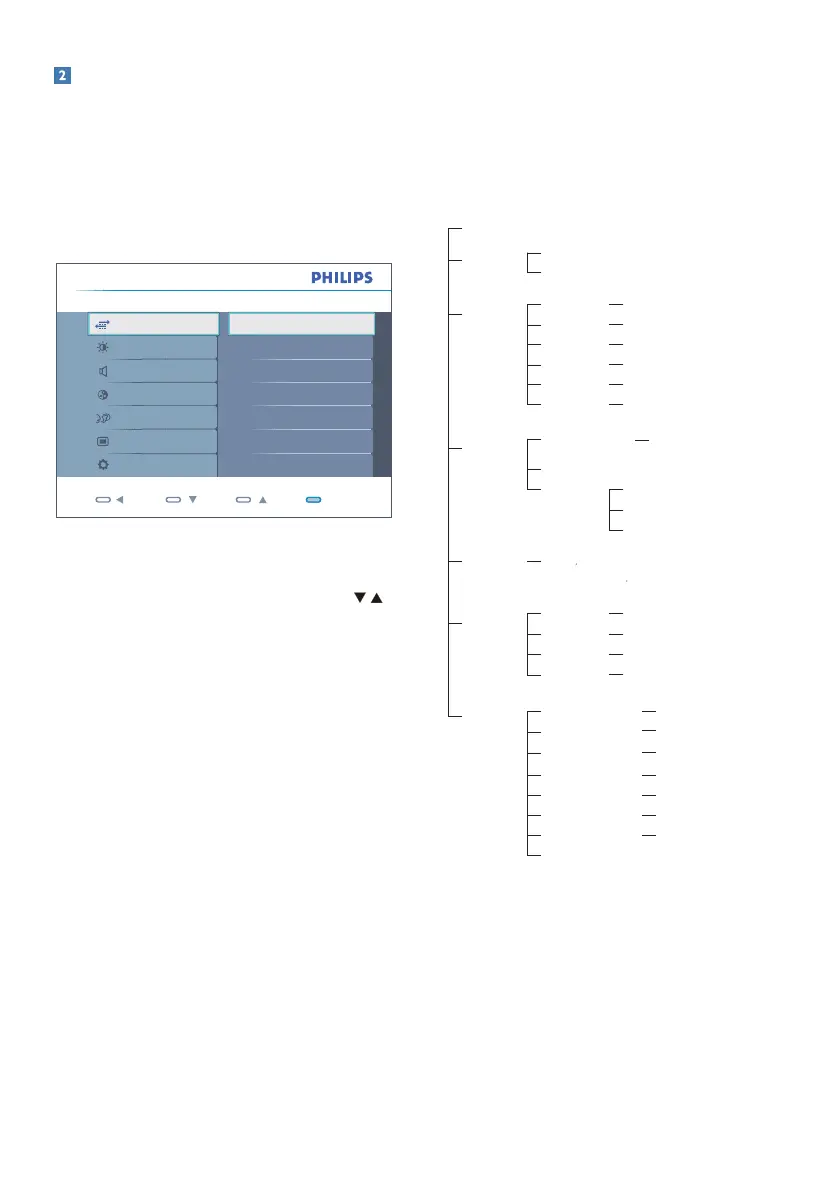
DescriptionoftheOnScreenDisplay
WhatisOn-ScreenDisplay(OSD)?
On-ScreenDisplay(OSD)isafeatureinall
PhilipsMonitors.Itallowsanendusertoadjust
screenperformanceorselectfunctionsof
themonitorsdirectlythroughanon-screen
instructionwindow.Auserfriendlyonscreen
displayinterfaceisshownasbelow:
Back OK
Color
OSD Settings
Audio
Language
Picture
Setup
Monitor Setup Input
DVI
VGA
Input
Basicandsimpleinstructiononthecontrol
keys
IntheOSDshownabove,userscanpress
buttonsatthefrontbezelofthemonitorto
movethecursor,orpressOKtoconfirmthe
choiceoradjustment.
TheOSDMenu
Belowisanoverallviewofthestructureof
theOn-ScreenDisplay.Youcanusethisasa
referencewhenyouwanttoworkyourway
aroundthedifferentadjustmentslateron.
Main menu Sub menu
Auto
Input
VGA
DVI
Picture
Wide screen, 4:3
0~100
0~100
On, Off
On, Off
1.8, 2.0, 2.2, 2.4, 2.6
Picture Format
Brightness
Contrast
SmartResponse
SmartContrast
Gamma
OSD Settings
0~100
0~100
Off, 1, 2, 3, 4
5, 10, 20, 30, 60
Horizontal
Vertical
Transparency
OSD Time out
Setup
0~100
On, Off
Yes, No
0~100
0, 1, 2, 3, 4
H. Position
V. Position
Power LED
Resolution Notification
Reset
Information
Language
English
Español, Français, Deutsch, Italiano,
Português,
Русский
簡体中文,
Türkçe
Color
5000K, 6500K, 7500K, 8200K,
9300K, 11500K
Red: 0~100
Green: 0~100
Blue: 0~100
Color Temperature
sRGB
User Define
0~100
0~100
Phase
Clock







 To Next Page