Z o adjust your TVpicture controls,
elect a channel and fbllow the
steps shown below:
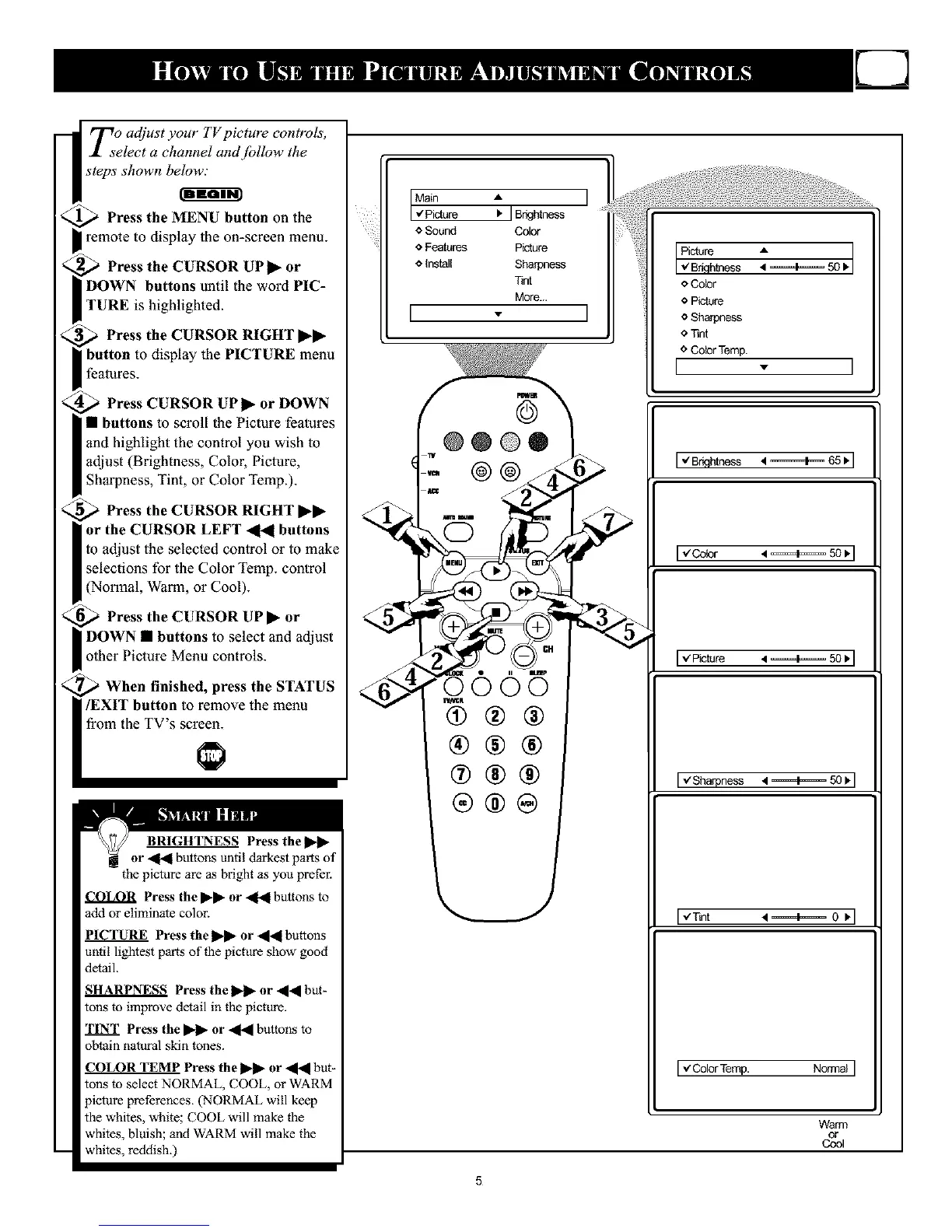
Press the MENU button on the
remote to display the on-screen menu.
Press the CURSOR UP I_ or
DOWN buttons until the word PIC-
TURE is highlighted.
Press the CURSOR RIGHT ••
button to display the PICTURE menu
features.
Press CURSOR UP I_ or DOWN
• buttons to scroll the Picture features
and highlight the control you wish to
adjust (Brightness, Color, Picture,
Shal_ness, Tint, or Color Temp.).
Press the CURSOR RIGHT ••
or the CURSOR LEFT _1_1 buttons
to adjust the selected control or to make
selections for the Color Temp. control
(Normal, Warm, or Cool).
Press the CURSOR UP • or
select and adjust
other Picture Menu controls.
When finished, press the STATUS
/EXIT button to remove the menu
from the TV's screen.
BRIGH'I_ESS Press thel_l_
or _ buttons until darkest parts of
the picture are as bright as you prefel:
Press the I_1_ or _ buttons to
add or eliminate color.
Press the _ or al_l buttons
until lightest parts of the picture show good
detail.
SHARPNES_ Press the _ or alal bnt_
tons to improve detail in the picture.
TINT Press the I_l_ or _ buttons to
obtain natural skin tones.
COLOR TEMP Press the _ or _il_l bnt-
tons to select NORMAL, COOL, or WARM
picture preferences. (NORMAL will keep
the whites, white; COOL will make the
whites, bluish; and WARM will make the
whites, reddish.)
Main A I
.€'Picture I. ] BrkJhtness
Sound Color
o Features Picture
o install Sharpness
Tint
More...
[ - I
@
@@@@
@@
I
e Color
o Picture
e Sharpness
e Tint
e Color Temp.
I - I
Iv"Brklhtness • ========1===65 _.
[-/Cobr • ===4==== 50 I.
'*"Picture • ======1=====501,
I "/Sharpness • =====1===_50 I,
,,'Tint •====4====. 0 )]
[ ,/Color Temp. Normal
Warm
or
Cool
5










 To Next Page