Tahe Incredible Surround jeature
dds greater depth and dimension to
both monaural (MONO) and stereo TV
sound. With the control turned ON the
TV's speakers can add even wider
sound separation to normal broadcasts.
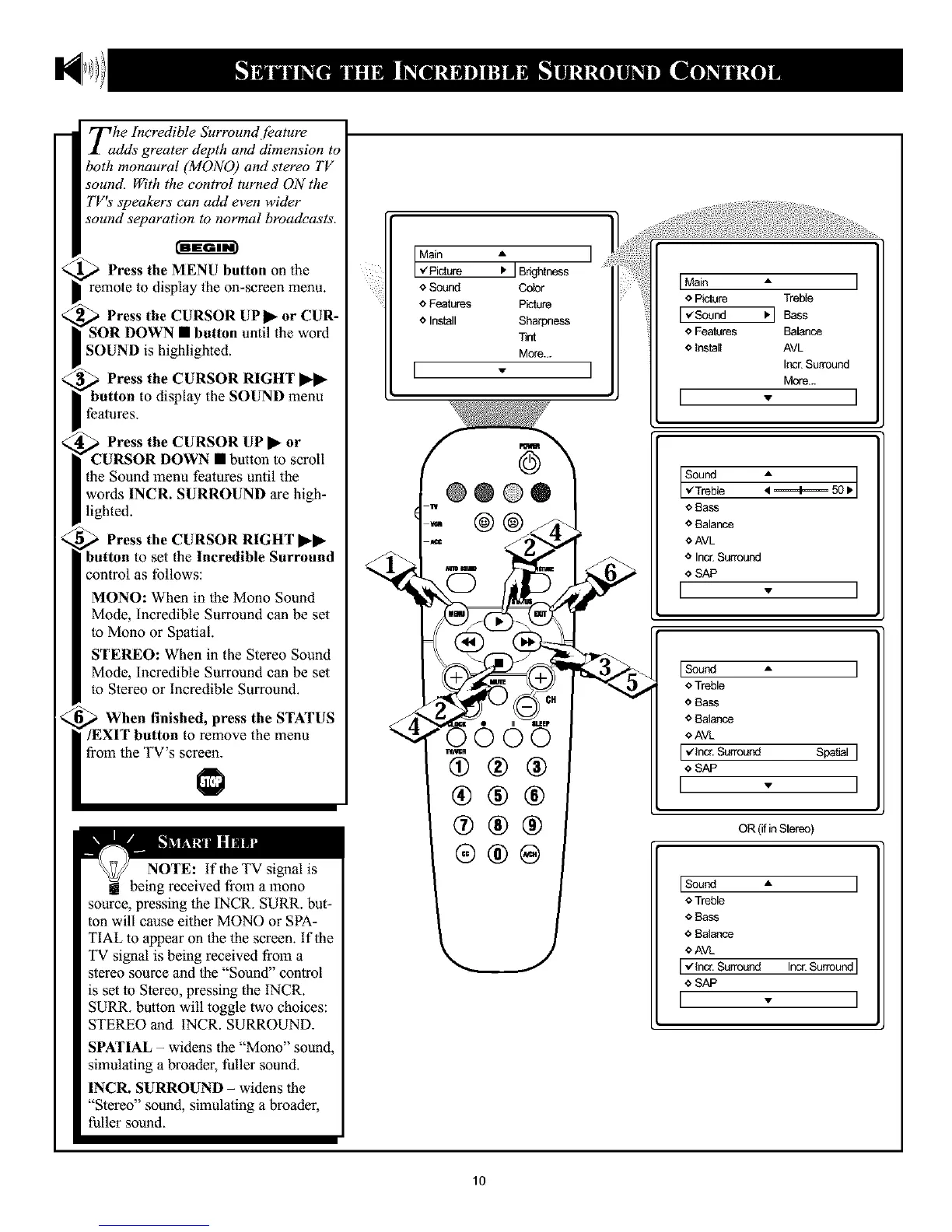
Press the MENU button oll the
remote to display the on-screen menu.
Press the CURSOR UP • or CUR-
l button until the word
SOUND is highlighted.
Press the CURSOR RIGHT ••
display the SOUND menu
features.
Press the CURSOR UP • or
DOWN • button to scroll
the Sound menu features until the
words INCR. SURROUND are high-
lighted.
Press the CURSOR RIGHT ••
button to set the Incredible Surround
control as follows:
MONO: When in the Mono Sound
Mode, Incredible Surround can be set
to Mono or Spatial.
STEREO: When in the Stereo Sound
Mode, Incredible Surround can be set
to Stereo or Incredible Surround.
When finished, press the STATUS
to remove the menu
from the TV's screen.
NOTE: If the TV signal is
being received from a mono
source, pressing the INCR. SURR. but-
ton will cause either MONO or SPA-
TIAL to appear on the the screen, if the
TV signal is being received from a
stereo source and the "Sound" control
is set to Stereo, pressing the INCR.
SURR. button will toggle two choices:
STEREO and INCR. SURROUND.
SPATIAL - widens the "Mono" sound,
simulating a broader, fuller sound.
INCR. SURROUND - widens the
"Stereo" sound, simulating a broader,
fuller sound.
Main • I
,/Picture I, JBrightness
e Sound Color
o Features Picture
o Install Sharpness
Tint
More...
I - I
®®®
(#®®
IMain A I
o Picture Treble
I,/Sound _'1 Bass
e Features Balance
<_Install AVL
Incr. Surround
More...
I - ]
sound:=+=50.1
,iTreb e
e Bass
o Balance
¢ AVL
o Incr.Surround
I<'sAP " I
ISo°nd - I
o Treble
o Bass
* Balance
*AVI_
I ,/Incr. Surround Spatial I
€ SAP
I - I
OR (ifinStereo)
Isoond • I
o Treble
o Bass
o Balance
OAVL
I,/Incr.Surround Incr.Su_oundI
,_SAP
I - I
10










 To Next Page